Cyber insurance requirements in 2026: the security and recovery controls businesses should have before they apply

On this page
Cyber insurance used to be bought the way most insurance is bought: fill in a form, answer a few questions about your IT, get a price. In 2026 the form is a technical audit. Carriers want to know exactly where multi-factor authentication is enforced, whether your backups would survive an attacker with domain admin rights, when you last restored one, whether endpoint detection covers every server, and when you last rehearsed an incident. They increasingly want the reports that prove it, and they assess a claim against what was true on the day of the loss, not the day of the application.
This article sets out the seven controls that recur across carrier questionnaires, what each means in practice, the evidence that satisfies an underwriter, the claims data that explains why these questions and not others, and what cover typically includes and excludes. It draws on the UK National Cyber Security Centre’s cyber insurance guidance, the US CISA #StopRansomware guide, and the 2026 claims and ransomware reports from Coalition and Sophos. Requirements vary by carrier and cover limit, so treat it as a readiness checklist and your broker’s questionnaire as the exam.
Why the questions look the way they do
Insurers write the questions from their losses. Three findings from this year’s reports explain most of the form.
Ransomware is the costliest claim, and the demands are growing. Coalition’s 2026 Cyber Claims Report, covering 2025, puts the average ransomware loss at $269,000, the highest of any claim type, with initial ransom demands up 47% year on year. Dual extortion, encrypting data and stealing it, was 70% of ransomware claims. Sophos’s 2026 State of Ransomware survey of 2,158 organisations found 56% of attacks succeeded in encrypting data, a median ransom payment of $769,000 and an average recovery cost of $1.7 million before any ransom.
Backups decide the outcome. Sophos’s study of 2,974 ransomware victims found that where attackers compromised the backups, the median recovery cost was $3 million against $375,000 where backups survived; 67% of victims with compromised backups paid, against 36%; and only 26% were fully recovered within a week, against 46%. Our guide to protecting backups from ransomware covers how attackers find and destroy them.
Most losses are fraud and email, not malware. Funds transfer fraud and business email compromise together were 58% of incidents in Coalition’s data. Fraud claims averaged $141,000, and 52% of them started with a compromised email account. That is why the form asks about MFA on email and about how you verify a change of bank details, and why the NCSC warns that some policies will not cover money lost through business email compromise at all.
Two further points. Coalition’s 2025 threat index found most ransomware incidents started with compromised perimeter devices, VPNs and firewalls, and that stolen credentials were the most common initial access, which is why remote access gets its own questions. And overall severity actually fell 19% in 2025 to an average loss of $116,000 while frequency rose 3%: the controls work, so carriers ask for more of them.
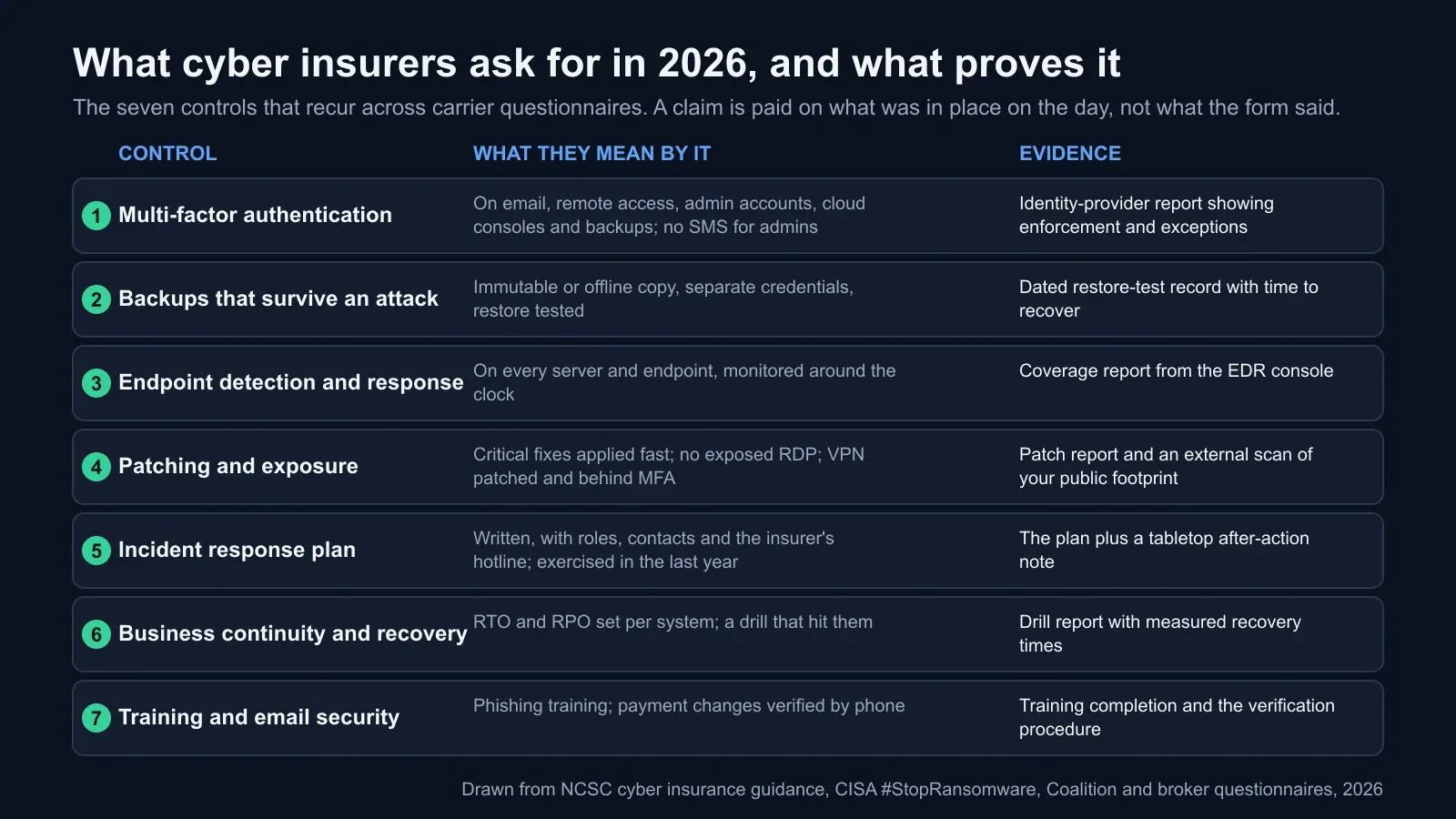
The seven controls and what proves each one
1. Multi-factor authentication, with the scope spelled out
The question is not “do you use MFA” but “where is it enforced, for whom, and with what exceptions”. The usual minimum scope is email, remote access (VPN and any remote desktop), administrator and privileged accounts, cloud management consoles, and increasingly the backup console itself. CISA’s guide recommends phishing-resistant MFA for all services, and several carriers now treat SMS codes as insufficient for privileged accounts.
What proves it: an export from your identity provider showing MFA enforcement by group, the list of accounts excluded and why, and confirmation that legacy protocols that bypass MFA are blocked. “Enabled” is not “enforced”; underwriters have learned the difference.
2. Backups that survive an attacker who is already inside
Three properties, each asked about separately: a copy the attacker cannot delete or encrypt (offline, air-gapped, or immutable storage with retention locks); credentials for the backup system separate from your main directory, protected by their own MFA; and a restore that has actually been performed, with the time it took recorded. CISA’s wording is “maintain offline, encrypted backups of critical data” and “regularly test the availability and integrity of backups in a disaster recovery scenario”. Most forms ask whether that test happened in the last twelve months.
What proves it: a dated restore-test record naming the systems restored, who did it, how long it took and what failed; the retention or immutability setting; and the separate credential arrangement. The NCSC’s guidance puts it simply: keep backups separate from your network or in a cloud service designed for the purpose, so ransomware has a smaller impact.
3. Endpoint detection and response on everything
Antivirus that scans files is no longer enough for most carriers; they ask for endpoint detection and response (EDR) on servers and workstations, and increasingly whether someone is watching it around the clock, in-house or through a managed detection service. The question that catches organisations out is coverage: the three servers nobody remembered, the contractor laptops, the virtual machines spun up last month.
What proves it: a coverage report from the EDR console reconciled against your asset inventory, and a line on who responds to alerts at 3 a.m.
4. Patching, and what the internet can see
Two halves. Inside: critical and exploited vulnerabilities fixed within a stated window (often 14 or 30 days), with the perimeter devices, VPNs and firewalls, at the front of the queue, because that is where Coalition found most ransomware starting. Outside: no remote desktop exposed to the internet, no end-of-life software on public systems, and nothing listening that you did not know about. Many carriers now run their own external scan of your domains during underwriting, so this is the one control they check without asking.
What proves it: a patch compliance report and your own external scan, taken before theirs. A scan of your public footprint also catches what the insurer’s scanner will flag: expired or weak TLS configurations, missing security headers, exposed admin panels. Our TLS configuration check covers the certificate side.
5. An incident response plan that has been exercised
A plan on a shelf satisfies nobody. Carriers ask whether it exists, whether it names roles and contacts (including the insurer’s own breach hotline, which most policies require you to call before engaging anyone else), whether it covers notification duties, and when it was last exercised. CISA adds a detail that matters on the day: keep a hard copy and an offline version, because the plan is no use on an encrypted file server, and have it approved in writing by the chief executive or equivalent.
What proves it: the plan, its version date, the list of contacts, and a short after-action note from the last tabletop exercise, with the gaps it found and what changed.
6. Business continuity with recovery times you have measured
This is where insurance meets the subject of this blog. Business interruption is often the largest part of a ransomware claim, and the length of the interruption is set by how fast you can recover. Carriers ask whether you have a business continuity plan, which systems are critical, and what the recovery time and recovery point objectives are. The strong answer is a drill result: “we restored the order system in four hours against a six-hour target on this date”, not “our RTO is six hours”.
What proves it: a recovery drill report with measured times against targets, per critical system. Our guides to RTO and RPO and to SOC 2 disaster recovery evidence show what that record looks like; the same document serves the auditor and the underwriter.
7. People, email and the payment check
Phishing awareness training, usually annual with simulated phishing, and a procedure for verifying any change to payment details or supplier bank accounts by a second channel, typically a phone call to a known number. The second is the single control most likely to prevent the fraud losses that make up the largest share of claims, and the one the business email compromise exclusion will punish you for lacking.
What proves it: training completion records and the written verification procedure, ideally with evidence it was used.
What cover usually includes, and what it does not
The NCSC’s guidance lists what a policy typically covers: restoring systems and data, limiting business interruption losses, and defending and settling data breach claims from customers or other parties; some policies also cover computer-enabled fraud. Most add incident response services, forensics, legal advice, public relations support and, in many markets, extortion payments subject to conditions.
The exclusions deserve as much attention as the price. Commonly excluded or limited:
- Funds lost through business email compromise, unless a specific social engineering or fraud endorsement is purchased, usually with its own lower limit.
- War and state-sponsored attacks, under exclusions that have been rewritten repeatedly since 2023 and vary widely in wording.
- Fines and penalties where the law makes them uninsurable.
- Betterment: the cost of improving systems beyond restoring them.
- Known incidents and prior acts before the policy began.
- Losses on systems you declared as protected when they were not. The NCSC puts the consequence plainly: keep your security details accurate and tell insurers when circumstances change, or the insurer may not be obliged to pay.
Also check waiting periods before business interruption cover starts, sub-limits for extortion and for dependent business interruption (your cloud provider’s outage, not yours), and whether the policy requires you to use the insurer’s panel of responders.
The NCSC’s seven questions, in short
The NCSC’s cyber insurance guidance is built around questions to ask yourself and the insurer. Paraphrased: what defences do you already have, and have you identified the assets and scenarios that matter most, rather than stopping at the insurer’s minimum; who in your organisation will assess the policy, with contract, technical and process expertise; do you understand the impacts you are insuring against, including interruption and recovery costs; what exactly does the policy cover and exclude; what security services does the insurer include; what support arrives during an incident; and what must stay in place to claim and to renew. Its baseline advice is to have fundamental safeguards, such as Cyber Essentials or Cyber Essentials Plus, in place before buying cover.
For UK organisations, Cyber Essentials does double duty. Its five controls (firewalls, secure configuration, security update management, user access control and malware protection) map onto roughly half of the insurer’s list, some carriers offer better terms for it, and any UK organisation with turnover under £20 million that certifies across its whole organisation is automatically entitled to a basic cyber liability policy arranged by IASME, with incident response support included.
A readiness checklist for the next application
- Re-read last year’s application and mark every answer that is no longer true. Those are your first fixes or your first disclosures.
- Build the evidence pack before the broker asks: MFA enforcement report, EDR coverage report reconciled to inventory, backup immutability settings and the last restore test, patch report, your own external scan, the incident response plan and its last exercise note, and a recovery drill result per critical system.
- Close the cheap gaps first. MFA on the backup console, blocking legacy authentication, taking remote desktop off the internet and a restore test can each be done in days.
- Run the drill you have been meaning to run. A tabletop for incident response and a timed restore of one critical system give you two pieces of evidence and usually a list of things to fix.
- Decide on the fraud endorsement with eyes open, given that most losses are fraud and email rather than malware.
- Disclose honestly. A known gap can be negotiated. A misstatement found during a claim cannot.
- Diary the renewal three months out, and treat the questionnaire as the security roadmap it has become.
Where BCDRPulse fits
Two of the seven controls want dated, external evidence that a small team rarely has to hand. BCDRPulse’s security scan (Pro) checks your public site’s TLS configuration and security headers from the outside, the same view the insurer’s scanner takes, and records a dated report. Continuous resilience (Business) reruns stress and recovery checks against your verified site on a schedule, so your recovery times are measured rather than estimated when the question comes. Uptime monitoring on the Free plan gives you the outage history that business interruption questions ask about. Every check runs only against a domain you have verified as yours. See pricing for the plans.
The bottom line
The cyber insurance form has turned into the shortest honest summary of what stops ransomware and fraud: MFA where it matters, backups the attacker cannot touch and you have actually restored, detection on every machine, patched edges, a rehearsed plan, measured recovery times, and a phone call before money moves. Build those because they cut your losses; collect the evidence because it is now the price of cover; and read the exclusions before the premium, because the policy you have is the one that pays.
Sources.
- 1. NCSC, Cyber insurance guidance (version 1.0, 6 August 2020; page reviewed September 2026) (opens in a new tab) www.ncsc.gov.uk
- 2. NCSC, Cyber Essentials overview (the five technical controls and the included cyber liability insurance) (opens in a new tab) www.ncsc.gov.uk
- 3. CISA, #StopRansomware guide (updated May 2023) (opens in a new tab) www.cisa.gov
- 4. Coalition, 2026 Cyber Claims Report (5 March 2026), as summarised by Reinsurance News (opens in a new tab) www.reinsurancene.ws
- 5. Coalition, 2026 Cyber Claims Report, headline figures (opens in a new tab) cybersecuritystats.com
- 6. Sophos, The State of Ransomware 2026 (2,158 organisations, fieldwork January to March 2026) (opens in a new tab) www.sophos.com
- 7. Sophos, The impact of compromised backups on ransomware outcomes (2,974 organisations, 2024) (opens in a new tab) www.sophos.com
- 8. Coalition, Cyber Threat Index 2025: most ransomware incidents start with compromised VPN devices (11 March 2025) (opens in a new tab) www.businesswire.com
Frequently asked questions.
What do cyber insurers require in 2026?
Most carriers ask about the same seven areas, whatever the form looks like: multi-factor authentication on email, remote access, privileged accounts, cloud consoles and backup systems; backups that an attacker inside your network cannot delete, with a tested restore; endpoint detection and response on servers and endpoints; prompt patching and no exposed remote desktop; a written incident response plan exercised within the last year; business continuity planning with recovery time targets; and security awareness training with a verification step for payment changes. The exact wording and the thresholds vary by carrier, broker and cover limit.
Is MFA mandatory for cyber insurance?
In practice, yes, for any meaningful cover. Email, remote access such as VPN, administrator accounts and cloud management consoles are the minimum scope most forms ask about, and many now add backup consoles. Several carriers treat SMS one-time codes as insufficient for privileged accounts and prefer app-based or phishing-resistant methods such as security keys. CISA's #StopRansomware guide recommends phishing-resistant MFA for all services. Expect to be asked for evidence of enforcement, not only a statement that MFA exists.
What backup requirements do insurers have?
Three things: a copy that ransomware cannot reach, meaning offline, air-gapped or immutable storage with credentials separate from your main directory; encryption; and a documented restore test, usually within the last twelve months, sometimes more recent. The reason is in the data. Sophos found that where attackers compromised backups, median recovery cost was eight times higher and two-thirds of victims paid, against roughly a third where backups survived. An untested backup counts for little with an underwriter.
Does cyber insurance cover ransomware?
Most policies cover ransomware response: forensics, restoration, business interruption and, depending on jurisdiction and policy, extortion payments. Whether paying is wise or lawful is a separate question; Coalition reports that a record 86% of its policyholders refused to pay in 2025. Check sub-limits for extortion and business interruption, waiting periods before interruption cover starts, and whether the policy requires the insurer's consent and negotiators before any payment.
What does cyber insurance usually not cover?
Common exclusions include fraud through business email compromise unless a specific endorsement is bought (the NCSC notes some policies will not cover money lost this way), losses attributed to war or state action, fines where they are uninsurable by law, costs to improve systems beyond restoring them, and incidents on systems you declared as protected when they were not. The last is the one organisations create for themselves: a control described on the form but not enforced on the day of the loss can lead to a reduced payout or a declined claim.
Does Cyber Essentials help with cyber insurance?
In the UK, yes in two ways. The NCSC recommends it as the baseline to have in place before buying cover, and some insurers offer better terms for certified organisations. Any UK organisation with turnover under £20 million that certifies to Cyber Essentials across its whole organisation is automatically entitled to a basic cyber liability insurance policy arranged by IASME, the scheme's delivery partner, including incident response support. It is a starting point, not a substitute for a policy sized to your business.
How do I prepare for a cyber insurance renewal?
Start three months out. Pull last year's application and check every answer is still true. Collect evidence for each control: identity-provider MFA report, EDR coverage report, backup restore test record, patch report, external scan of your public footprint, incident response plan with its last exercise date, and recovery drill results. Fix the gaps that can be fixed in a quarter, and disclose the rest honestly. A broker would rather negotiate around a known gap than discover it during a claim.
Why are premiums and requirements rising when claim severity fell?
Frequency and severity move differently. Coalition's 2026 report found claims frequency up 3% while average severity fell 19%, largely because fewer victims pay and recoveries of stolen funds improved. Ransom demands still rose 47%, and large enterprises had five times the claims frequency of smaller firms. Carriers price on the risk they can measure, so they push for the controls that demonstrably cut losses, which is why the questionnaire keeps growing.
Published .
Founder, BCDRPulse
Founder of BCDRPulse. Enterprise backup and data protection since 2007, supporting Fortune 500 companies. Writes guides to keeping a site up, fast and secure, and to proving it.