RTO vs RPO: what they mean, how to set them, and how to prove you can meet them
On this page
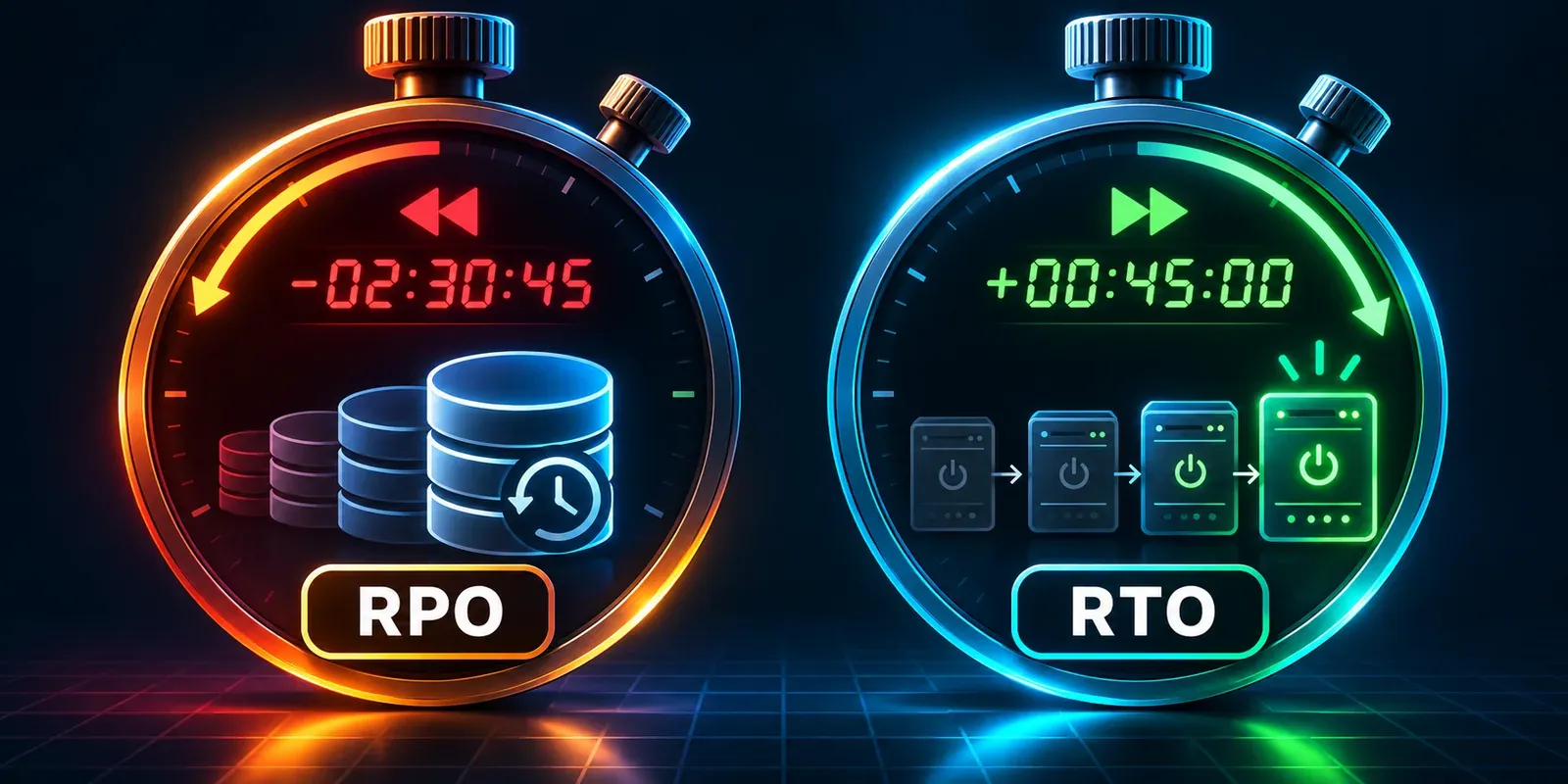
RTO is how long you can afford to be down. RPO is how much data you can afford to lose, measured as time. Every recovery plan rests on those two numbers, and most plans go wrong in the same place: the targets are written down, the backups are running, and nobody has measured whether the business would actually come back within the target, with the data it needs, when something fails.
This guide defines both terms properly, shows why they are independent, walks through setting them from business impact rather than from what your tools happen to do, lays out what each level of target costs, and ends with the only test that counts: a timed drill that produces a measured recovery time and a measured restore point.
RTO and RPO, defined properly
The definitions below come from NIST Special Publication 800-34, the contingency planning guide most audit and risk frameworks borrow from.
| Term | What it means | Measured in | Example |
|---|---|---|---|
| RTO (recovery time objective) | The longest a system can be in recovery before the business is harmed: your maximum acceptable downtime | Minutes, hours, days | “Checkout must be back within 2 hours” |
| RPO (recovery point objective) | The point in time to which data must be recovered after an outage: your maximum acceptable data loss, as a span of time | Minutes, hours, days | “We can lose at most 15 minutes of orders” |
| MTD (maximum tolerable downtime) | The longest a business process can be disrupted without significant harm; the ceiling the RTO sits under | Hours, days | “Order taking cannot stop for more than 4 hours” |
| Actual recovery time and point | What really happened in the last drill or incident | Same units | “We were back in 3 h 40 min from a copy 55 minutes old” |
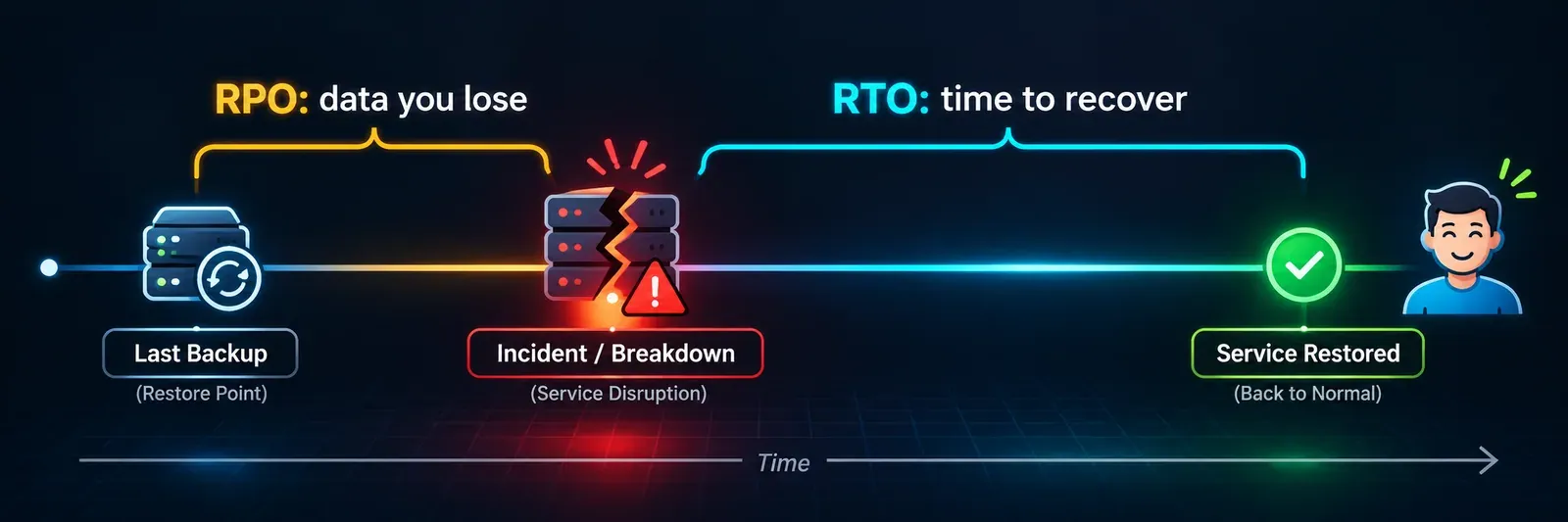
Two things are easy to miss. First, RTO applies to systems and RPO applies to data, but both serve a business process; the MTD belongs to the process. NIST’s guidance is that the RTO for the systems behind a process must be short enough that the process resumes within its MTD, which includes the time to check restored data and catch up on work that piled up during the outage. A two-hour RTO for the database does not give you a two-hour outage; it gives you two hours plus verification plus catch-up.
Second, both are objectives. They are targets you set. The numbers that describe your real capability are the actual recovery time and the actual restore point, and you only know those after you have measured them.
A worked example
An online shop takes orders around the clock. Its database is backed up every 15 minutes, and the team has rehearsed a restore that takes about 90 minutes from the decision to restore until the site is taking orders again.
At 14:00 a storage failure takes the database down. The timeline:
| Time | What happens | Which number it feeds |
|---|---|---|
| 13:52 | Last successful backup completes | The restore point is 13:52 |
| 14:00 | Database fails; orders stop | The outage clock starts |
| 14:12 | Monitoring alerts; on-call confirms it is not a deploy | Time to detect and decide counts towards RTO |
| 14:20 | Restore declared; runbook starts | |
| 15:50 | Database restored, application reconnected | Restore job complete is not the end |
| 16:05 | Checkout verified with a real test order; site reopened | Actual recovery time: 2 h 05 min |
| Orders placed between 13:52 and 14:00 are gone | Actual data loss: 8 minutes |
Against targets of a two-hour RTO and a 15-minute RPO, the shop met its RPO and missed its RTO by five minutes. Notice where the time went: 20 minutes before anyone started restoring, and 15 minutes verifying after the restore finished. Teams that only time the restore job itself would have recorded 90 minutes and called it a pass.
Why RTO and RPO are independent
They are met by different investments, so you can hit one and miss the other:
| RPO met (little data lost) | RPO missed (hours of data lost) | |
|---|---|---|
| RTO met (back quickly) | The goal: fast recovery from a recent copy | Fast failover to a standby that was replicated only nightly |
| RTO missed (slow recovery) | Backups every few minutes, but restoring takes a day because nobody automated it | Both the copy and the process are inadequate |
The top-right cell is common and surprising: a warm standby brought up in minutes, running on data from last night’s copy. The bottom-left is the classic backup-tool trap: the backup schedule is excellent, the restore has never been rehearsed, and the first real restore takes a day of improvisation.
How to set them: from business impact, not from the backup tool
The wrong way is to look at what the backup software does (“nightly backups, so our RPO is 24 hours”) and call it a target. The right way is a short business impact analysis. It does not need to be a 40-page document; a spreadsheet with honest numbers is enough.
Step 1: list the processes, not the servers
Taking orders, fulfilling orders, paying staff, answering support tickets, publishing content. Each process depends on several systems; the targets belong to the process first.
Step 2: estimate what downtime and data loss cost per hour
Be concrete: lost revenue, staff idle, contractual penalties, regulatory exposure, customer churn, reputational damage. Two industry figures show the scale. In Uptime Institute’s 2025 survey, reported in its Annual Outage Analysis 2026, 57% of operators said their most recent major outage cost more than $100,000, and one in five reported costs over $1 million for the second year running. ITIC’s 2024 survey of more than 1,000 organisations found that an hour of downtime costs over $300,000 for more than 90% of mid-sized and large enterprises. Both are survey figures and your business is not an average, so do the sum for your own revenue and obligations.
Step 3: set the MTD for each process
Ask the people who own the process: how long before this becomes a serious problem, and how long before it becomes a crisis? That ceiling is the MTD.
Step 4: assign RTO and RPO per system, inside the ceiling
For each system a process depends on, set an RTO comfortably shorter than the MTD (remember verification and catch-up time) and an RPO the process can tolerate. Tier the results so you are not pretending everything is critical:
| Tier | Typical contents | Typical targets |
|---|---|---|
| 0: foundations | Identity, DNS, core network, backup system, hypervisor management | Must come back first; RTO shortest of all, because nothing else restores without them |
| 1: revenue and customers | Production database, customer-facing app, payments, status page | RTO minutes to a few hours; RPO minutes |
| 2: running the business | Email, support desk, finance, fulfilment | RTO hours to a day; RPO hours |
| 3: everything else | Analytics, wikis, test environments, archives | RTO days; RPO a day or more |
That ordering is the same idea as the “minimum viable company” in our guide to surviving a ransomware attack: the smallest set of systems the business needs first, restored in a deliberate order.
Step 5: check the dependencies
A two-hour RTO for the database is meaningless if the backup console, DNS and the identity provider needed to log in to them are in a tier with a 24-hour RTO. Every system’s RTO is bounded by the slowest system it depends on.
What each target costs
Tighter targets cost more, and the cost curve is steep near zero. AWS’s disaster recovery guidance groups the approaches into four strategies, from least to most expensive. The same shape applies on any platform, cloud or not.
| Strategy | How it works | RTO you can expect | RPO you can expect | Relative cost |
|---|---|---|---|---|
| Backup and restore | Point-in-time copies; rebuild infrastructure and restore data when needed | Hours (longer without infrastructure as code) | The backup interval: a day for nightly, minutes for frequent snapshots | Lowest |
| Pilot light | Data replicated continuously to a second site; core infrastructure in place but switched off; servers started on failover | Tens of minutes | Seconds to minutes for replicated data | Low |
| Warm standby | A scaled-down but fully working copy already running; scale it up on failover | Minutes | Seconds to minutes | Medium |
| Multi-site active/active (or hot standby) | Full capacity in two or more sites serving traffic at once | Near zero for most failures | Near zero; data corruption still relies on backups | Highest |
AWS notes that continuous replication of a database to another region typically lags by under a second, and that promoting a replica to take over can take under a minute for its global database, or a few minutes with a reboot for other engines. Those are the numbers that make a minutes-level RTO possible. It also makes a point many plans ignore: replication copies corruption and malicious deletion as faithfully as it copies good data, so even an active/active design needs point-in-time backups, and the recovery point for a corruption event is always earlier than the moment it was discovered.
Two practical rules fall out of the table:
- RPO is bought with copy frequency. Nightly backups cannot give you a one-hour RPO, whatever the plan says. Snapshots every 15 minutes, or continuous replication, can.
- RTO is bought with readiness and rehearsal. The difference between a four-hour restore and a 40-minute one is usually automation (infrastructure as code, scripted failover) and practice, not hardware.
The ransomware correction to RPO
RPO assumes your most recent copy is usable. After a ransomware intrusion it often is not. Mandiant’s M-Trends 2026 report puts the global median dwell time, how long attackers were inside before detection, at 14 days in 2025, and half of intrusions lasted longer. A backup taken yesterday may contain the attacker’s tools and accounts; the restore point you can actually use is the last clean one, which may be days or weeks older.
Sophos’s 2024 survey of 2,974 ransomware victims found that attackers tried to compromise backups in 94% of cases and succeeded in 57% of those. So the honest RPO for a ransomware scenario has two parts: how old the last clean copy is, and whether any copy survives at all. Both are decided before the attack, by immutable copies kept longer than the likely dwell time and by keeping the backup system off the corporate identity domain. Our ransomware recovery guide covers the controls.
Common mistakes
- Taking the RTO from the restore job. The clock runs from the moment users lose service to the moment they have it back, including detection, decision, verification and catch-up.
- One RTO for everything. Treating every system as tier 1 makes the plan unaffordable and unrunnable; treating none as tier 0 makes the restore order wrong.
- Ignoring the recovery of the recovery system. The backup console, its credentials and its network must be in tier 0 or nothing else comes back.
- Confusing replication with backup. Replication protects against hardware and site loss; only point-in-time copies protect against deletion, corruption and encryption.
- Setting targets and never measuring them. In Cohesity’s 2026 survey of 3,200 organisations, only 22% had both documented and tested a minimum viable company recovery plan. A target that has never been measured is a wish.
- Forgetting the dependencies you do not run. Payment providers, email services and SaaS tools have their own recovery times; your RTO cannot be shorter than theirs for the parts of the process that need them.
How to measure the real numbers: the drill
The only way to know your actual recovery time and point is to recover, on purpose, with a stopwatch. AWS’s Well-Architected guidance calls these game days and recommends involving the same people who would handle a real incident. A drill does not have to take production down: restoring into an isolated environment and verifying with a real user journey gives honest numbers.
Record six things every time:
| Measure | How to capture it |
|---|---|
| Time to detect | From the simulated failure to the first alert a human saw |
| Time to decide | From the alert to the declared decision to recover (this is where plans lose an hour) |
| Time to restore | The runbook itself, step by step, with the person running it |
| Time to verify | Until a real user journey works end to end, not until “restore complete” |
| Actual recovery point | The timestamp of the copy you restored, and why that one |
| Blockers | Every missing credential, unlisted dependency and stale runbook step |
The first two numbers are the ones most teams never measure, and they are often larger than the restore itself. The sum of the first four is your actual recovery time; compare it with the RTO. The gap between the restore point and the failure is your actual data loss; compare it with the RPO. The blockers list is the work plan until the next drill.
Run the full drill for tier 0 and tier 1 at least once a year and after major changes, test individual restores far more often (automatically, after backup jobs, if your tooling allows), and keep the timed reports: they are exactly what an auditor asks for, as our guide to SOC 2 disaster recovery evidence explains. Smaller failures, such as a lost instance or a slow dependency, are better exercised through chaos engineering than a full drill.
An RTO/RPO worksheet
One row per system, filled in during the impact analysis and updated after every drill:
| Column | Example |
|---|---|
| Process it supports | Order taking |
| Tier | 1 |
| MTD of the process | 4 hours |
| Target RTO | 2 hours |
| Target RPO | 15 minutes |
| How RPO is met | Snapshots every 15 minutes plus continuous replication to the standby |
| How RTO is met | Scripted failover to warm standby; runbook v7 |
| Dependencies (tier 0) | DNS, identity, backup console |
| Last drill date | 2026-10-14 |
| Measured recovery time | 2 h 05 min |
| Measured recovery point | 8 minutes before failure |
| Open blockers | Checkout verification manual; add a synthetic test order |
Where BCDRPulse fits (and where it does not)
BCDRPulse is not a backup, replication or failover product, so it does not set or meet your RPO. It works on the time side, from outside your network, the way customers see your site:
- Uptime monitoring (free plan, checks every 5 minutes; every minute on Pro and Business) gives you an independent record of when your site went down and came back, which is the honest start and end of your recovery clock.
- Continuous resilience (Business) runs scheduled checks of how your site holds up and how quickly its response times recover under repeated load, so you have dated evidence of recovery behaviour between drills.
- Load testing (Pro) lets you confirm that a restored or failed-over environment can take real traffic before you call the recovery complete.
Every test runs only against a domain you have verified as yours through a DNS record. See pricing for which plan includes each.
The bottom line
RTO and RPO are the two promises in every recovery plan: how long until we are back, and how much we will have lost. Set them from what downtime and data loss actually cost your business, tier your systems so the foundations come back first, buy the targets with copy frequency and rehearsed automation, and remember that after ransomware the usable restore point is the last clean one.
Then measure. A timed drill that produces a real recovery time and a real restore point turns two targets into two facts, and the gap between them into next quarter’s work.
Sources.
- 1. NIST SP 800-34 Rev. 1, Contingency Planning Guide for Federal Information Systems (May 2010, updated November 2010) (opens in a new tab) csrc.nist.gov
- 2. NIST Computer Security Resource Center glossary, recovery time objective (opens in a new tab) csrc.nist.gov
- 3. NIST Computer Security Resource Center glossary, recovery point objective (opens in a new tab) csrc.nist.gov
- 4. NIST Computer Security Resource Center glossary, maximum tolerable downtime (opens in a new tab) csrc.nist.gov
- 5. AWS, Disaster recovery options in the cloud (Disaster Recovery of Workloads on AWS whitepaper) (opens in a new tab) docs.aws.amazon.com
- 6. AWS Well-Architected, Conduct game days regularly (opens in a new tab) docs.aws.amazon.com
- 7. Uptime Institute, Uptime announces Annual Outage Analysis report 2026 (13 May 2026) (opens in a new tab) uptimeinstitute.com
- 8. ITIC, 2024 Hourly Cost of Downtime report, part 1 (opens in a new tab) itic-corp.com
- 9. Mandiant (Google Cloud), M-Trends 2026 (24 March 2026) (opens in a new tab) cloud.google.com
- 10. Sophos, The impact of compromised backups on ransomware outcomes (2024 survey) (opens in a new tab) www.sophos.com
- 11. Cohesity, Research finds most cyber recovery plans are built for the wrong outcome (16 September 2026) (opens in a new tab) www.cohesity.com
Frequently asked questions.
What is RTO?
Recovery time objective: the longest a system or service can be down after a failure before the business is harmed. NIST defines it as the overall length of time a system's components can be in the recovery phase before negatively impacting the organisation's mission. It is a target you set, measured in minutes, hours or days.
What is RPO?
Recovery point objective: the point in time to which data must be recovered after an outage, which in practice means the most data you can afford to lose, measured as time. An RPO of 15 minutes means you must be able to restore to a copy no older than 15 minutes, so you must back up or replicate at least that often.
What is the difference between RTO and RPO?
RTO is about time to recover; RPO is about data lost. RTO starts when the outage starts and ends when users can work again. RPO looks backwards from the outage to the last usable copy of the data. A business can have a tight RTO and a loose RPO, or the reverse, and the two are met by different investments.
What is maximum tolerable downtime (MTD)?
The longest a business process can be disrupted without causing significant harm to the organisation. NIST uses it as the ceiling the RTO must fit under: the RTO for each system has to be short enough that the process it supports comes back within its MTD, including the time to verify and resume work.
What is a good RTO and RPO?
There is no universal good number; the right targets come from what an hour of downtime and an hour of lost data cost your business. Many customer-facing services land around an RTO of one to four hours and an RPO of minutes to an hour; internal and archive systems can tolerate a day or more. What matters is that each target is justified by impact and proven in a drill.
Can RPO be zero?
Nearly. Synchronous replication can keep two copies identical, but it costs performance and money, and it copies mistakes and ransomware encryption instantly too. For most businesses the practical answer is a near-zero RPO for a few critical datasets through continuous replication, plus point-in-time backups to recover from corruption.
How do you calculate RTO and RPO?
Run a business impact analysis: list each process, estimate the cost and consequences of downtime per hour and of data loss per hour, set the maximum tolerable downtime, then assign an RTO shorter than that ceiling and an RPO the business can stand. Then run a timed recovery drill to find out whether your current setup can actually meet the numbers.
How often should you test RTO and RPO?
Test individual restores routinely, ideally automatically after backup jobs, and run a full timed recovery drill of your most critical systems at least once a year and after any major change. Record the actual recovery time and the actual restore point each time, and treat the gap between measured and target as the work list.
Published . Last updated .
Founder, BCDRPulse
Founder of BCDRPulse. Enterprise backup and data protection since 2007, supporting Fortune 500 companies. Writes guides to keeping a site up, fast and secure, and to proving it.