SOC 2 disaster recovery evidence: what auditors ask for and how to produce it
On this page
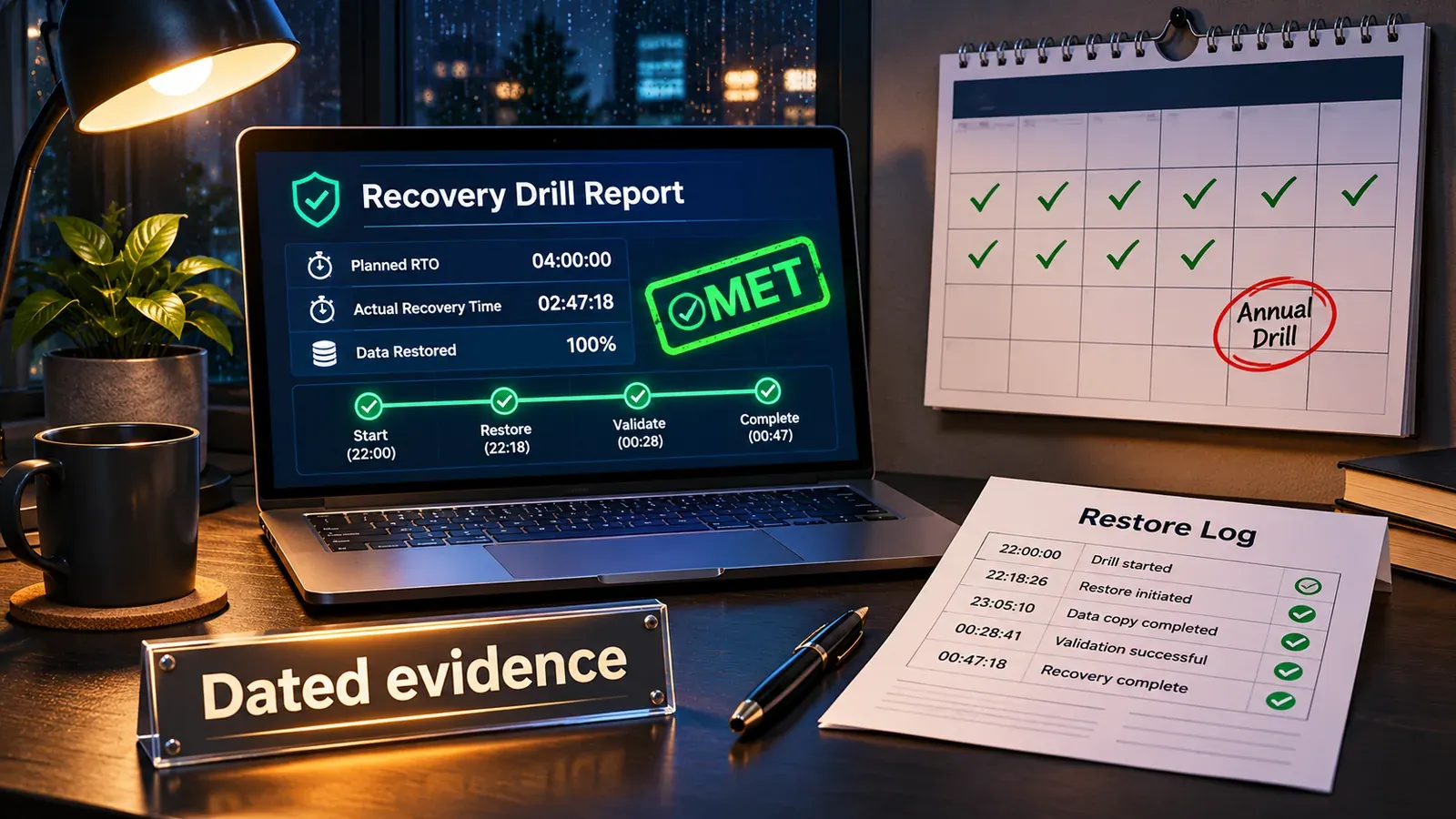
A SOC 2 auditor assessing availability does not want your disaster recovery plan. They want proof that you tested it, inside the audit period, and fixed what the test found. For a Type 2 report that means dated artefacts: restore logs, a timed drill report, the plan’s revision history and the tickets that closed the findings. This guide explains what the criteria actually say, what evidence satisfies them, a 12-month calendar that keeps you ready, and a drill report template that produces the evidence as a by-product of doing the work properly.
It is written for the people who have to produce the evidence, not for auditors, and it is general information rather than audit advice: your auditor decides what is sufficient for your report.
What SOC 2 actually says about recovery
SOC 2 reports are built on the AICPA’s Trust Services Criteria. The 2017 criteria, with points of focus revised in 2022, cover five categories: Security, Availability, Processing Integrity, Confidentiality and Privacy. Security is in every SOC 2; the other four are included when the organisation chooses to include them. Disaster recovery lives mostly in Availability, with roots in Security.
| Criterion | What it says (paraphrased from the published criteria) | What it means for recovery |
|---|---|---|
| A1.1 | The entity maintains, monitors and evaluates current processing capacity and use of system components to manage capacity demand and enable additional capacity | Capacity monitoring and forecasting, including the capacity you would need during a failure |
| A1.2 | The entity authorises, designs, develops or acquires, implements, operates, approves, maintains and monitors environmental protections, software, data backup processes and recovery infrastructure to meet its objectives | Backups must exist, be protected and be monitored; recovery infrastructure must be real, not planned |
| A1.3 | The entity tests recovery plan procedures supporting system recovery to meet its objectives | The recovery plan is tested, and the test supports the objectives (your RTO and RPO) |
| CC7.4 and CC7.5 (Security) | The entity responds to identified security incidents and identifies, develops and implements activities to recover from them | Incident response and recovery for security events, including ransomware |
| CC9.1 (Security) | The entity identifies, selects and develops risk mitigation activities for risks arising from potential business disruptions | Business disruption is a risk you must have considered and mitigated |
The 2022 points of focus under A1.2 and A1.3 spell out what an auditor will look for, including that recovery plan procedures are tested, that the integrity and completeness of backup data is tested, and that recovery plans are updated based on the results. The points of focus are guidance rather than requirements, but they are a reliable map of the questions you will be asked.
Three consequences follow:
- “Objectives” means your objectives. The criteria do not set an RTO or RPO. They ask whether your testing shows you can meet the ones you set. If you have never set them, the first finding writes itself. Our guide to RTO and RPO covers setting them from business impact.
- Backups and recovery are separate controls. A1.2 is about the copies and the infrastructure; A1.3 is about the procedures. Proof that backup jobs ran is not proof that recovery works.
- Updating the plan is part of the control. A test with no documented changes afterwards looks, to an auditor, like a test nobody learned from.
Type 1 versus Type 2: why the dates matter
A Type 1 report assesses whether your controls are suitably designed and implemented as of a specific date. A Type 2 report also assesses whether they operated effectively over a period, commonly three to twelve months. Nearly every customer who asks for your SOC 2 wants a Type 2.
For recovery testing the difference is the calendar. In a Type 1, a current plan and a recent test are enough. In a Type 2, the auditor samples the period: if your window is 1 January to 31 December and your last full drill was 15 December of the previous year, there is no test in the period, however good it was. The same applies to backup restore tests and to the plan review. Evidence has to be dated inside the window, and the safest habit is to test more often than the window requires, so a date is never in doubt.
A plan is not evidence
The gap between most companies and a clean audit is not technical. Cohesity’s 2026 survey of 3,200 organisations with 1,000 or more employees found that only 37% had formally documented a minimum viable company recovery plan and only 22% had both documented and tested one. Mandiant’s M-Trends 2026 report describes attackers deliberately going after backups and identity systems to deny recovery; Sophos’s 2024 survey found that where attackers tried to compromise backups they succeeded 57% of the time. Auditors read the same reports, which is why “we have backups” stopped satisfying anyone some years ago.
What counts is an artefact that is dated, attributable and specific. The table below is the evidence list most SOC 2 availability examinations work through.
| Evidence | What it proves | Criteria it supports | Notes |
|---|---|---|---|
| Recovery plan or runbook, with version history and approval | A procedure exists and is maintained | A1.2, A1.3, CC9.1 | Show the diff between versions; an unchanged plan for three years is a flag |
| Recovery objectives (RTO, RPO) per in-scope system, with the business impact rationale | The objectives the tests are measured against | A1.3 | A tiered list beats a single number for everything |
| Backup configuration and job logs for the period | Backups run as designed | A1.2 | Sampled across the window, including failures and how they were handled |
| Restore test records: what was restored, from which copy, to where, verified how, by whom, when | Backups can actually be recovered, complete and intact | A1.2 (backup integrity and completeness) | Automated restore verification counts if the output is kept |
| Drill or exercise report: scenario, date, participants, timeline, measured recovery time and recovery point, findings | Recovery procedures were tested against the objectives | A1.3 | The core artefact; template below |
| Findings tracker: tickets for each finding with owner, fix, closure date | The plan was updated from results | A1.3 | Closure inside the period is ideal; open items need a documented timeline |
| Capacity and availability monitoring: dashboards or exported reports, alert configuration, alert history | Capacity and availability are monitored | A1.1, A1.2 | Exports with dates; screenshots alone are weak |
| Incident records for real outages in the period, with post-incident reviews | Recovery worked (or did not) in practice | CC7.4, CC7.5 | A real recovery, documented, is strong evidence; hiding one is worse than reporting it |
| Vendor evidence for critical dependencies: their SOC 2 reports, DR commitments, status history | Dependencies outside your control are managed | CC9.1 | Hosting, DNS, identity, payment providers |
| Training and roles: who is on the recovery team, when they were briefed | People know the procedure | A1.3 | Attendance at the drill usually covers it |
A 12-month evidence calendar
The simplest way to always have in-window evidence is a fixed rhythm. This calendar suits a small or mid-sized SaaS company with one or two production environments.
| Cadence | Activity | Artefact produced |
|---|---|---|
| Continuous | Backup jobs with monitoring; uptime and capacity monitoring with alerts | Job logs, alert history, availability reports (export monthly) |
| Monthly | Restore one system or dataset from backup into an isolated environment; verify integrity (row counts, checksums, a user journey) | Restore test record |
| Quarterly | Tabletop exercise: walk the team through a scenario (site loss, ransomware, loss of the identity provider); check that runbooks, contacts and decisions still hold | Tabletop report with findings |
| Annually | Full timed recovery drill of tier 0 and tier 1 systems against RTO and RPO, ideally a real failover or a full restore into an isolated network | Drill report with measured recovery time and point |
| Annually | Plan review and approval; dependency review (vendor SOC 2 reports, DR commitments) | Approved plan version, vendor review record |
| After every exercise | Findings logged, assigned and closed | Tickets with closure dates |
| After major changes | Repeat the relevant restore test or drill (new database engine, new region, new backup product) | Dated test record linked to the change |
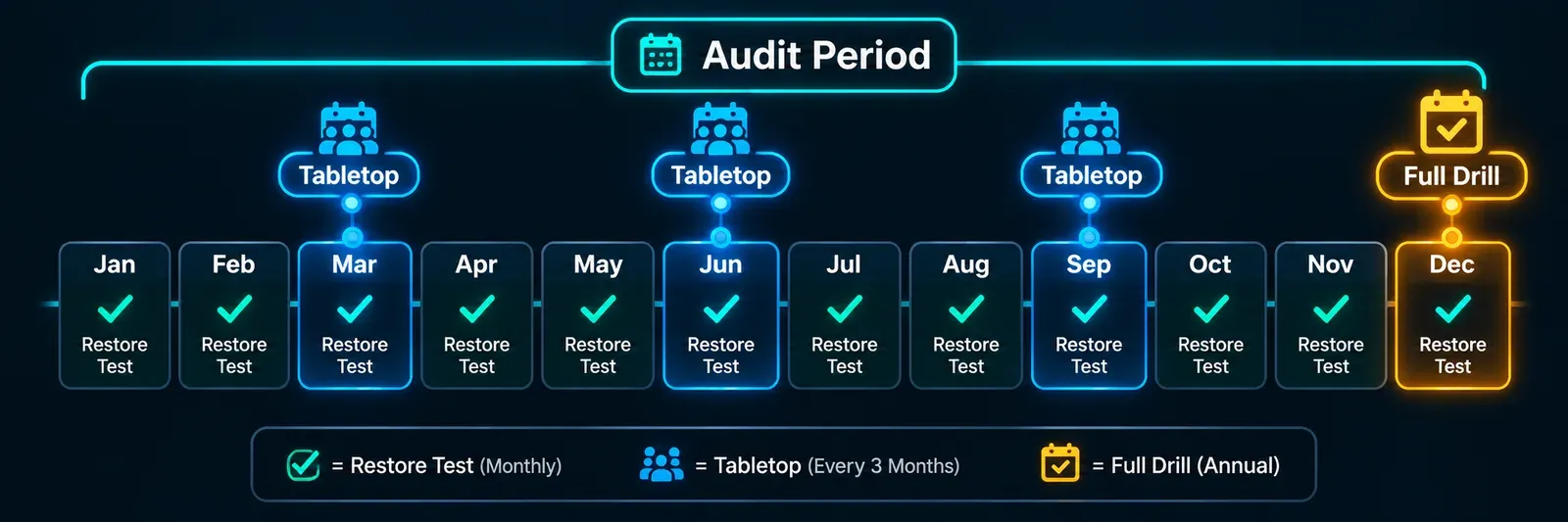
Spread the monthly restores across systems so that over a year every in-scope data store has been restored at least once. Put the annual drill in the first half of the audit window, so there is time to fix findings and, if needed, re-test before the window closes.
Running a drill that produces evidence
NIST SP 800-34 describes a progression of exercises, from discussion-based tabletop exercises through functional exercises that actually operate systems, with scope growing as the plan matures. AWS’s Well-Architected guidance adds the practical rules: involve the people who would respond to a real incident, tell stakeholders in advance, and treat findings without blame. A drill that follows those rules produces an audit-ready report almost automatically if you capture the right things as you go.
Before
- Choose the scenario and the scope: which systems, which failure, which objectives are being tested.
- Confirm the objectives being measured (the RTO and RPO of each system in scope).
- Agree the blast radius: isolated environment, standby region, or production during a maintenance window.
- Name roles: who runs the restore, who times it, who verifies, who takes notes.
- Set abort conditions and a rollback.
During
Time everything from a single clock and write the timeline as it happens:
| Timestamp | Event |
|---|---|
| T+0 | Failure declared (simulated) |
| First alert seen by a human | |
| Decision to recover taken; runbook opened | |
| Each runbook step started and finished, with who did it | |
| Restore complete | |
| Verification complete: a real user journey works | |
| Recovery declared complete |
Note every deviation from the runbook, every credential someone had to go and find, every step that no longer matched the environment. Those are the findings.
After
Write the report the same day, while details are fresh. The template:
Recovery drill report Date and time: … Scenario: … Scope (systems and objectives): … Participants and roles: … Timeline: (the table above) Measured recovery time: … against RTO of … Met / not met Measured recovery point: restore taken at … against RPO of … Met / not met Verification performed: (what was checked, by whom, result) Findings: (numbered; each with severity, owner, ticket reference, target date) Plan changes: (runbook version before and after, what changed) Approved by: … Date: …
Store it with the plan, link the tickets, and update the plan’s version. That one document, repeated each year, is the backbone of your A1.3 evidence. For the smaller, more frequent exercises between drills, such as killing an instance or cutting off a dependency, our guide to chaos engineering for small teams describes an experiment card that doubles as a record.
Common findings, and how to avoid them
| Finding | Why it happens | Avoid it by |
|---|---|---|
| Plan exists, no test in the period | The drill slipped past the window | Fixed calendar; drill in the first half of the window |
| Backup “tests” are only job success logs | Nobody restored anything | Monthly restores with verification records |
| No recovery objectives defined | Targets never set | A tiered RTO/RPO list with rationale |
| Drill findings never closed | No tracker | Tickets with owners and dates, reviewed quarterly |
| Plan not updated after the test | Report written, plan untouched | Version the plan; record the diff in the report |
| Recovery of the backup system itself not covered | Tier 0 missing | Include identity, DNS and the backup console in the drill scope |
| Dependencies assumed | No vendor review | Annual review of critical vendors’ SOC 2 reports and DR terms |
| Evidence is screenshots without dates or context | Collected in a hurry | Export reports with timestamps; keep originals |
Ransomware changes what “tested” means
Two shifts in recent years make the classic site-loss drill insufficient on its own. First, the restore point: Mandiant measured a median attacker dwell time of 14 days in 2025, so the copy you restore from after a ransomware attack must be the last clean one, which can be weeks older than the last backup. A drill that restores yesterday’s backup proves less than it used to; a drill that selects an older immutable copy, restores it into an isolated network and scans it before reconnecting proves what matters. Second, identity: the people and credentials you need to run the restore may be exactly what the attacker took. Testing the break-glass accounts and the backup console’s separate identity belongs in the drill. The controls themselves are covered in our guide to making recovery survive a ransomware attack.
Where monitoring evidence fits, and its limits
Continuous, dated records of availability and recovery are good supporting evidence for A1.1 and A1.2, and they strengthen a drill report by showing what customers experienced. BCDRPulse produces that kind of record from outside your network:
- Uptime monitoring (free plan; every minute on Pro and Business) gives a dated, independent log of when your sites were up and down, with alerts by email and webhook.
- Continuous resilience (Business) runs scheduled checks of how your site holds up and recovers under repeated load, producing dated reports between drills.
- Security scan (Pro) gives a dated, graded snapshot of your public security posture; it is an automated assessment, not a penetration test.
Be clear with yourself and your auditor about the limits. These are supporting evidence only. BCDRPulse does not back up or restore data, is not a control or a certification, does not make you SOC 2 compliant, and does not replace a test of your recovery plan or a restore of your backups. Every test runs only against a domain you have verified as yours through a DNS record; see pricing for plan details.
The bottom line
SOC 2’s availability criteria ask a plain question: can you show that you tested recovery, inside the period, against the objectives you set, and fixed what you found? Answer it with a fixed calendar of restores, tabletops and one timed drill a year, a drill report that records measured recovery time and point, versioned plans, and closed tickets. Do that and the audit becomes a filing exercise. Skip it and the first real outage becomes the test, with the auditor reading the post-mortem.
This is general information, not audit advice. Confirm what evidence your auditor expects.
Sources.
- 1. AICPA & CIMA, 2017 Trust Services Criteria (with revised points of focus, 2022) (opens in a new tab) www.aicpa-cima.com
- 2. AICPA & CIMA, SOC 2: SOC for Service Organizations, Trust Services Criteria (opens in a new tab) www.aicpa-cima.com
- 3. Linford & Company, Availability Trust Services Criteria in a SOC 2 (opens in a new tab) linfordco.com
- 4. A-LIGN, What's the difference between SOC 2 Type I and Type II? (opens in a new tab) www.a-lign.com
- 5. NIST SP 800-34 Rev. 1, Contingency Planning Guide for Federal Information Systems (opens in a new tab) csrc.nist.gov
- 6. AWS Well-Architected, Conduct game days regularly (opens in a new tab) docs.aws.amazon.com
- 7. AWS, Disaster recovery options in the cloud (opens in a new tab) docs.aws.amazon.com
- 8. Mandiant (Google Cloud), M-Trends 2026 (24 March 2026) (opens in a new tab) cloud.google.com
- 9. Cohesity, Research finds most cyber recovery plans are built for the wrong outcome (16 September 2026) (opens in a new tab) www.cohesity.com
- 10. Sophos, The impact of compromised backups on ransomware outcomes (2024 survey) (opens in a new tab) www.sophos.com
Frequently asked questions.
Does SOC 2 require disaster recovery testing?
If your report includes the Availability category, yes in substance. Criterion A1.3 states that the entity tests recovery plan procedures supporting system recovery to meet its objectives, and A1.2 covers backups and recovery infrastructure. The Security category, which every SOC 2 includes, also expects incident response and recovery activities (CC7.4 and CC7.5). If your report covers Security only, availability-specific testing is not formally in scope, though customers increasingly ask for it.
What is the difference between a SOC 2 Type 1 and Type 2 report?
A Type 1 report assesses whether controls are suitably designed and in place at a single point in time. A Type 2 report also tests whether they operated effectively over a period, typically 3 to 12 months. For recovery testing that means a Type 1 can accept a plan and a recent test; a Type 2 needs dated evidence that testing happened inside the audit window.
How often does SOC 2 require you to test your disaster recovery plan?
The criteria set no frequency. In practice, auditors expect at least one full recovery or business continuity test per audit period, usually annual, plus routine backup restore tests, with the plan updated after each exercise. Testing more often than the window requires is the simplest way to be sure a dated test falls inside it.
What evidence do SOC 2 auditors ask for on disaster recovery?
The written plan with its revision history; recovery objectives (RTO and RPO) for in-scope systems; backup job logs and restore test records; a dated report of a recovery drill or tabletop with participants, scenario, measured recovery time and findings; tickets showing the findings were fixed; and evidence that the plan was reviewed and approved within the period.
Does a tabletop exercise count as a disaster recovery test for SOC 2?
Often, for the plan procedures, if it is documented with the scenario, attendees, decisions and findings. Auditors generally also want evidence that backups can actually be restored, which a discussion exercise cannot show. A tabletop for the procedures plus timed restore tests for the data is a common and defensible combination.
Can uptime monitoring or resilience reports be SOC 2 evidence?
As supporting evidence, yes: dated availability records and recovery measurements help demonstrate that capacity and availability are monitored (A1.1) and that recovery behaviour is observed. They do not replace a test of your recovery plan or a restore of your backups, and no monitoring product makes an organisation SOC 2 compliant.
What is the most common SOC 2 finding on disaster recovery?
A plan that exists but was not tested, or was tested outside the audit window, followed closely by restore tests that only confirm a backup job ran rather than that data was restored and verified, and by findings from a drill that were never tracked to closure.
Published . Last updated .
Founder, BCDRPulse
Founder of BCDRPulse. Enterprise backup and data protection since 2007, supporting Fortune 500 companies. Writes guides to keeping a site up, fast and secure, and to proving it.