Synology NAS ransomware (C3RB3R): patch, close the door, and check what the box was protecting
On this page
On 29 October 2026 Synology published a short statement with a long shadow: attackers were encrypting NAS devices that run outdated versions of DiskStation Manager, the aim was ransom, and every owner of a vulnerable device should update immediately. The ransomware, which researchers track as C3RB3R, had been showing up in user forums for about two weeks by then. Files get a .L0CK3D extension, a note called read-me3.txt appears in every folder, and there is no free decryptor.
The detail that should stop any business owner is not the malware. It is the target. A NAS is the box most small companies bought to hold their backups. An attack that encrypts it is an attack on the recovery plan, and if the NAS was the only copy, the plan is gone.
This article sets out what is known and what is not, the fixed DSM builds from both advisories in play, a ten-minute check of whether your device is exposed, the steps to take if you are already hit, and the design lesson that outlasts this particular campaign.
What is happening
The timeline, as far as the public record goes:
- Mid-October 2026. Reports of Synology devices with .L0CK3D files begin appearing on the BleepingComputer forums and Reddit. BleepingComputer later dates the first reports to more than two weeks before 2 November.
- 29 October. Synology issues its statement from Taipei. It says threat actors are targeting devices on outdated DSM versions by exploiting a vulnerability it patched in December 2024, urges every user on a vulnerable version to update, and recommends enabling automatic updates. It points to advisory SA-24:20.
- 2 November. BleepingComputer reports the wave, notes that Synology has not named the specific flaw, and quotes a spokesperson directing them back to the same 2024 advisory. It adds that Shadowserver now tracks more than 380,000 Synology NAS devices exposed to the internet, without saying how many are patched or are honeypots.
- 3 November. The Hacker News reports an analysis by the Qihoo 360 Internet Security Center, which describes C3RB3R as a long-standing NAS attacker and says the group has been exploiting two critical flaws Synology fixed in September 2026, CVE-2026-13684 and CVE-2026-13639, both rated 9.8.
Two things remain unknown. Synology has not said how many devices are affected, and it has not confirmed the entry route. The malware’s behaviour is better documented: before encrypting, it skips 27 system directories and a list of file types, including executables and libraries, so that the device keeps running long enough to finish the job.
Which flaw, and why it does not matter for what you do next
There is a disagreement in the reporting, and it is worth being precise about it.
Synology’s statement and its spokesperson point to SA-24:20, an advisory first published on 5 November 2024 for flaws found at the Pwn2Own contest. Its headline bug, CVE-2024-10441, is a critical output encoding flaw in the system plugin daemon that lets a remote attacker run arbitrary code without logging in. Two lesser flaws, CVE-2024-50629 and CVE-2024-10445, allow limited file reads and writes.
360’s researchers point to SA-26:13, published on 18 September 2026. Its two critical bugs are an output encoding flaw in SCGI (CVE-2026-13684) and insufficient entropy in the login logic (CVE-2026-13639). Both are rated 9.8, both let a remote attacker read or write arbitrary files without authentication, and neither has a workaround.
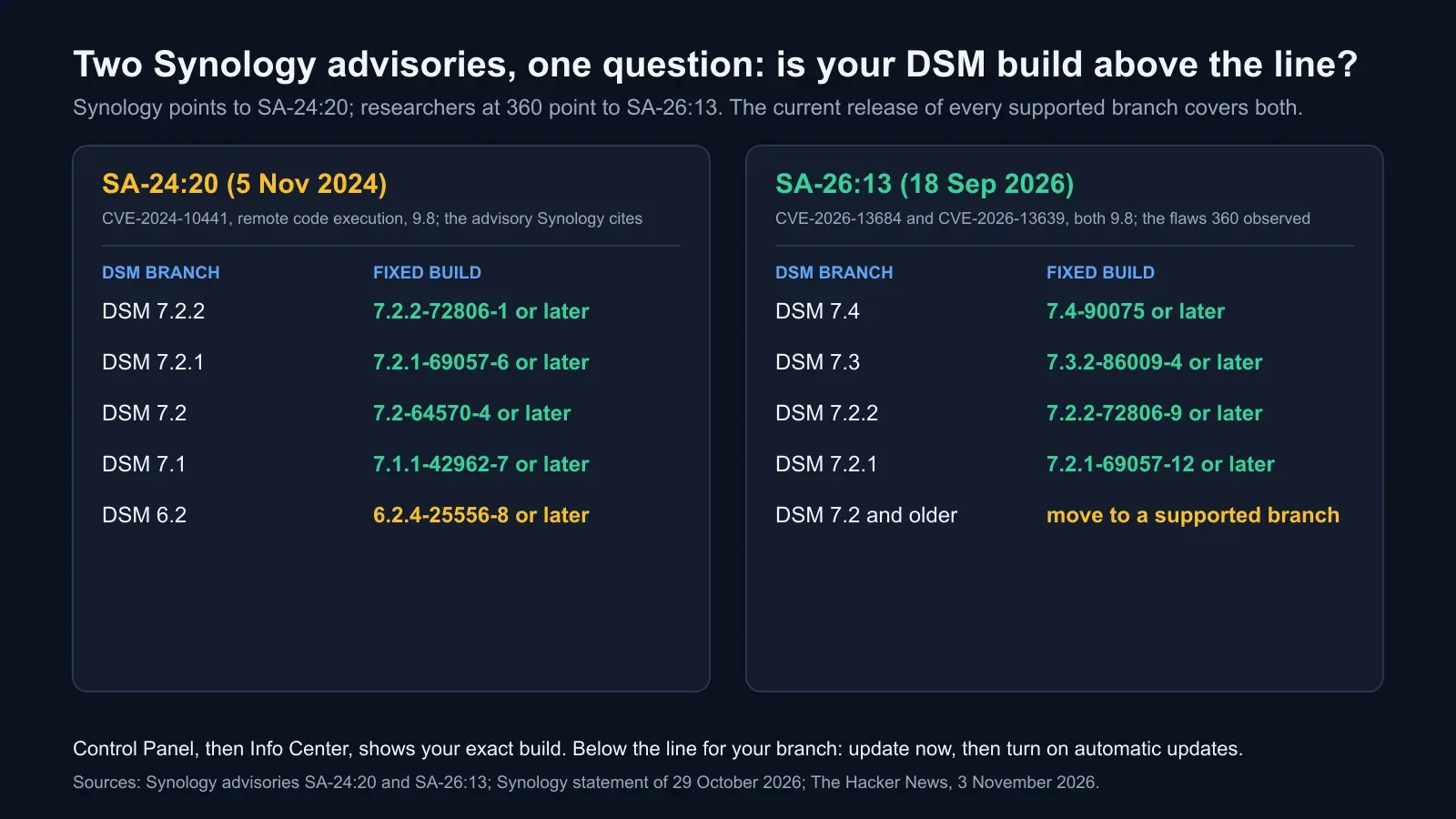
For an owner the distinction is academic. Both advisories are resolved, both fixes are in the current release of every supported DSM branch, and a device that has taken its updates is covered by both. What the disagreement tells you is something else: a device that missed a critical patch two years ago has almost certainly missed the ones since, and the attackers have more than one way in.
The fixed builds, side by side:
| DSM branch | SA-24:20 fixed build (Nov 2024) | SA-26:13 fixed build (Sep 2026) |
|---|---|---|
| DSM 7.4 | not yet released then | 7.4-90075 or later |
| DSM 7.3 | not yet released then | 7.3.2-86009-4 or later |
| DSM 7.2.2 | 7.2.2-72806-1 or later | 7.2.2-72806-9 or later |
| DSM 7.2.1 | 7.2.1-69057-6 or later | 7.2.1-69057-12 or later |
| DSM 7.2 | 7.2-64570-4 or later | branch not listed |
| DSM 7.1 | 7.1.1-42962-7 or later | branch not listed |
| DSM 6.2 | 6.2.4-25556-8 or later | branch not listed |
If your device is on DSM 7.2 or older, the right move is not to find the minimum build but to move to a supported branch. Synology’s own severity rating for 6.2 under SA-24:20 was only “moderate”, which means the critical bug may not even be fully addressed on the oldest branch.
Why the backup box is the target
NAS devices have been a ransomware target for years. QNAP owners met eCh0raix in 2019 and DeadBolt in 2022. Synology warned in August 2021 that the StealthWorker botnet was brute-forcing its devices to plant ransomware. C3RB3R is the current name on an old pattern, and the pattern holds for three reasons.
The device is reachable. Owners forward ports 5000 and 5001 on the router so they can reach files from anywhere, and the DSM login page becomes a public web page. Shadowserver’s count of more than 380,000 internet-exposed Synology devices is the attack surface in one number.
The device is rarely patched. A NAS sits in a cupboard and works. Nobody logs in to look for updates, and automatic updates were off by default on older installs. A flaw from November 2024 still working in October 2026 is the proof.
The device holds everything. On most small networks the NAS is the file server, the backup target for every PC and the archive, all at once. Encrypt it and the business loses the live files and the copies in the same minute. Our guide to protecting backups from ransomware describes how attackers go looking for exactly this box inside a network. C3RB3R is the shortcut: it skips the network and comes in from the internet directly.
A ten-minute check of your own NAS
Do these in order. Each takes a minute or two in DSM.
1. Find your DSM build. Control Panel, then Info Center, shows the exact version string. Compare it with the table above. If it is below the SA-26:13 build for your branch, update now: Control Panel, Update & Restore, Update. Turn on automatic updates while you are there.
2. Find out whether the management page is on the internet. On your router, look for port forwards to the NAS on 5000, 5001 or any port you set up. In DSM, open Security Advisor and run a scan; it flags exposed services. If you use QuickConnect, check which services it relays. A simpler test: from a phone on mobile data, try your public address with the DSM port. If a login page appears, the world can see it.
3. Close the door. Remove the port forwards. If you need remote file access, use a VPN to your network, or limit QuickConnect to the file apps rather than the full DSM console. Enable multi-factor authentication on every account, disable the default admin account if it is still active, and turn on auto-block for failed logins.
4. Find your second copy. Open Snapshot Replication, if installed, and check whether shared folders have snapshots and whether those snapshots are immutable. Immutable snapshots, available on DSM 7.2 and later, cannot be deleted by anyone, including an administrator, until their retention period ends. Open Hyper Backup and check whether a backup task runs to another device, to cloud storage or to an external drive, and when it last succeeded.
5. Prove the copy restores. Pick one folder, restore it from the snapshot or the Hyper Backup task to a different location, and open the files. A backup that has never been restored is a hope, not a plan. Insurers now ask for the date of this test, as our article on cyber insurance requirements in 2026 explains.
If you are already hit
The order matters.
- Disconnect the network cable. Not a reboot, not a shutdown. Pull the cable so the encryption stops and the attacker loses access, while memory and logs stay intact.
- Do not wipe, reset or reinstall. The evidence of how they got in is on the device, and so may be snapshots that predate the attack. A factory reset destroys both.
- Keep a copy of read-me3.txt and a sample encrypted file. Decryptors, if one ever appears, are built from these, and your insurer and the police will ask for them.
- Check Snapshot Replication for snapshots older than the first .L0CK3D file. Immutable ones will be there. Ordinary ones may be, if the attacker did not have time or rights to delete them. Restore from those to a clean device or a clean volume.
- Check Hyper Backup targets and any offline drive. Restore from the most recent copy the NAS could not have overwritten.
- Rebuild the NAS from a clean install of the current DSM, restore the data, and only then reconnect it, with the management interface no longer exposed.
- Report it. In the UK that is Action Fraud and the NCSC; in India, the Cyber Crime portal and CERT-In; in the US, CISA and the FBI’s IC3. Notify your insurer within the window your policy sets, which is often 48 or 72 hours.
Synology’s statement says its support team will help affected users, and its first question will be the DSM version. Have the Info Center string ready.
The design lesson that outlasts C3RB3R
A single NAS, reachable from the internet, holding the only copy of the backups, is not a backup strategy. It is one device with three jobs and one password.
The pattern that survives this campaign and the next one is the rule the industry has settled on: three copies of the data, on two different kinds of storage, with one copy somewhere else, and one of those copies immutable or offline so that nobody holding your credentials can delete it. On a Synology that means immutable snapshots on the shared folders, a Hyper Backup task to a second location that uses its own credentials, and a restore test on the calendar. The RTO and RPO you can promise the business are set by that second copy and that test, not by the NAS itself.
BCDRPulse does not reach inside your network, and this article is deliberately about the device, not the platform. Where the two meet is the public face: if the NAS is published on a hostname, a security scan of that hostname shows what an attacker’s first scan would show, and uptime monitoring tells you the moment it stops answering, which during an encryption run is often the first sign. The patching, the port forwards and the second copy are yours to check, and the check above takes ten minutes.
Checklist
- DSM at or above the SA-26:13 build for your branch, automatic updates on
- No router port forwards to the DSM management ports; remote access by VPN or a limited QuickConnect
- Multi-factor authentication on every account, default admin disabled, auto-block on
- Immutable snapshots on the shared folders that matter, with a retention period longer than the time it would take you to notice an attack
- A Hyper Backup task to a second device, cloud bucket or offline drive, with its own credentials, succeeding on schedule
- One restore test done in the last quarter, with the date written down
- Security Advisor run and its findings cleared
The bottom line
Synology’s statement is three sentences long because the fix is one sentence long: update DSM. The reason the wave exists is that hundreds of thousands of devices never did, and sat on the public internet waiting. Patch the device today, take it off the internet this week, and then look harder at the question the attackers have forced: if this box were encrypted tomorrow, where is the copy they could not reach.
Sources.
- 1. Synology, Synology urges users to update DSM following ransomware attacks on outdated DSM versions (press release, 29 October 2026) (opens in a new tab) www.synology.com
- 2. Synology, Security advisory Synology-SA-24:20 DSM (PWN2OWN 2024): CVE-2024-10441, CVE-2024-50629, CVE-2024-10445 (published 5 November 2024, updated 28 March 2025) (opens in a new tab) www.synology.com
- 3. Synology, Security advisory Synology-SA-26:13 DSM: CVE-2026-13684 and CVE-2026-13639 (18 September 2026) (opens in a new tab) www.synology.com
- 4. BleepingComputer, Synology warns of C3RB3R ransomware attacks targeting NAS devices (2 November 2026) (opens in a new tab) www.bleepingcomputer.com
- 5. The Hacker News, Synology NAS devices targeted in ransomware attacks exploiting patched DSM flaw (3 November 2026) (opens in a new tab) thehackernews.com
- 6. CISA, #StopRansomware guide (updated May 2023) (opens in a new tab) www.cisa.gov
Frequently asked questions.
Which Synology devices are affected by the C3RB3R ransomware?
Synology says the attacks target devices running outdated versions of DiskStation Manager. Its 29 October 2026 statement points to advisory SA-24:20, whose fixed builds are DSM 7.2.2-72806-1, 7.2.1-69057-6, 7.2-64570-4, 7.1.1-42962-7 and 6.2.4-25556-8 or later. Researchers at 360 believe the attackers use two flaws fixed in September 2026 under SA-26:13, whose fixed builds are DSM 7.4-90075, 7.3.2-86009-4, 7.2.2-72806-9 and 7.2.1-69057-12 or later. A device updated to the latest release of its DSM branch is covered by both advisories. Synology has not published a count of affected devices.
How do I know if my Synology NAS has been hit?
Files have a .L0CK3D extension added to their names and a text file called read-me3.txt appears in affected folders demanding payment for a decryptor. Shared folders may show files that no longer open. DSM itself usually still loads. If you see these signs, disconnect the device from the network first and read the recovery section of this article before doing anything else.
Can C3RB3R-encrypted files be recovered without paying?
No free decryptor has been published for this campaign as of 5 November 2026. Recovery depends on a copy of the data the ransomware could not reach: a Snapshot Replication snapshot taken before the encryption, especially an immutable one; a Hyper Backup copy on another device or in cloud storage; or an offline copy. Paying is a last resort that funds the next wave and does not guarantee working keys, and insurers and law enforcement both advise against it.
Is a NAS a safe place to keep backups?
Only as one copy among several. A NAS on the same network, reachable with the same credentials as the systems it protects, is a convenient target: compromise it and both the live data and the backup go at once. The usual rule is three copies on two kinds of media with one off site, and in 2026 most insurers and guidance add that at least one copy must be immutable or offline, so that nobody with your passwords can delete it.
Should my Synology NAS be reachable from the internet at all?
The management interface should not be. Synology's own advice during this wave is to block access to the DSM web interface from the internet. If you need remote access, put it behind a VPN or Synology's QuickConnect relay rather than forwarding ports 5000 or 5001 on your router, keep DSM current, enable automatic updates, turn on multi-factor authentication for every account and let Security Advisor in DSM flag what is exposed.
Does BCDRPulse scan NAS devices?
No. BCDRPulse tests and monitors websites and public hostnames you have verified you own, not storage devices on your network. If your NAS is published on a public hostname, a security scan of that hostname shows what the internet sees of it, and uptime monitoring tells you when it stops answering, but the patching, exposure and backup checks in this article are done on the device itself.
Published .
Founder, BCDRPulse
Founder of BCDRPulse. Enterprise backup and data protection since 2007, supporting Fortune 500 companies. Writes guides to keeping a site up, fast and secure, and to proving it.