How to check your TLS configuration in 2026: protocols, ciphers, certificates, HSTS and the changes that catch sites out

On this page
To check your TLS configuration, look at ten things: the protocol versions you offer, your cipher suites, your key exchange groups, the certificate chain, the certificate’s lifetime and how it is renewed, revocation, HSTS, redirects and mixed content, the origin behind your CDN, and the endpoints browsers never see. Free checkers grade the first few in seconds. The rest are where sites actually break, and 2026 moved the ground under several of them: certificates now last at most 200 days, the largest certificate authority has switched off OCSP, and post-quantum key exchange has become the default in browsers.
This guide works through the ten checks in order, explains what changed in 2026, shows how to read a grade, and ends with a renewal runbook built for short certificate lifetimes.
What changed in 2026
| Change | What it means | Source |
|---|---|---|
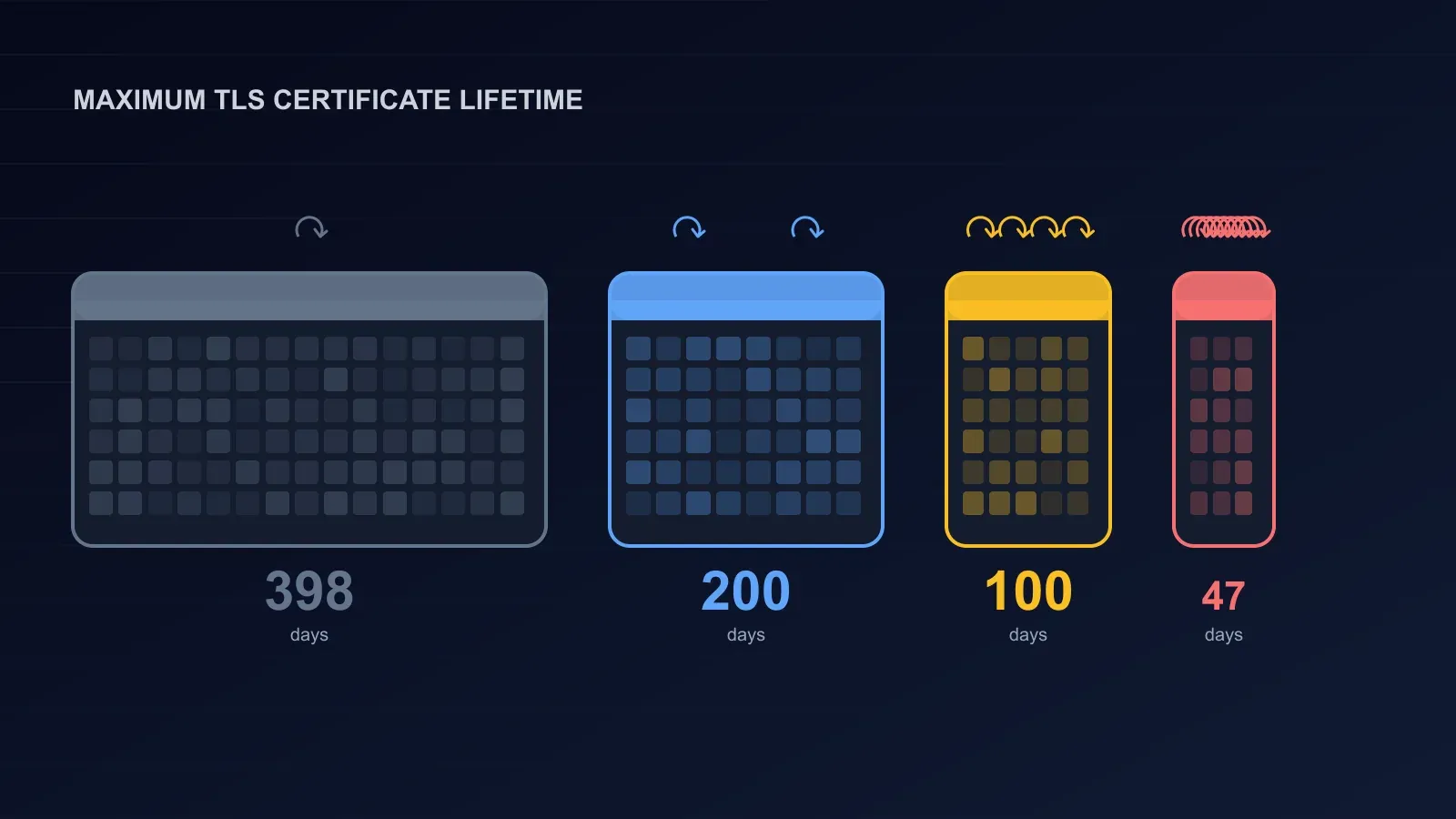
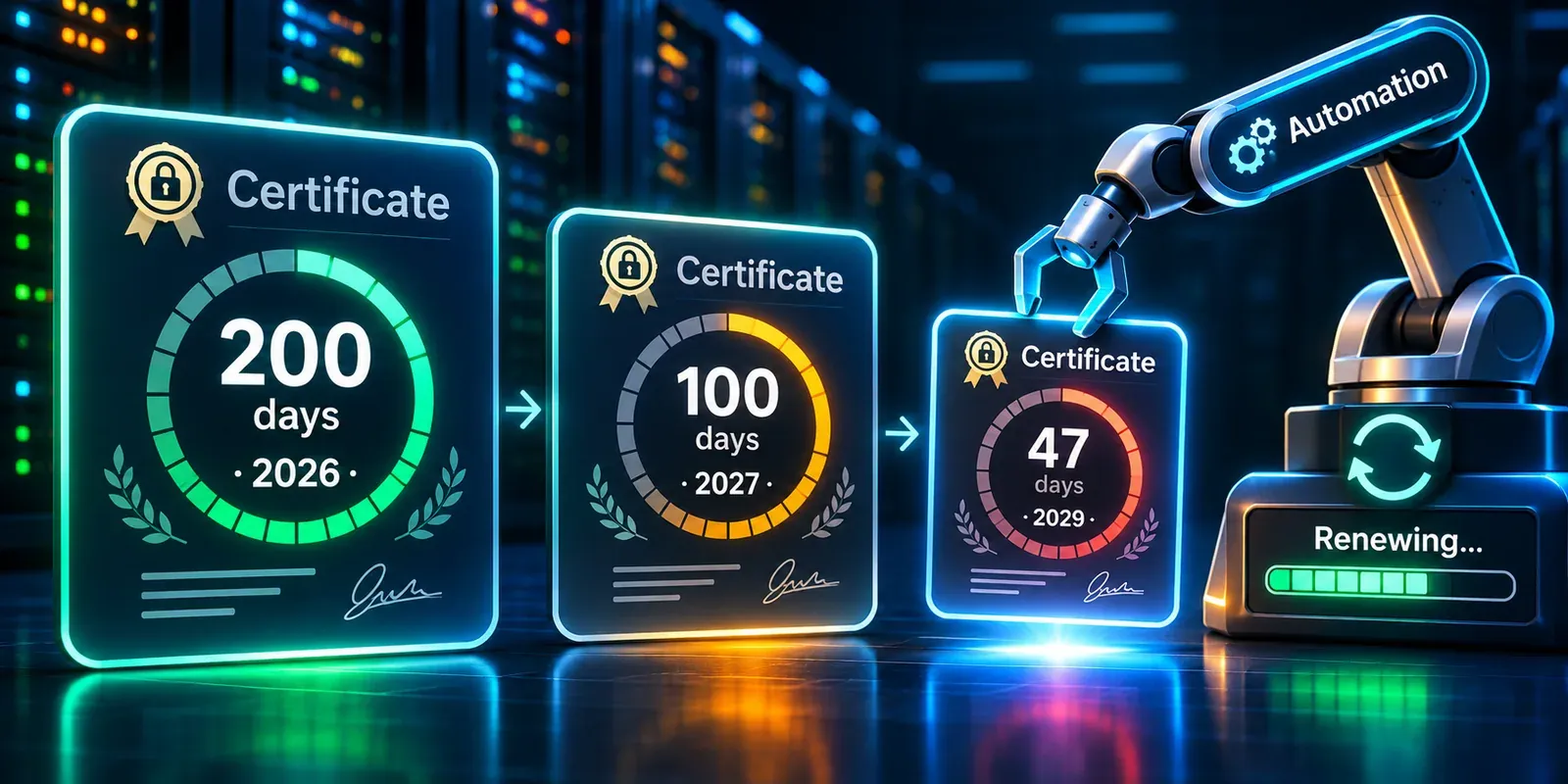
| Maximum certificate lifetime cut to 200 days from 15 March 2026, then 100 days from 15 March 2027 and 47 days from 15 March 2029; domain validation reuse falls to 10 days by 2029 | A certificate renewed by hand once a year is no longer possible; the first 200-day certificates issued in March came due in October 2026 | CA/Browser Forum ballot SC-081v3, passed 11 April 2025 with 25 certificate issuers in favour and none against |
| Let’s Encrypt offers 6-day certificates and plans to cut its own maximum to 45 days by February 2028 | Short-lived certificates make revocation almost irrelevant and automation mandatory | Let’s Encrypt certificate lifetime page |
| Let’s Encrypt ended OCSP on 6 August 2025, citing privacy; revocation now goes through CRLs | OCSP stapling settings pointed at Let’s Encrypt do nothing; browsers rely on CRL-based mechanisms and short lifetimes | Let’s Encrypt announcement |
| Post-quantum key exchange became normal. Cloudflare reported in April 2026 that more than two-thirds of human TLS traffic to its network used hybrid ML-KEM | Servers that support X25519MLKEM768 protect today’s traffic against decryption by a future quantum computer | Cloudflare, 30 April 2026 |
| Mozilla’s Server Side TLS guidelines moved to TLSRef, whose version 6.0 removed the Old profile and lists X25519MLKEM768 first in both remaining profiles | The reference configuration most tools and checkers follow now assumes no legacy clients and expects post-quantum support | TLSRef, Mozilla wiki |
| Expired certificates are still a top cause of outages. In DigiCert’s 2026 Certificate Management Outlook, 34% of companies had an outage caused by an expired certificate, nearly three-quarters had at least five hours of certificate-related downtime in a year, and nearly one in four said their worst certificate incident cost over $250,000 | Shorter lifetimes multiply the number of renewals, and therefore the number of chances to miss one | Help Net Security, September 2026 (vendor survey) |
The ten-point check
1. Protocol versions
Offer TLS 1.3 and TLS 1.2, nothing else. The IETF deprecated TLS 1.0 and 1.1 in RFC 8996 (March 2021): both “MUST NOT be used”, because their handshake integrity depends on SHA-1 and they lack modern algorithms. RFC 9325 (November 2022, the current best-practice document) requires TLS 1.2 support, recommends TLS 1.3, and says a server that supports 1.3 must prefer it. SSL 2 and 3 should not exist anywhere in your configuration.
TLSRef’s two profiles make the choice simple:
| Profile | Versions | Use when |
|---|---|---|
| Modern | TLS 1.3 only | Your clients all support TLS 1.3 (current browsers, your own apps, modern APIs) |
| Intermediate | TLS 1.2 and 1.3 | You serve the general public; TLSRef calls this “the recommended configuration for the vast majority of services” |
How to check: a scanner lists the versions negotiated. If TLS 1.0 or 1.1 appears, turn it off; almost no legitimate client has needed it for years, and SSL Labs caps the grade at B while it is on.
2. Cipher suites
A cipher suite names the algorithms a connection uses. Keep the ones that give forward secrecy (a compromised server key cannot decrypt past traffic) and authenticated encryption (AEAD, which protects integrity and confidentiality together). Drop everything else.
| Keep | Drop |
|---|---|
TLS 1.3: TLS_AES_128_GCM_SHA256, TLS_AES_256_GCM_SHA384, TLS_CHACHA20_POLY1305_SHA256 | Any suite using CBC mode, RC4, 3DES, DES, NULL or export-grade ciphers |
| TLS 1.2: the ECDHE suites with ECDSA or RSA authentication and AES-GCM or ChaCha20-Poly1305 (six suites in the TLSRef Intermediate profile) | Static RSA key exchange (TLS_RSA_WITH_…), which has no forward secrecy; anonymous or pre-shared-key suites on a public site |
RFC 9325 says implementations must support and prefer forward-secret suites and recommends the four ECDHE AES-GCM suites for TLS 1.2; TLSRef adds the ChaCha20 pair. Let the client choose among the good suites: that is what current guidance recommends, and it lets phones pick ChaCha20 where they have no AES hardware.
3. Key exchange groups
The key exchange decides how the two sides agree on the session keys. In 2026 the right list, in order, is X25519MLKEM768, X25519, prime256v1, secp384r1, which is exactly TLSRef’s list. The first is the post-quantum hybrid: X25519 plus ML-KEM, so the connection is safe unless both are broken. Browsers already offer it; Cloudflare measured more than two-thirds of human traffic using it by April 2026. If your server software is recent (OpenSSL 3.5 or later, current versions of the major web servers and load balancers), enabling it is one line. If you still use finite-field Diffie-Hellman for old clients, use 2048-bit parameters from RFC 7919.
4. The certificate chain
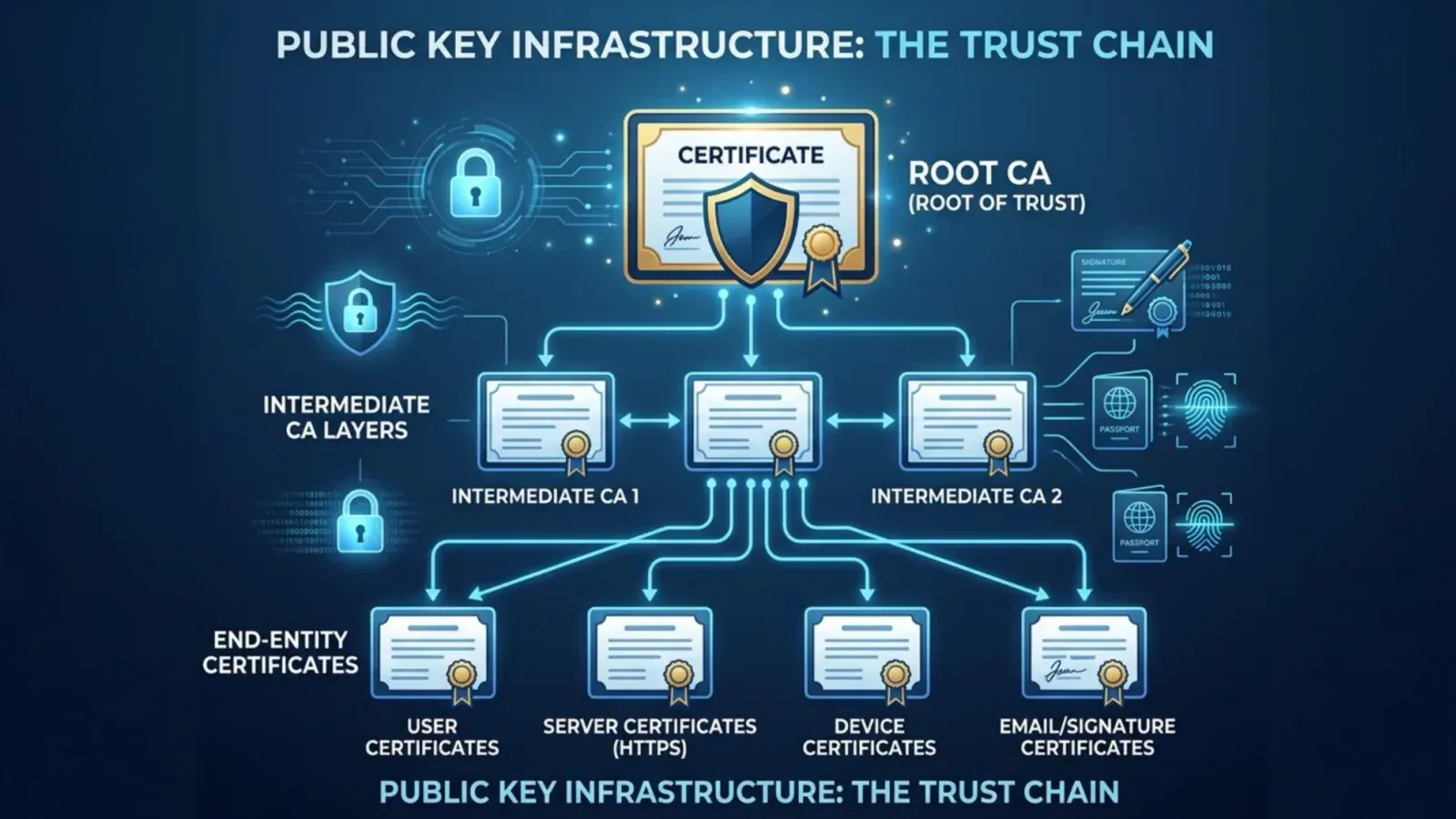
Browsers need the server certificate and the intermediate certificates that link it to a trusted root. A server that sends only the leaf works in your browser (which has cached the intermediate from another site) and fails for a visitor whose browser has not. Check that:
- the full chain is served, in order, without the root (sending the root is harmless but pointless);
- every hostname a visitor might use is in the Subject Alternative Name list, including
wwwand the apex; - the key is ECDSA P-256 (TLSRef’s recommendation) or RSA with at least 2048 bits (the RFC 9325 minimum); P-384 and 4096-bit RSA add cost for little gain;
- the certificate was issued by a publicly trusted CA and is logged in Certificate Transparency, which browsers require for public certificates.
An incomplete chain is one of the most common findings on otherwise well-configured sites, and SSL Labs caps the grade for it.
5. Certificate lifetime and renewal
This is the check that changed most. Since 15 March 2026 no public certificate may be issued for more than 200 days; a year from now it will be 100, and in 2029 it will be 47. Let’s Encrypt’s six-day certificates show where this is going.
What to check:
- Is renewal automated? ACME clients (Certbot, acme.sh, the built-in clients in Caddy, Traefik, cert-manager, and most CDNs and load balancers) renew unattended. If someone renews by hand, that process will fail within a year of these schedules.
- When does it renew? The usual rule is at one-third of the lifetime remaining: around day 60 of 90, day 133 of 200. That leaves time to notice a failure.
- Does renewal failure alert anyone? A silent failure is the outage. Monitor expiry from outside, independently of the renewal tool.
- Where else is the certificate installed? Load balancers, CDNs, mail servers, legacy appliances and internal services each need the renewed certificate deployed, and each is a place a renewal can succeed without the deployment happening.
The cost of missing one is well documented. Microsoft Teams went down for hours on 3 February 2020 because an authentication certificate expired, and DigiCert’s 2026 survey found a third of companies had suffered an outage the same way. With lifetimes shrinking, the number of renewals per year per certificate goes from one to several, and eventually to dozens.
6. Revocation
Revocation tells browsers a certificate should no longer be trusted. Two mechanisms exist: OCSP (a live query, or a stapled response from the server) and CRLs (downloaded lists). Let’s Encrypt switched its OCSP service off in August 2025 and now publishes only CRLs; browsers increasingly rely on CRL-derived mechanisms and, above all, on short lifetimes, which make a compromised certificate expire on its own within days. Practically: if your certificate carries an OCSP URL, OCSP stapling still helps; if it does not, remove stapling settings that log errors; and treat a short lifetime plus automated renewal as the real revocation story.
7. HSTS
HTTP Strict Transport Security (RFC 6797) is a response header that tells a browser to use HTTPS only for your domain for a stated time, closing the gap where a first request over plain HTTP could be intercepted. RFC 9325 says web servers should use it. The checklist:
- Serve
Strict-Transport-Security: max-age=63072000; includeSubDomainsonce every subdomain works over HTTPS. Two years is TLSRef’s recommendation; SSL Labs’ A+ grade also requires a long max-age. - Serve it only on HTTPS responses; browsers ignore it on HTTP.
- Consider the preload list only when you are certain. The requirements at hstspreload.org are a valid certificate, an HTTP-to-HTTPS redirect on the same host, HTTPS on every subdomain, and a header with
max-ageof at least 31,536,000 seconds (one year),includeSubDomainsandpreload. The site warns that inclusion “cannot easily be undone”: removal takes months to reach users through browser updates, and a subdomain that cannot do HTTPS will be unreachable in the meantime.
8. Redirects and mixed content
Every HTTP URL should redirect, once, to its HTTPS equivalent on the same host, and the HTTPS page should load no scripts, styles, images or frames over HTTP. Browsers block mixed scripts and upgrade or block mixed images, so the usual symptom is a feature that silently stops working rather than a warning. Check the redirect chain too: http://www to https://www to https://apex is two redirects where one would do.
9. Behind a CDN, check the origin separately
If your site sits behind a CDN or edge proxy, every checker on the internet is grading the CDN’s edge, not your server. A clean A+ may say nothing about the TLS between the edge and your origin. Check:
- Origin TLS exists and is enforced. The edge should connect to your origin over HTTPS with a certificate it validates, not over plain HTTP and not in a mode that accepts any certificate.
- The origin’s own configuration meets the same ten checks: version, suites, chain, lifetime. Origin certificates are often the ones renewed by hand and forgotten.
- Direct access to the origin is blocked, so attackers cannot bypass the edge; our guide to short DDoS attacks covers hiding the origin.
- Post-quantum to the origin. The edge-to-origin leg can use hybrid key exchange too if your origin supports it; Cloudflare’s edge, for example, negotiates it when the origin offers it.
10. The certificates browsers never see
APIs, mail servers (SMTP, IMAP), VPN gateways, message queues, database connections, internal dashboards and service-to-service calls all use TLS, and none of them is checked by a browser-oriented scanner. They are also where expired certificates hide longest, because nobody sees a warning page. Keep an inventory of every certificate you operate, with its expiry and its renewal method, and alert on all of them.
How to read a grade
Public checkers such as Qualys SSL Labs roll these checks into a letter. The rules Qualys has published over the years give the shape:
| Grade effect | Cause |
|---|---|
| Capped at B or lower | TLS 1.0 or 1.1 still enabled; no forward secrecy; suites without authenticated encryption; an incomplete chain |
| Capped at C or F | SSL 3 or RC4 support; known vulnerabilities; a certificate that is expired, mismatched or untrusted |
| A | Modern versions and suites, a valid full chain, strong keys |
| A+ | All of the above plus HSTS with a long max-age |
A grade is a snapshot of the public edge. It does not see your origin, your renewal automation or your internal endpoints, and it cannot tell you whether the certificate will renew next month. Aim for the top of the scale, then do the checks a grade cannot.
A renewal runbook for short lifetimes
- Inventory. Every certificate you operate: hostname, where it is installed, who issued it, lifetime, renewal method, owner. Include the ones in section 10.
- Automate issuance and deployment. ACME for everything a public CA issues; a scheduled job or operator for anything that must be copied to a load balancer, appliance or internal host after renewal.
- Renew early. At one-third of the lifetime remaining; for a 47-day certificate that is around day 31.
- Alert from outside. An external check of each public endpoint’s expiry date, with warnings scaled to the lifetime (for example at 30, 14 and 7 days for a 200-day certificate; at 10, 5 and 2 days for a 47-day one), sent to a channel someone reads.
- Test the failure path. Once a quarter, make a renewal fail on a test host and confirm the alert arrives and the runbook works. Our guide to chaos engineering lists an expiring certificate as one of its ten starter experiments, because it tests monitoring rather than code.
- Review quarterly. Remove certificates for retired hosts, check that renewal jobs still run, and read the CA/Browser Forum schedule for the next cut.
How BCDRPulse checks this for you
Free checkers grade a public endpoint and are the right first look. BCDRPulse’s tools go a step further and keep the result:
- Deep TLS analysis (Business) covers the protocol, cipher suite, key exchange, certificate chain and expiry, and HSTS checks above for a verified domain, and returns a graded, downloadable report with findings in order of importance.
- Security scan (Pro) checks whether HTTPS is enforced alongside your other security headers and grades the result A to F. It is an automated assessment, not a penetration test.
- Uptime monitoring (free plan) tells you from outside when a certificate problem has actually taken a site down.
Every test runs only against a domain you have verified as yours through a DNS record. See pricing for which plan includes each.
The bottom line
A good TLS configuration in 2026 is TLS 1.3 and 1.2 only, forward-secret authenticated cipher suites, post-quantum hybrid key exchange first, a complete chain with a modern key, HSTS with a long max-age, and clean redirects. What keeps it good is not the configuration but the operations around it: automated renewal that is monitored from outside, an inventory that includes the endpoints no browser visits, and a separate look at the origin behind your CDN. Certificate lifetimes are heading for 47 days. The sites that will still be up in 2029 are the ones that stopped renewing by hand in 2026.
Sources.
- 1. IETF RFC 8446, The Transport Layer Security (TLS) Protocol Version 1.3 (August 2018) (opens in a new tab) datatracker.ietf.org
- 2. IETF RFC 8996, Deprecating TLS 1.0 and TLS 1.1 (March 2021) (opens in a new tab) datatracker.ietf.org
- 3. IETF RFC 9325, Recommendations for Secure Use of TLS and DTLS (November 2022, BCP 195) (opens in a new tab) datatracker.ietf.org
- 4. IETF RFC 6797, HTTP Strict Transport Security (November 2012) (opens in a new tab) datatracker.ietf.org
- 5. TLSRef, Server-side TLS recommended configurations (successor to Mozilla's Server Side TLS guidelines, configuration version 6.0) (opens in a new tab) docs.tlsref.org
- 6. Mozilla wiki, Security/Server Side TLS (pointer to the moved guidelines) (opens in a new tab) wiki.mozilla.org
- 7. HSTS preload list submission requirements (opens in a new tab) hstspreload.org
- 8. CA/Browser Forum, Ballot SC-081v3: Introduce schedule of reducing validity and data reuse periods (voting closed 11 April 2025) (opens in a new tab) cabforum.org
- 9. Let's Encrypt, Certificate lifetime rationale and plans (opens in a new tab) letsencrypt.org
- 10. Let's Encrypt, OCSP service has reached end of life (6 August 2025) (opens in a new tab) letsencrypt.org
- 11. Cloudflare, Post-quantum encryption for Cloudflare IPsec is generally available (30 April 2026) (opens in a new tab) blog.cloudflare.com
- 12. Cloudflare Radar, Post-quantum encryption adoption (opens in a new tab) radar.cloudflare.com
- 13. Help Net Security, Certificate failures can cost firms over $250,000 (DigiCert Certificate Management Outlook, 14 September 2026) (opens in a new tab) www.helpnetsecurity.com
- 14. TechSpot, Microsoft Teams suffered a temporary outage due to an expired SSL certificate (February 2020) (opens in a new tab) www.techspot.com
- 15. Qualys, Announcing SSL Labs grading changes for 2017 (opens in a new tab) blog.qualys.com
Frequently asked questions.
Which TLS versions should a website support in 2026?
TLS 1.3 and TLS 1.2 only. RFC 8996 (2021) states that TLS 1.0 and 1.1 must not be used, and RFC 9325 requires TLS 1.2 and recommends preferring TLS 1.3. The widely used TLSRef Intermediate profile, the successor to Mozilla's guidelines, allows both; its Modern profile is TLS 1.3 only for services that need no older clients.
What is the difference between SSL and TLS?
SSL (Secure Sockets Layer) was the original protocol; TLS (Transport Layer Security) replaced it in 1999 and has been revised since, with TLS 1.3 the current version. Every version of SSL is obsolete and insecure. People still say 'SSL certificate' out of habit; the certificate and the protocol it protects are TLS.
How often do TLS certificates need to be renewed in 2026?
Public certificates issued since 15 March 2026 are valid for at most 200 days under the CA/Browser Forum's SC-081v3 schedule; the maximum drops to 100 days from 15 March 2027 and 47 days from 15 March 2029. Let's Encrypt issues 90-day certificates by default and offers 6-day ones. At those lifetimes renewal has to be automated, usually through the ACME protocol.
What is HSTS and should I enable it?
HTTP Strict Transport Security (RFC 6797) is a response header telling browsers to use HTTPS only for your domain for a set time. Enable it once every page and subdomain works over HTTPS; TLSRef recommends a max-age of two years. Add it to the browser preload list only when you are sure: the list requires a one-year max-age, includeSubDomains and preload, and getting removed takes months.
What cipher suites should I use?
For TLS 1.3, the three standard suites (AES-128-GCM, AES-256-GCM, ChaCha20-Poly1305). For TLS 1.2, the ECDHE suites with AES-GCM or ChaCha20-Poly1305, which give forward secrecy and authenticated encryption. Remove anything using CBC, RC4, 3DES, static RSA key exchange or export-grade ciphers. For key exchange, list the post-quantum hybrid X25519MLKEM768 first, then X25519.
What is post-quantum TLS and do I need it?
A key exchange that combines a classical curve (X25519) with the ML-KEM lattice algorithm, so that recorded traffic cannot be decrypted later by a quantum computer. Modern browsers already use it, and Cloudflare reported in April 2026 that more than two-thirds of human TLS traffic to its network was protected by hybrid ML-KEM. If your server software supports it, enable it; it costs a little handshake size and nothing else.
Why does my site get a B on SSL Labs?
Usually one of a few caps: TLS 1.0 or 1.1 still enabled, cipher suites without forward secrecy or authenticated encryption, an incomplete certificate chain, or a weak key. SSL Labs' published rules cap the grade for each, and A+ additionally requires HSTS with a long max-age. Fix the caps first, then add HSTS.
Published . Last updated .
Founder, BCDRPulse
Founder of BCDRPulse. Enterprise backup and data protection since 2007, supporting Fortune 500 companies. Writes guides to keeping a site up, fast and secure, and to proving it.