Most DDoS attacks now last under 10 minutes. Here's why that's harder to handle (and what to do)
On this page
Most DDoS attacks are now over in less time than it takes to make a coffee: Cloudflare’s report for Q3 2026 says 96% of the 18.2 million network-layer attacks it stopped ended in under 10 minutes, and 98% stayed under 1 Gbps. That makes them harder to handle, not easier, because they finish before a person can respond, stay below the volume alarms most teams rely on, and can slip between the checks of a typical uptime monitor while still knocking a site offline.
The fix is not a faster on-call engineer. It’s defence that acts on its own, monitoring that works on the same timescale as the attacks, and knowing in advance how your own site fails and recovers under pressure. This article walks through the 2026 data, explains why short attacks cause disproportionate trouble, and gives a 10-step plan you can check your setup against.
What is a DDoS attack?
A denial-of-service (DoS) attack tries to overload a website, server or network so that it slows down or stops responding. A distributed denial-of-service (DDoS) attack does the same thing from many machines at once, usually a botnet: thousands of hijacked devices such as home routers, cameras and cloud servers, all sending traffic on command.
A DDoS attack doesn’t need to steal anything to hurt you. The UK’s National Cyber Security Centre (NCSC) points out that even a temporary outage can damage productivity and sales if it hits business-critical functions, even when no data is touched.
What the Q3 2026 data shows
Cloudflare published its DDoS Threat Report for Q3 2026 on 29 October 2026. Cloudflare sells DDoS protection, so these are vendor figures from its own network, but that network is large: the company says it protects more than 20% of the web.
| Finding (July to September 2026) | Figure |
|---|---|
| Network-layer DDoS attacks mitigated | 18.2 million, about 8,226 per hour (one every 0.44 seconds) |
| Change from Q3 2025 | Up 208% year on year |
| Attacks that ended in under 10 minutes | 96% |
| Attacks that stayed under 1 Gbps | 98% |
| Hyper-volumetric attacks (over 1 Tbps) | 251, down from 805 in Q2, a fall of nearly 69% |
| HTTP DDoS requests mitigated | 14.4 trillion |
| Mitigated traffic | 272.6 PB at the network layer, 95.1 PB at the HTTP layer |
| DNS amplification attacks | Up 215%, to 3.43% of network-layer attacks |
| Generic UDP floods | Up 122%; share rose from 14.06% to 31.31% of network-layer attacks |
| CLDAP reflection attacks | Down 99.5% quarter on quarter, to 0.05% of attacks |
| Most-attacked industry | Media, Production & Publishing |
| Most-attacked locations | United States, then China, then Indonesia (2.93%) |
Source: Cloudflare, DDoS threat report for 2026 Q3. Vendor figures.
A note on the 208% figure. The report uses it in two ways. Its key-insights box attaches a 208% surge to short-burst, low-bandwidth attacks (under 10 minutes and 1 Gbps), while the body text ties +208% to the total number of network-layer attacks compared with Q3 2025. SiliconANGLE’s coverage reports the total-attacks reading. The safe statement is the one in the table: 18.2 million attacks, up 208% year on year. The report does not give a separate, unambiguous growth figure for short attacks alone.
Why the biggest attacks fell. Cloudflare links the drop in 1 Tbps-plus attacks, cautiously, to law-enforcement action in early 2026 that dismantled four large IoT botnets: Aisuru, KimWolf, JackSkid and Mossad. The report presents this as a possible explanation, not proven cause and effect. It also warns that IoT botnets remain a durable threat, with new variants (Dysphoria and Evooo1Bot) already circulating, and that the largest attacks still exceed 1 Tbps hundreds of times a quarter.
Who gets the short attacks. Cloudflare says short-burst, high-count attacks are the typical pattern of DDoS-for-hire “booter” services, and says they mainly targeted computer software, gambling and casino, and information technology companies in Q3. If you run a SaaS product, this is your category.
What the report doesn’t cover. It gives no breakdown of where attacks came from, and no duration figures for HTTP (application-layer) attacks.
A second view: Gcore’s numbers
Gcore, another DDoS mitigation vendor, published its own data for the second half of 2025 in March 2026. It counted 1.3 million attacks in Q4 2025, up from 512,000 a year earlier, and a peak of 12 Tbps. On duration it found the same pattern, even more sharply:
- 75% of network-layer attacks lasted less than one minute, and only 2% went beyond ten minutes.
- 64% of application-layer attacks lasted more than ten minutes.
That second point matters. The flood of very short attacks is mostly at the network layer. Attacks aimed at your application, such as floods of search or login requests, tend to last longer and look more like real traffic. Your plan needs to handle both.
Types of DDoS attacks
CISA, the FBI and MS-ISAC group DDoS attacks into three families in their joint guide, Understanding and Responding to Distributed Denial-of-Service Attacks (updated March 2024). Here is what each one means in practice.
| Type | What it attacks | How it works | 2026 examples | What usually stops it |
|---|---|---|---|---|
| Volumetric | Your bandwidth: the size of the pipe into your network | Sends more traffic than your connection can carry. Often uses amplification: the attacker sends small requests to open servers (DNS, CLDAP) with your address forged as the sender, and those servers send much larger replies to you | DNS amplification, UDP floods | Upstream scrubbing by your CDN, ISP or mitigation provider, which has far more capacity than you |
| Protocol | Network equipment and server connection tables: firewalls, load balancers | Abuses how protocols work, for example opening thousands of half-finished TCP connections (a SYN flood) until the device can’t accept new ones | SYN floods, malformed-packet floods | Mitigation at the network edge, connection limits, SYN cookies |
| Application layer (Layer 7) | Your web application, database and APIs | Sends requests that look like normal browsing, but aimed at expensive pages such as search, login or checkout | HTTP floods | A web application firewall (WAF), rate limiting, bot detection, caching |
Volumetric and protocol attacks are measured in bits or packets per second. Application-layer attacks are measured in requests per second, and a modest number of the right requests can take down a database long before any bandwidth alarm goes off.
Why short attacks are harder to handle
A 30-hour attack is painful, but it’s obvious. Everyone knows something is wrong, and there’s time to escalate. A four-minute attack is different in five ways.
1. It’s over before a human can react
Think about a typical response chain. An alert fires. It reaches a phone. Someone wakes up, opens a laptop, logs in, looks at dashboards and decides it’s a DDoS rather than a bad deploy. Then they call the provider or flip a setting. Even a well-drilled team needs several minutes for that chain, and at night it is usually longer.
By then, 96% of attacks in Cloudflare’s data were already over. Cloudflare’s report puts it bluntly: “most attacks end long before a human analyst could see the alert”. That is why its own mitigation runs without human intervention. If your protection depends on someone switching it on, it’s protecting you from the 4% of attacks that last long enough, not the 96% that don’t.
2. It hides under your volume alarms
Many teams set DDoS alerts on traffic volume: page someone when inbound traffic passes a few gigabits per second. Yet 98% of attacks in Q3 stayed under 1 Gbps. Cloudflare notes that this is still plenty to overwhelm a server or a website. A small server behind a 1 Gbps connection, or an application that falls over at a few thousand requests per second, doesn’t need a record-breaking attack to go down. The alarm that only fires on huge spikes stays silent.
3. The minutes still count, and they add up
A four-minute outage at 2 a.m. may not lose many sales. But short attacks rarely come alone, because booter services make them cheap to repeat. Here’s a worked example against a common availability promise:
| Value | |
|---|---|
| Minutes in a 30-day month | 43,200 |
| Downtime allowed by a 99.95% monthly target | 21.6 minutes |
| Six four-minute disruptions in a month | 24 minutes |
| Result | Target missed, without a single “major incident” |
Each event looks too small to investigate. Together they break the commitment you made to customers. If you only track major incidents, you won’t see this coming.
4. It slips between your uptime checks
An uptime monitor doesn’t watch your site continuously. It checks it at intervals. If the outage starts and ends between two checks, the monitor reports 100% uptime for a period when your customers saw errors. The next section shows how large that gap is.
5. It can be a probe, or cover for something else
A short attack is sometimes a test: the attacker checks whether you’re protected and how you respond before deciding whether to come back harder. The NCSC warns that attacks often come in waves and advises against committing all your staff to the first one.
A DDoS attack can also be used as a distraction. In a 2016 survey of more than 4,000 businesses by Kaspersky, a security vendor, 56% of those hit by DDoS believed it was a smokescreen or decoy for other criminal activity. That is old, self-reported data, but the lesson still holds: when a short attack ends, check your login, admin and data-access logs for that window, not just your traffic graphs.
The monitoring gap: how often does a check miss a short outage?
Assume a full outage (every request fails), checks evenly spaced, and an outage that starts at a random moment. The chance that at least one check lands inside the outage is roughly the outage length divided by the check interval, capped at 100%.
| Outage length | 5-minute checks: chance at least one check sees it | 1-minute checks: chance at least one check sees it |
|---|---|---|
| 30 seconds | 10% | 50% |
| 1 minute | 20% | 100% |
| 2 minutes | 40% | 100% |
| 4 minutes | 80% | 100% |
| 6 minutes | 100% | 100% |
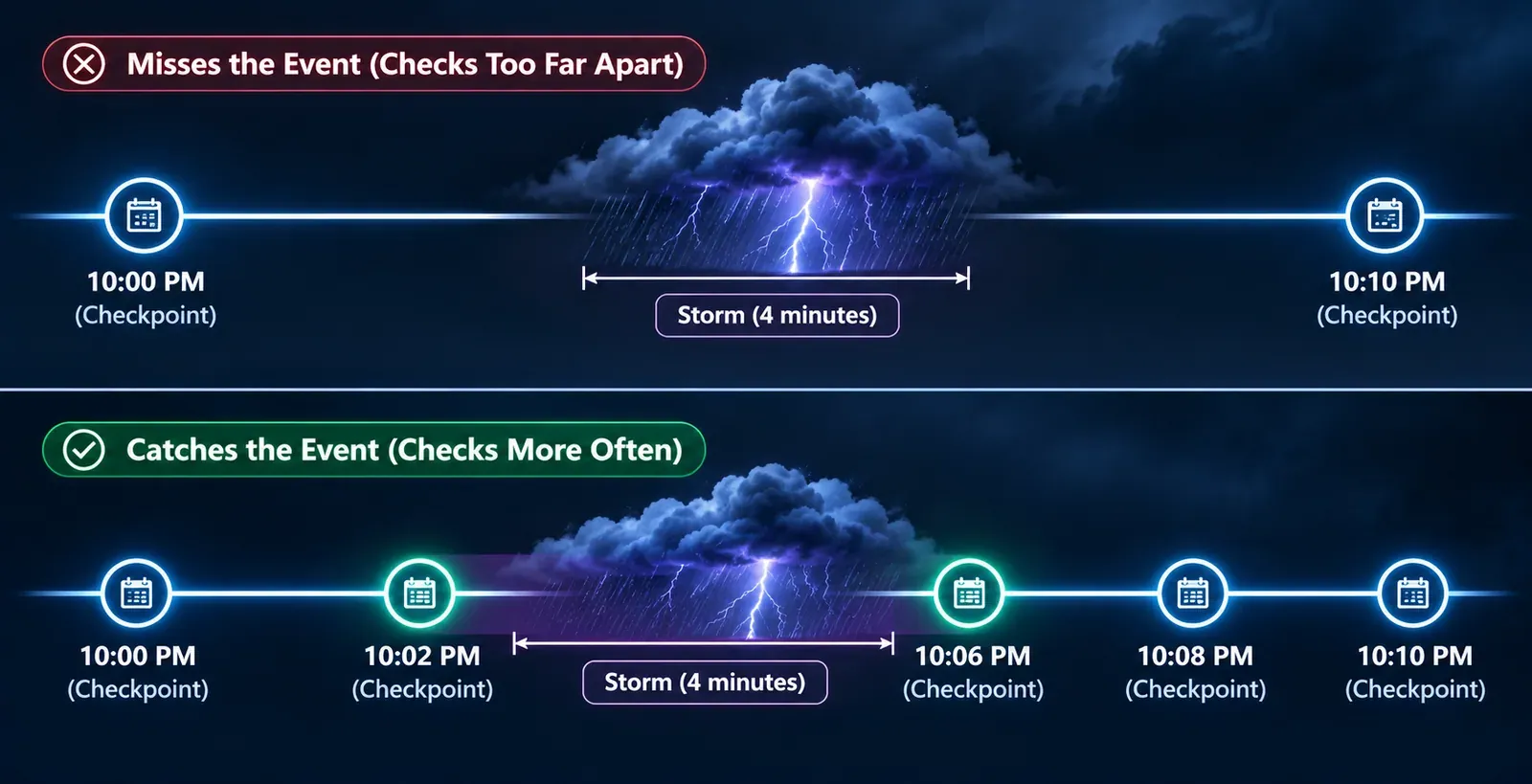
So with five-minute checks, a four-minute outage goes completely unseen about one time in five, and a two-minute outage is missed more often than it’s caught. With one-minute checks, any full outage of a minute or more is seen.
Three honest caveats:
- Seeing it once isn’t the same as measuring it. With five-minute checks, one failed check tells you the site was down at some point, but the real outage could have been seconds or nearly ten minutes. Shorter intervals give you a far better estimate of how long customers were affected.
- Many monitors wait for more than one failed check before sending an alert, to avoid false alarms. That’s sensible, but it means a short outage can be recorded without anyone being told. Check how your tool is configured.
- Partial degradation is harder. If one request in three fails, a single check may succeed. Your CDN and application error-rate metrics, which see every request, are the better signal for that.
Shorter check intervals don’t stop attacks. They make short outages visible, which is the first step to proving they happen and fixing what they expose.
A 10-step plan for short DDoS attacks
The NCSC’s denial-of-service guidance is built around four practices: understand your service, understand your defences, create a response plan, and test your response. The steps below follow that shape, adjusted for attacks that are over in minutes.
1. Use always-on, automated mitigation
This is the single most important decision. On-demand protection is switched on, by you or your provider, after an attack is detected. Always-on protection sits in the traffic path all the time and filters attacks automatically.
| On-demand | Always-on | |
|---|---|---|
| Time to start mitigating | Minutes to hours: detection, decision, then traffic rerouting | Seconds, with no human step |
| Handles a four-minute attack? | Usually not: the attack ends first | Yes |
| Cost profile | Often cheaper day to day | Ongoing cost |
| Fits | Services that can tolerate some downtime | Anything customer-facing or revenue-bearing |
Given that 96% of network-layer attacks end in under ten minutes, on-demand protection is a poor fit for most SaaS and e-commerce sites. CISA’s guidance for federal agencies makes a related point: basic ISP protections help, but a dedicated DDoS protection service will likely defend better against larger or more advanced attacks.
2. Put a CDN and WAF in front of your origin
The NCSC recommends considering a content delivery network (CDN) for web services and notes that it is very difficult to take one down with a DoS attack, because its capacity is spread across many locations. A CDN absorbs volumetric traffic and serves cached pages even when your servers are busy. A web application firewall (WAF) inspects requests and blocks known attack patterns at the application layer.
3. Hide your origin IP address
A CDN only protects you if attackers can’t go around it. The NCSC advises making sure your CDN masks your site so attackers can’t discover the true origin, and using IP allow-listing so that every request must reach you through the CDN. In practice:
- Allow inbound web traffic to the origin only from your CDN’s published IP ranges.
- Don’t expose the origin through old DNS records, mail servers on the same IP, or direct-to-origin test hostnames.
- If the origin IP has been public in the past, consider changing it after you move behind a CDN.
4. Rate-limit expensive endpoints
Application-layer attacks go after the pages that cost the most to serve: search, login, password reset, cart and API calls. Set rate limits per client and per IP range on those endpoints, not just one global limit. The NCSC also suggests, as part of graceful degradation, being ready to switch off resource-heavy features such as site search or personalised recommendations, or limit them to signed-in users, during an attack.
5. Make DNS resilient
DNS is a target in its own right, and if your domain can’t be resolved, nothing else matters. Use a DNS provider with an anycast network (the same address served from many locations, so traffic spreads across them), consider a secondary DNS provider so one provider’s failure doesn’t take you offline, and keep backups of your DNS configuration. The NCSC specifically recommends backing up configuration for third-party hosted services such as DNS, and notes that using multiple providers can improve the availability of functions like DNS.
6. Build in capacity headroom, and know its limits
Upstream protection won’t filter everything instantly, so the NCSC says it is desirable for your service to be able to scale quickly. It also warns that cloud capacity is not unlimited, that cloud platforms may cap how many instances you can start, and that raising those caps often takes a manual request. Decide in advance how much you’re willing to spend on scaling during an attack, and at what point you’ll switch to a reduced service instead. Remember that autoscaling which takes five minutes to add servers will usually react after a four-minute attack has ended.
7. Tune alerts for short spikes
Short attacks need alerts that look at short windows and the right signals:
- Error rate and latency over one-minute windows, not five- or fifteen-minute averages that smooth a spike away.
- Requests per second on expensive endpoints, not just total bandwidth.
- Your mitigation provider’s own alerts and logs. The NCSC notes that upstream providers may offer monitoring feeds showing traffic attempting to reach your service, even when they filter it.
- Uptime checks at a short interval, so short full outages show up at all.
8. Write a runbook and a who-to-call list
When an attack does get through, nobody should be searching for a phone number. A one-page runbook should cover:
- How to confirm it’s a DDoS rather than a deploy, a database problem or a traffic surge.
- Your mitigation provider’s emergency contact, account ID and escalation route.
- Your ISP and hosting provider contacts.
- Who decides to switch to degraded mode, and what that means.
- How to reach your admin tools if the main site is down. The NCSC advises keeping management access separate from the service under attack and limiting it to trusted locations.
- Who tells customers, and through which channel that doesn’t depend on the site itself.
9. Review every attack that reached customers
After any attack that caused errors or slowdowns customers could see, run a short, blameless review: how long it lasted, how it was detected, what got through and why, and what changes. Add the minutes to your availability reporting even when each event looks small. Also check security logs for the same window, in case the attack was cover for something else (reason 5 above).
10. Test how your site degrades and recovers
The NCSC is direct about this: thinking you’re prepared is not the same as knowing, and a paper review can miss bottlenecks. It recommends knowing the types and volume of attack you can withstand, and using legitimate testing providers to test your defences.
There are two different kinds of test here, and both matter:
- Attack testing checks your DDoS protection itself. Do this only with your mitigation and hosting providers’ agreement, through a legitimate testing provider.
- Load and stress testing checks your own application. It doesn’t simulate an attack, but it answers questions every DDoS plan depends on: at what traffic level does the site start to slow down? Does it fail cleanly with errors, or hang? When the pressure stops, does it recover in seconds, or does it need a restart? Our guide to load testing versus stress testing explains the difference.
Recovery time is the number short attacks expose. If your site recovers in 30 seconds after a four-minute flood, customers lose four and a half minutes. If it needs a manual restart, they may lose an hour. That gap is the same idea as a recovery time objective; see RTO vs RPO.
How to check your monitoring and recovery with BCDRPulse
BCDRPulse is not a DDoS protection or DDoS simulation service, and it won’t stop an attack. It covers two parts of the plan above: seeing short outages (step 7) and knowing how your site fails and recovers (step 10).
- Uptime monitoring comes with the Free, Pro and Business plans. Free checks every 5 minutes, with up and down alerts by email and webhook. Pro and Business check every 1 minute, which catches far more short outages, as the table above shows.
- Stress testing (Pro) raises the pressure on your verified site until it degrades, and shows how it fails and how it recovers once the load lifts. Cloud stress testing (Business) applies sustained pressure from cloud infrastructure and includes recovery after the load stops.
- Continuous resilience (Business) reruns those checks on a schedule, so you notice if a code or infrastructure change makes the site slower to recover.
Every test runs only against a domain you’ve verified as yours through a DNS record. See pricing for plan details.
The bottom line
DDoS attacks in 2026 are mostly small, short and constant: 18.2 million network-layer attacks in one quarter on one provider’s network, 96% of them over in under ten minutes. They beat human response, slip under bandwidth alarms and fall between uptime checks, while customers still see errors.
The answer is to match the timescale. Protection that acts on its own. Alerts and checks that look at minutes, not quarter-hours. A runbook for the attacks that get through. And a tested, known answer to the question that decides how much a short attack really costs you: when the pressure stops, how fast does your site come back?
Sources.
- 1. Cloudflare, DDoS threat report for 2026 Q3 (29 October 2026) (opens in a new tab) blog.cloudflare.com
- 2. SiliconANGLE, Cloudflare finds the largest DDoS attacks fell 69% as total attacks rose 208% (29 October 2026) (opens in a new tab) siliconangle.com
- 3. Gcore, Gcore Radar report reveals 150% surge in DDoS attacks year-on-year (24 March 2026) (opens in a new tab) gcore.com
- 4. CISA, FBI and MS-ISAC, Understanding and Responding to Distributed Denial-of-Service Attacks (opens in a new tab) cisa.gov
- 5. CISA, CISA, FBI and MS-ISAC release update to joint guidance on distributed denial-of-service techniques (21 March 2024) (opens in a new tab) cisa.gov
- 6. CISA, Additional DDoS guidance for federal agencies (October 2022) (opens in a new tab) cisa.gov
- 7. NCSC, Denial of Service (DoS) guidance (last reviewed 25 March 2024) (opens in a new tab) www.ncsc.gov.uk
- 8. NCSC, Preparing for denial of service attacks: upstream defences (opens in a new tab) www.ncsc.gov.uk
- 9. NCSC, Preparing for denial of service attacks: scaling (opens in a new tab) www.ncsc.gov.uk
- 10. NCSC, Preparing for denial of service attacks: response plan (opens in a new tab) www.ncsc.gov.uk
- 11. NCSC, Preparing for denial of service attacks: testing and monitoring (opens in a new tab) www.ncsc.gov.uk
- 12. Kaspersky, Research reveals hacker tactics: cybercriminals use DDoS as smokescreen for other attacks on business (22 November 2016) (opens in a new tab) www.kaspersky.com
Frequently asked questions.
What is a DDoS attack?
A distributed denial-of-service (DDoS) attack floods a website, server or network with traffic from many machines at once, so real users can't get through. The machines are usually hijacked devices in a botnet, such as compromised routers and cameras. The goal is not to steal data but to make a service slow or unavailable.
How long does a DDoS attack last?
Most are short. Cloudflare's DDoS Threat Report for Q3 2026 found that 96% of the 18.2 million network-layer attacks it mitigated ended in under 10 minutes. Gcore, another mitigation vendor, reported that 75% of network-layer attacks it saw in late 2025 lasted under one minute. Application-layer attacks tend to run longer: Gcore found 64% of them lasted more than 10 minutes. Outliers can run for days; the longest Mirai botnet attack Cloudflare recorded in Q3 2026 lasted 49.7 hours.
Is there a DDoS attack happening today?
Almost certainly, somewhere. Cloudflare alone mitigated about 8,226 network-layer DDoS attacks per hour in Q3 2026, roughly one every 0.44 seconds. Whether one is hitting your site right now is a different question, and only your own monitoring and your provider's dashboards can answer it.
What are the main types of DDoS attacks?
There are three families. Volumetric attacks try to use up your bandwidth, for example DNS amplification or UDP floods. Protocol attacks exploit how network protocols work, such as SYN floods that exhaust connection tables. Application-layer attacks send requests that look legitimate, such as HTTP floods against search or login pages, to exhaust the application itself.
What is an example of a DDoS attack?
A typical 2026 example is a short UDP flood under 1 Gbps that lasts a few minutes, often bought from a DDoS-for-hire 'booter' service; Cloudflare says these mainly hit software, gambling and IT companies in Q3 2026. At the other extreme, the longest sustained Mirai botnet attack Cloudflare recorded that quarter ran for 49.7 hours between 19 and 21 August.
What is the best DDoS protection for a business website?
Always-on, automated mitigation in front of your origin, usually from a CDN or a dedicated DDoS mitigation provider, rather than protection you switch on after an attack starts. Pair it with a web application firewall, rate limits on expensive endpoints, a hidden origin IP and resilient DNS. Most attacks are over in minutes, so anything that needs a human to act first will usually be too late.
Can a 5-minute uptime check miss a DDoS outage?
Yes. If your site goes down for four minutes and your monitor checks every five, there is roughly a one-in-five chance that no check lands during the outage at all. A one-minute check interval catches any full outage of a minute or longer. Shorter intervals don't stop attacks, but they make short outages visible and measurable.
Can I test my website against a DDoS attack?
Only against infrastructure you own, with your hosting and mitigation providers' agreement, and the UK's NCSC advises using legitimate testing providers for attack testing. A load or stress test is not an attack simulation, but it is still useful: it shows the traffic level where your site starts to degrade, how it fails and how quickly it recovers.
Published .
Founder, BCDRPulse
Founder of BCDRPulse. Enterprise backup and data protection since 2007, supporting Fortune 500 companies. Writes guides to keeping a site up, fast and secure, and to proving it.