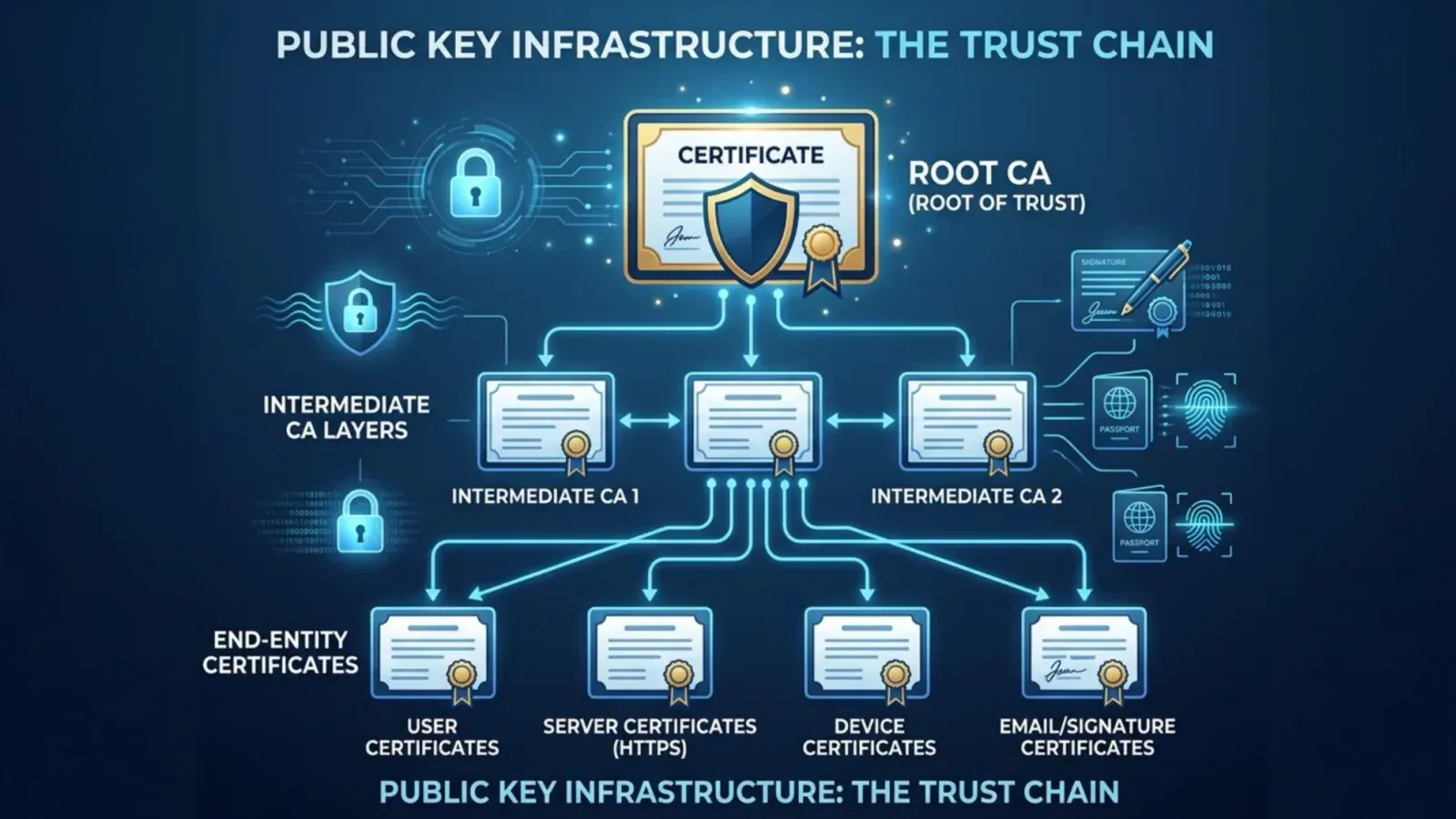
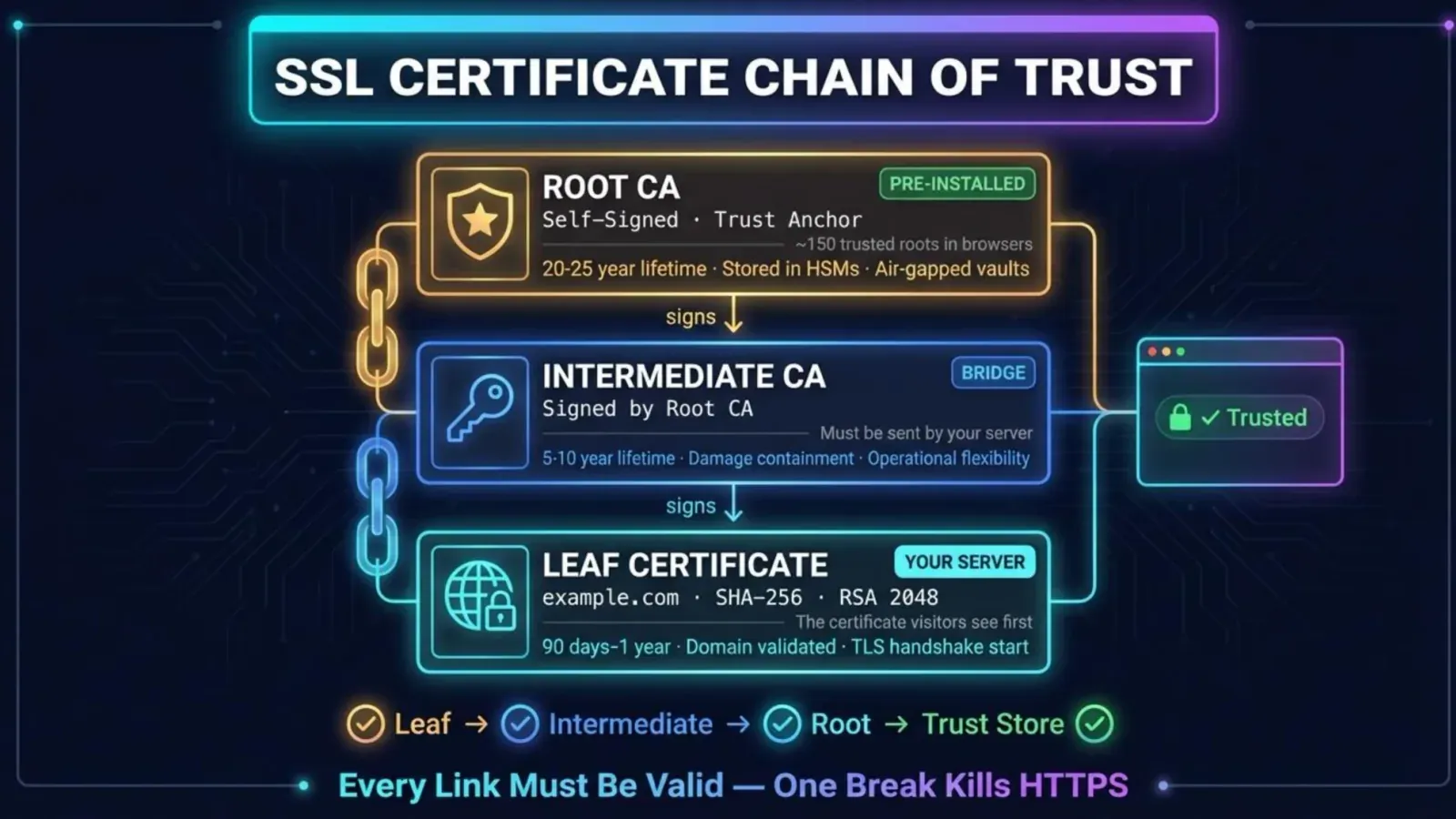
The 47-day certificate: what shorter TLS lifetimes mean for a small site, and what to do before March 2027
On this page
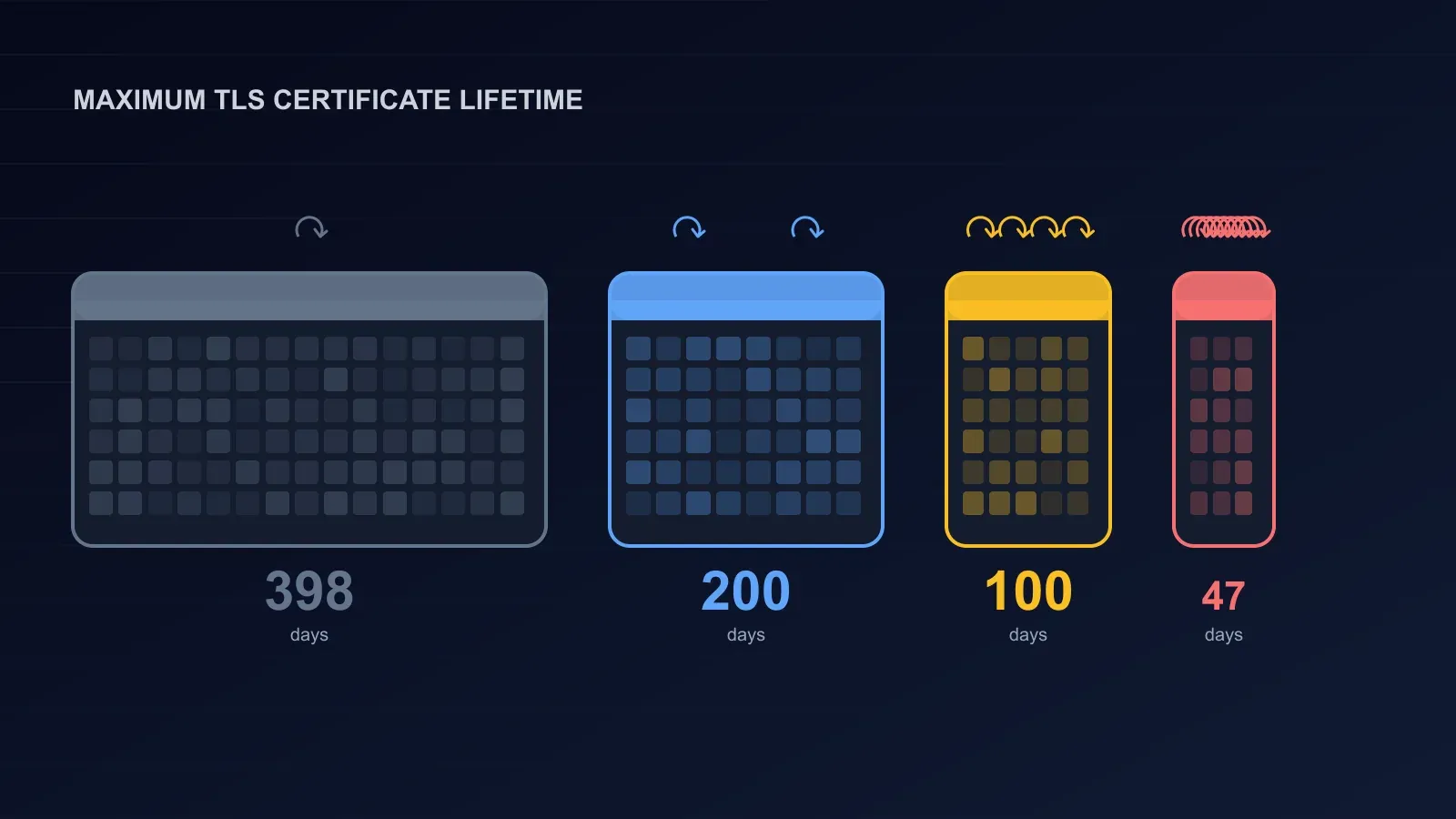
For most of the web’s history a TLS certificate was a yearly chore. Someone bought it, installed it, and set a reminder for eleven months later. That arrangement has ended. Since 15 March 2026 no publicly trusted certificate authority may issue a certificate that lasts more than 200 days. From 15 March 2027 the limit is 100 days. From 15 March 2029 it is 47 days, which means renewing roughly every month with any sensible margin.
The decision was taken on 11 April 2025 by the CA/Browser Forum, the body where browser makers and certificate authorities set the rules, in a ballot proposed by Apple that passed with 25 certificate authorities in favour and none against. This article explains the schedule, the reasoning behind it, what actually changes for a small site, where the deadlines bite hardest, and a plan that fits in an afternoon.
The schedule
| Certificates issued from | Maximum lifetime | Domain validation can be reused for |
|---|---|---|
| Before 15 March 2026 | 398 days | 398 days |
| 15 March 2026 | 200 days | 200 days |
| 15 March 2027 | 100 days | 100 days |
| 15 March 2029 | 47 days | 10 days |
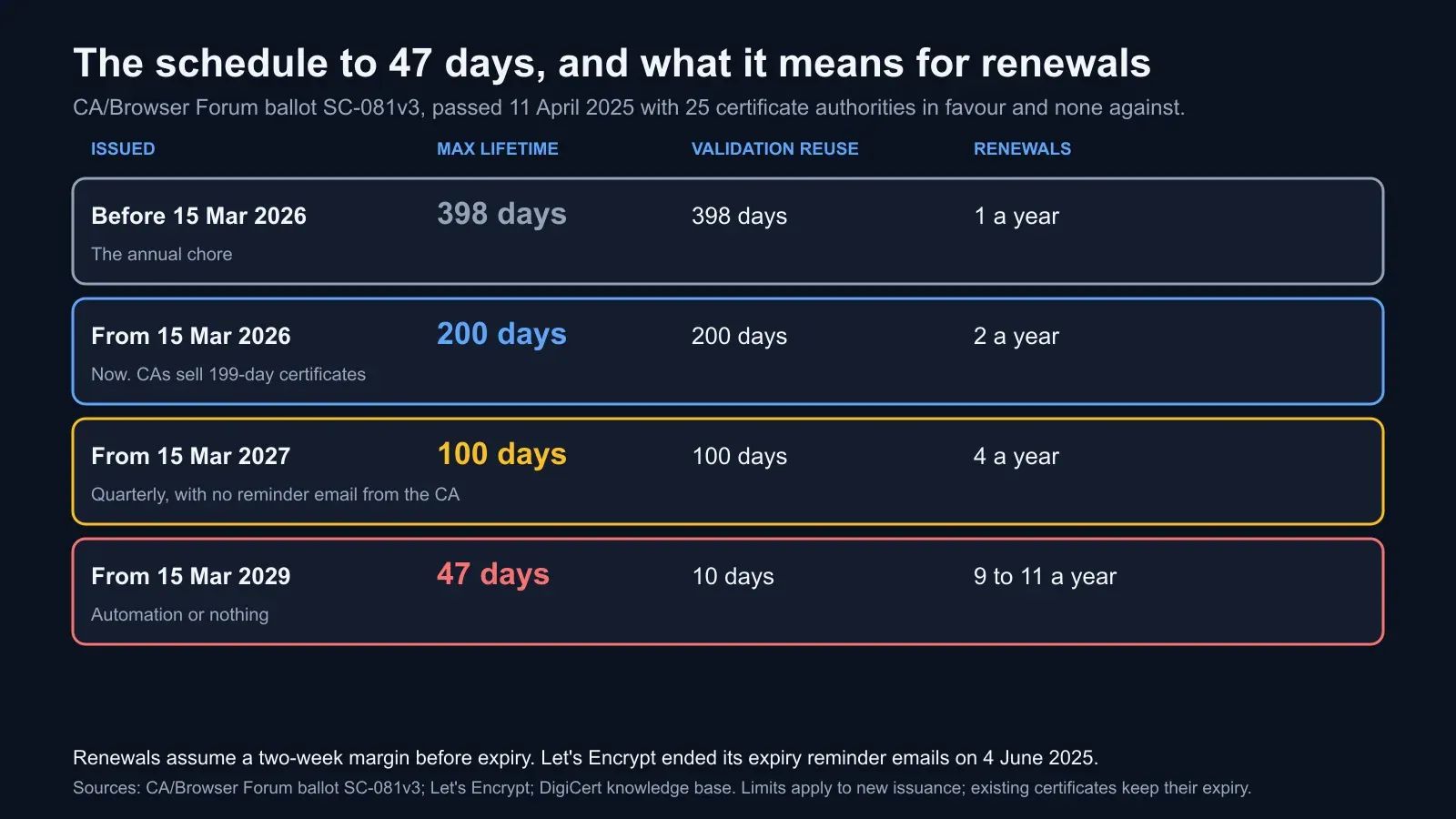
Two details matter. The limits apply to new issuance, so a certificate issued in February 2026 with a year’s validity stays valid until it expires. And the third column is the quieter change: the period for which a certificate authority may reuse its check that you control the domain shrinks to ten days in the final phase, which means that from 2029 nearly every renewal involves a fresh validation, by a DNS record or a file on the web server. Automation has to handle that too.
Certificate authorities sell inside the limits with a margin: DigiCert’s public certificates are 199 days now and 99 days from March 2027, as our article on the DigiCert G5 migration noted. Let’s Encrypt has issued 90-day certificates since 2015 and in January 2026 made six-day certificates generally available, so for a large part of the web the future arrived early.
Why the industry chose this
The reason is revocation, and it is worth understanding because it explains why no certificate authority voted against making its own product expire faster.
When a certificate’s private key is stolen, or a certificate is issued to the wrong party, the certificate authority revokes it. In theory every browser then refuses it. In practice browsers check revocation inconsistently: the online check adds a delay to every connection, fails open when the responder is slow, and is skipped by some clients altogether. A revoked certificate can keep working for the rest of its life on a large share of devices. The industry has spent twenty years trying to fix this and has concluded that the reliable fix is to make “the rest of its life” short.
The eMudhra incident in October 2026 was a demonstration. Eight intermediate certificates had private keys that could be computed from their public keys; Chrome and Firefox blocked them within hours, but the fix for a site chaining to them was a new certificate, not a revocation anyone could trust clients to see. Our eMudhra explainer covers it. With 47-day certificates the exposure from any such event is capped at seven weeks by arithmetic rather than by hoping every client checks.
The second reason is validation. A domain that changed hands, a DNS record that was wrong when checked, a hosting account that was compromised at the moment of validation: each of these can leave a valid certificate in the wrong hands for as long as the validation can be reused. Ten days closes that too.
What changes for a small site
For most sites the honest answer is: the arithmetic of renewals, and nothing else, as long as the renewals are automated.
| Lifetime | Renewals per year with a two-week margin | What manual renewal looks like |
|---|---|---|
| 398 days | 1 | An annual chore |
| 200 days | 2 | Twice a year, one of them in the holidays |
| 100 days | 4 | Quarterly, and one will be missed |
| 47 days | 9 to 11 | Not a job a person can do reliably |
The transition that matters is the one to 100 days in March 2027. At two renewals a year a diligent person can still cope. At four, with the certificate authority’s reminder email no longer arriving, somebody will be on leave. Let’s Encrypt stopped sending expiry reminders on 4 June 2025, stating that most of its subscribers now have reliable automation and that the mailing list had become a cost and a privacy burden. Other certificate authorities will follow the economics. The reminder is now your monitor or nothing.
The cost of a miss has not changed. Microsoft Teams was down for about three hours on 3 February 2020 because an authentication certificate expired, in front of twenty million users. Smaller sites fail more quietly and lose the morning’s orders all the same. With nine renewals a year instead of one, the number of chances to miss goes up by nine, and the only arrangement that survives that is one where no person is in the loop.
Where the deadlines bite
The website itself is usually the easy part. Hosts, platforms and content delivery networks have issued and renewed certificates automatically for years; if your site is on one of those and the current certificate’s issue date is recent, the website is done. The deadlines bite in the places certificates were installed once and forgotten:
- Mail servers, where the certificate for SMTP and IMAP was uploaded by hand and the client software gives a silent failure when it expires.
- Load balancers, API gateways and reverse proxies, especially in cloud consoles where the certificate was pasted in during setup.
- VPN endpoints and firewalls, whose admin interfaces need a file upload.
- Appliances and devices, from NAS boxes to printers to door controllers, with a web interface and no ACME client.
- Internal tools on public names, the status page, the wiki, the monitoring dashboard, each with its own certificate and no owner.
- Anything with certificate pinning, where a client was built to accept one specific certificate and will reject its replacement.
- Code-signing and client certificates, which the ballot does not cover but which the same forgotten-renewal failure mode does.
Each of these needs one of three answers before March 2027: an ACME client that can reach it, a managed certificate from the platform it runs on, or a named owner with a calendar and a documented manual process, accepted as a known risk.
An afternoon’s plan
1. Inventory. List every hostname you own that serves TLS, and for each: where the certificate is installed, who issued it, when it expires, and how it gets renewed. The last column is the one most lists cannot fill in. A security scan of each public hostname fills in the issuer and expiry; the installation and renewal method you have to find.
2. Automate the website. If it is not already on an ACME client or a managed certificate, move it. Certbot, acme.sh and Caddy are the common clients; most control panels and every major cloud load balancer have ACME or managed certificates built in. Prefer DNS validation where you can, because it works for wildcard certificates and for servers that are not reachable on port 80, and because it survives the ten-day reuse limit without a file on every server.
3. Deal with the stragglers. For each non-website certificate, choose: an ACME client that can deploy to it, which exists for most load balancers, mail servers and many appliances; a move to a platform that manages certificates; or an owner and a calendar. Write the choice down next to the inventory line.
4. Monitor expiry. Set a check on every public hostname that alerts at 14 days and again at 7 days before expiry, to two people. The 14-day alert catches an automation that has silently stopped; the 7-day alert is the last call. An uptime check on the hostname catches the expiry itself, because a site whose certificate has expired stops answering over HTTPS.
5. Rehearse one renewal. Force a renewal on one host and watch it end to end: the validation, the issuance, the deployment, the reload of the service, and a scan afterwards confirming the new certificate is the one being served. An automation that has never been seen to work is in the same category as a backup that has never been restored.
6. Check the chain while you are there. Shorter certificates mean more frequent chain changes too, as certificate authorities rotate intermediates. Our guide to checking a TLS configuration covers what to look for.
Where BCDRPulse fits
A security scan of each verified hostname reports the certificate’s expiry, issuer and chain and the TLS and header configuration the world sees, which is the fastest way to build the inventory and to confirm after each renewal that the new certificate is live. The deep TLS analysis on the Business plan goes through protocols, cipher suites and the full chain for the hosts where a misconfiguration would matter most. Uptime monitoring on the hostname, every five minutes on Free and every minute on paid plans, raises the alert if a certificate does expire, because the site stops answering. The platform does not issue or install certificates; the ACME client and the inventory are yours, and after this afternoon they should be running without you.
Checklist
- Inventory of every TLS hostname with installation point, issuer, expiry and renewal method
- Website on ACME or a managed certificate, with DNS validation where possible
- Every mail server, load balancer, VPN, appliance and internal tool assigned to automation, a managed platform or a named owner
- Expiry alerts at 14 and 7 days to two people, plus an uptime check on each hostname
- One renewal rehearsed end to end and confirmed by a scan
- Pinned certificates identified and the pinning removed or made rotation-safe
- Date in the diary: 15 March 2027, when 100-day certificates begin
The bottom line
The certificate that lasted a year will last six weeks from 2029, and a hundred days from March 2027. Browsers and certificate authorities agreed to this unanimously because revocation never worked and short lifetimes do. For a site whose certificates renew themselves, nothing changes. For everything that was installed once by hand, the next sixteen months are the time to make that true, and the afternoon it takes is cheaper than the morning the site is down with a warning page in front of it.
Sources.
- 1. CA/Browser Forum, Ballot SC-081v3: Introduce schedule of reducing validity and data reuse periods (passed 11 April 2025) (opens in a new tab) cabforum.org
- 2. Let's Encrypt, Ending support for expiration notification emails (22 January 2025; service ended 4 June 2025) (opens in a new tab) letsencrypt.org
- 3. Let's Encrypt, 6-day and IP address certificates are generally available (15 January 2026) (opens in a new tab) letsencrypt.org
- 4. Google, Protecting Chrome and Android users from compromised eMudhra intermediate CA certificates (October 2026) (opens in a new tab) blog.google
- 5. TechRadar, Microsoft Teams outage was caused by an expired authentication certificate (3 February 2020) (opens in a new tab) www.techradar.com
- 6. DigiCert, Knowledge base: G5 root migration and ICA selection guide (certificate lifetimes of 199 and 99 days) (opens in a new tab) knowledge.digicert.com
Frequently asked questions.
When do TLS certificates become 47 days?
From 15 March 2029, under ballot SC-081v3 of the CA/Browser Forum, which sets the rules every publicly trusted certificate authority follows. Before that, the maximum lifetime is 200 days for certificates issued from 15 March 2026 and 100 days for those issued from 15 March 2027. The current limit, 398 days, applied to certificates issued before 15 March 2026. A certificate already issued keeps its original expiry; the limits apply to new issuance.
Why are certificate lifetimes being shortened?
Because revoking a bad certificate does not work reliably. When a private key is stolen or a certificate is mis-issued, the certificate authority can revoke it, but browsers and other clients check revocation inconsistently, so a revoked certificate can keep working for the rest of its life. Shorter lifetimes shrink that window. They also force domain ownership to be re-checked more often, which limits the damage from a domain that changes hands or a validation that was wrong. The ballot was proposed by Apple and passed with no votes against.
Do I need to do anything if my host manages my certificate?
Usually not for the website itself. Hosts, content delivery networks and platforms that issue certificates automatically already renew on a short cycle, and Let's Encrypt has issued 90-day certificates for a decade. Check two things: that the automation is actually running, by looking at the current certificate's issue date, and that nothing else under your name has a manually installed certificate, such as a mail server, a load balancer, an API gateway, a VPN or an old appliance. Those are where the 2027 and 2029 deadlines bite.
What happens if a certificate expires?
Browsers show a full-page warning that most people will not click through, API clients refuse to connect, and anything that depended on the service fails. Microsoft Teams was down for about three hours on 3 February 2020 because an authentication certificate expired. With lifetimes falling to 47 days there are nine chances a year to miss instead of one, which is why the only safe answer is automation plus a monitor that alerts well before expiry.
What is ACME and do I need it?
ACME is the protocol that lets software request, validate and renew certificates without a person involved; Let's Encrypt made it standard and most commercial certificate authorities now support it. A client such as Certbot, acme.sh, Caddy, or the built-in support in most web servers, panels and cloud load balancers renews the certificate automatically before it expires. For any certificate you install by hand today, ACME or an equivalent managed service is the thing to move to before March 2027, when 100-day certificates make quarterly manual renewals the norm.
Does BCDRPulse monitor certificate expiry?
A security scan of a verified hostname reports the certificate's expiry date, its chain and the TLS configuration the world sees, and the deep TLS analysis on the Business plan goes further into protocols, ciphers and the full chain. Run a scan after each renewal to confirm the new certificate is the one being served, and keep an uptime check on the hostname so that a certificate failure, which stops the site answering over HTTPS, raises an alert.
Published .
Founder, BCDRPulse
Founder of BCDRPulse. Enterprise backup and data protection since 2007, supporting Fortune 500 companies. Writes guides to keeping a site up, fast and secure, and to proving it.