How often should uptime monitoring check your site? One minute, five minutes, and what each one misses
On this page
Every uptime monitor works the same way underneath. At a fixed interval it sends a request to your site, waits for the answer, and records up or down. Everything you learn about your site’s availability, from the alert that wakes you to the uptime percentage on the report, is built from those instants and nothing in between. The interval is therefore not a setting. It is the resolution of your knowledge, and the longest an outage can run before anyone is told.
Most people pick the interval by picking a plan. Free tiers check every five minutes; the first paid tier checks every minute; the expensive ones go to thirty or fifteen seconds. This article sets out what those numbers mean in minutes of silent downtime, why the shape of modern outages makes the choice matter more than it did, and a way to decide that starts from your business rather than from a price list.
The maths of detection delay
Take a monitor that checks every five minutes and an outage that begins at a random moment. On average the outage is two and a half minutes old when the next check lands. That first failed check is rarely an alert on its own: most tools, sensibly, want a second failure before they wake anyone, to avoid false alarms from a single dropped packet. The second check comes a full interval later. The alert itself takes a few seconds to deliver.
So the typical alert from a five-minute monitor with a two-failure rule arrives about seven and a half minutes into the outage, and the worst case is ten. With one-minute checks and the same rule, the typical alert arrives at about a minute and a half, worst case two.
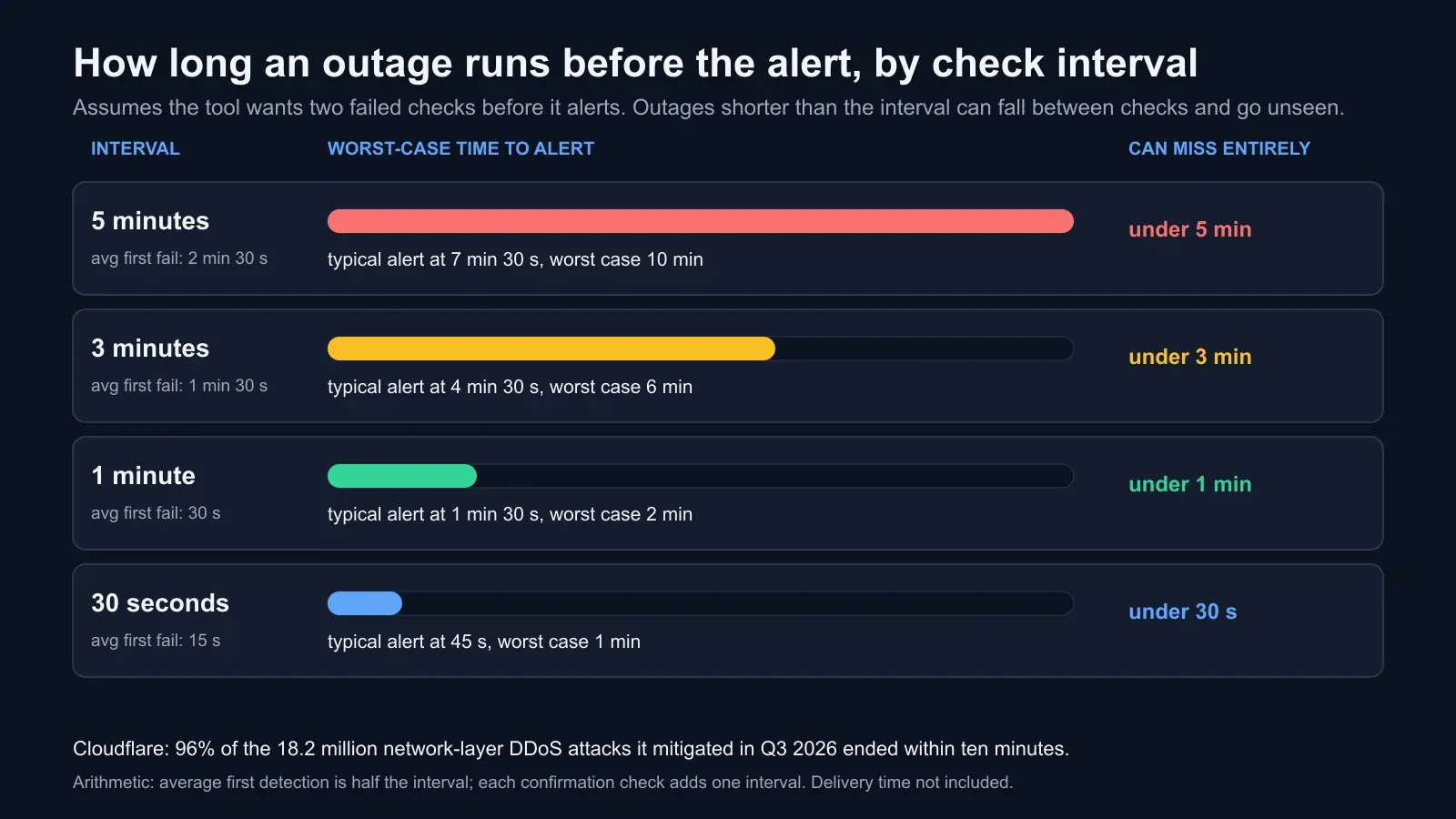
The table below gives the numbers for the intervals tools actually sell. The confirmation column assumes the tool wants two failed checks before alerting; halve the figures for a tool set to alert on the first failure, and accept more false alarms.
| Check interval | First failed check, average | Alert with 2-failure rule, typical | Alert, worst case | Outage length that can be missed entirely |
|---|---|---|---|---|
| 5 minutes | 2 min 30 s | 7 min 30 s | 10 min | anything under 5 min |
| 3 minutes | 1 min 30 s | 4 min 30 s | 6 min | anything under 3 min |
| 1 minute | 30 s | 1 min 30 s | 2 min | anything under 1 min |
| 30 seconds | 15 s | 45 s | 1 min | anything under 30 s |
The last column is the one people forget. An outage shorter than the interval can fall entirely between two checks, in which case the monitor never records it. Our article on short DDoS attacks works through the probabilities: with five-minute checks, a two-minute outage is seen only 40% of the time and a thirty-second one about 10%.
Why this matters more than it used to
Outages are getting shorter, and short is exactly what coarse monitoring cannot see.
Cloudflare mitigated 18.2 million network-layer DDoS attacks in the third quarter of 2026, three times the number a year earlier, and 96% of them ended within ten minutes. The attacker’s economics have moved to swarms of brief, low-bandwidth bursts: 98% stayed under a gigabit per second. A burst that saturates a small site’s upstream for four minutes and stops is a complete outage for those four minutes and invisible to a five-minute check four times in five.
It is not only attacks. Cloudflare’s own status page for 4 November 2026 lists an incident of elevated errors for Durable Objects in eastern North America that lasted two minutes. A certificate renewal that fails and is retried, a deploy that restarts the application, a database failover, a DNS change propagating unevenly: each is a few minutes of real customer-facing failure that a coarse monitor will usually log as 100% uptime.
That has a second consequence. The interval sets the floor on what your uptime figure can mean. A site that drops for four minutes every hour is available 93% of the time by the clock. A five-minute monitor can report it as 100%, because the outages keep falling in the gaps. If you promise 99.9% to a customer, which is 43 minutes and 50 seconds a month, a five-minute monitor cannot tell you whether you kept the promise. A one-minute monitor can.
What the intervals cost
The market has settled into bands. UptimeRobot’s free plan checks every five minutes; its Solo plan every sixty seconds; Team every thirty; Scale every fifteen. BCDRPulse checks every five minutes on the Free plan, which covers up to ten verified sites, and every minute on Pro and Business. Other tools land in the same places with different names.
The pattern says something useful: the industry treats one minute as the line between “keeping an eye on things” and “running a service”, and prices it as the first paid step. Thirty and fifteen seconds exist for teams with a paging rota and a recovery target measured in seconds; for most businesses the gain from one minute to thirty seconds is small next to the gain from five minutes to one.
How to choose: start from the minutes, not the plan
Ask one question. How many minutes can the site be down before anyone knows, without real harm? Not how many minutes of downtime are acceptable in total, which is the recovery target, but how long you can afford to be unaware.
For a brochure site that sends enquiries by email, the honest answer may be fifteen minutes. For a shop, a booking engine, a login page or an API that other systems depend on, the answer is usually two or three, because every unaware minute is lost orders and the refresh storm that follows.
Then divide that number by the number of checks the tool needs before it alerts, usually two. The result is the longest interval you should accept.
- Fifteen minutes of tolerable unawareness, two checks: seven-minute interval, so five minutes is fine.
- Three minutes, two checks: ninety seconds, so one minute.
- One minute, two checks: thirty seconds.
If the answer you get is faster than you are willing to pay for, that is useful information too: it tells you the gap between what the business needs and what it has, which is the sentence to put in front of whoever holds the budget. The same number should match the detection step in your recovery plan; our guide to RTO and RPO explains why a recovery target that does not include detection time is a target you will miss.
The interval is half the setup
A one-minute check of the wrong thing is worth less than a five-minute check of the right thing. Five settings decide whether an alert means anything.
Check the page that earns money. Home pages are usually cached at a content delivery network and stay up when the application behind them has fallen over. Check the home page for reachability, and check a dynamic page for the application: the cart, a search result, the login form, an API endpoint that touches the database.
Check for the right content, not just a response. A server that answers every request with a styled error page and a 200 status is up by the loosest definition and down by every useful one. Set the expected status code and a keyword that only appears on the real page.
Check from more than one place. A single probe location produces false alarms from its own network and misses a regional failure elsewhere. Two or more locations, with an alert only when they agree, cuts both. Probes from a global network do this without you choosing cities.
Send the alert to two people by two channels. Email is slow and filtered; a webhook into the team’s chat tool or a paging app is immediate. One person on holiday should not mean nobody is told.
Alert on recovery too. An incident needs an end time as much as a start. The recovery alert is also the first thing to check against the timeline of what you changed, which is how most short outages get explained.
What BCDRPulse does here
BCDRPulse’s monitoring runs from Cloudflare’s global network against sites you have verified you own. The Free plan checks up to ten verified assets every five minutes and sends up and down alerts by email and webhook, with the check history kept. Pro and Business check every minute, which by the arithmetic above is the difference between an alert at seven minutes and one at ninety seconds. The pricing page has the plan lines.
What monitoring cannot tell you is where the limit sits before you hit it. For that the same verified site can be given a load test at the traffic you expect and a stress test to the point where it degrades, so the next alert arrives with the context of what the site can take. Monitoring is the smoke alarm; the tests are the building inspection.
Checklist
- Tolerable minutes of unawareness written down, and the interval derived from it
- Interval at one minute for any site that takes orders, logins, bookings or API calls
- Home page checked for reachability and a dynamic page checked for the application
- Expected status code and a keyword set on each check
- Checks from at least two locations, alert on agreement
- Alerts to two people by two channels, with a recovery alert
- Uptime percentage reported with the interval it was measured at
The bottom line
A five-minute check is an honest free default for a site that can afford to be unaware for a quarter of an hour. For anything that earns money by the minute, the interval is the longest outage you have agreed not to know about, and most businesses that work the arithmetic through find they agreed to more than they meant to. Decide the minutes first, and let the interval follow.
Sources.
- 1. Cloudflare, DDoS threat report 2026 Q3: more swarms, fewer giants (October 2026) (opens in a new tab) blog.cloudflare.com
- 2. Cloudflare, Status page incident history (incidents of 4 November 2026) (opens in a new tab) www.cloudflarestatus.com
- 3. UptimeRobot, Pricing: check intervals by plan (5 minutes Free, 60 seconds Solo, 30 seconds Team, 15 seconds Scale) (opens in a new tab) uptimerobot.com
- 4. BCDRPulse, Pricing: uptime monitoring every 5 minutes on Free, every minute on Pro and Business (opens in a new tab) bcdrpulse.com
- 5. Google, Site Reliability Engineering: Monitoring distributed systems (the four golden signals) (opens in a new tab) sre.google
Frequently asked questions.
Is a 5-minute uptime check good enough?
For a site where a few minutes of unnoticed downtime costs little, yes, and it is what most free plans offer, including UptimeRobot's and BCDRPulse's. For a site that takes orders, logins or bookings, no: with five-minute checks and a two-failure confirmation rule the first alert typically arrives six to ten minutes into an outage, and outages shorter than the interval are missed outright. Those sites should check every minute, which on most tools is the first paid tier.
How long does it take to detect an outage with uptime monitoring?
On average half the check interval before the first failed check, plus one full interval for each extra failed check the tool requires before alerting, plus the time to deliver the alert. With five-minute checks and two failures required, that is about two and a half minutes plus five, so seven to eight minutes typically and up to ten in the worst case. With one-minute checks and the same rule, about one and a half minutes typically and two in the worst case.
Why does my uptime monitor show 100% when customers reported the site down?
Because the outage fell between two checks. A monitor that checks every five minutes only knows the state of the site at those instants; a three-minute outage has a 40% chance of being seen at all, and a thirty-second one about a 10% chance. Customers see every second. If reports and the monitor disagree, shorten the interval and look at your CDN or server error-rate graphs, which see every request.
Should I monitor the home page or the checkout?
The page that earns the money. Home pages are usually cached at a CDN and stay up when the application behind them has failed, so a home-page check can show green through an outage of the cart, the login or the API. Check the home page for reachability and a dynamic page, such as the cart, a search result or a login form, for the health of the application, with a keyword check that confirms the real page rendered rather than an error page with a 200 status.
What is the difference between uptime monitoring and a load test?
Uptime monitoring asks one question at intervals: is the site answering now. A load test asks a different question once: how does the site behave when many people arrive at the same time. Monitoring tells you about the outage after it starts; load and stress testing tell you about the limit before it is reached. A site needs both, and the two reports read together explain most incidents.
How many locations should uptime checks run from?
At least two, in different regions, with an alert only when more than one agrees the site is down. A single location produces false alarms from its own network trouble and misses regional failures elsewhere. Checks from a global network, such as the Cloudflare network BCDRPulse runs from, give a view closer to what your users see without you having to choose the regions.
Published .
Founder, BCDRPulse
Founder of BCDRPulse. Enterprise backup and data protection since 2007, supporting Fortune 500 companies. Writes guides to keeping a site up, fast and secure, and to proving it.