WordPress security alert, November 2026: the critical core and plugin vulnerabilities every website owner should check

On this page
Three updates in five weeks each closed a hole on WordPress sites that an attacker could reach without logging in. WordPress core 7.1.4 (28 October 2026) fixed a race condition in the update process that attackers started probing the same day. Contact Form 7, installed on more than 10 million sites, shipped 6.2.4 on 29 October to stop unauthenticated file uploads. Gravity Forms, the most widely used paid form plugin, closed a critical PHP object injection in 3.1.3, published as CVE-2026-103039 with a 9.8 score on 30 October.
None of this means your site is hacked. It means that if you are on the wrong version, someone could have tried. This article gives the affected versions, the exact conditions each attack needs, how to check your site in five minutes, and what to do if your site met those conditions.
The five-minute check
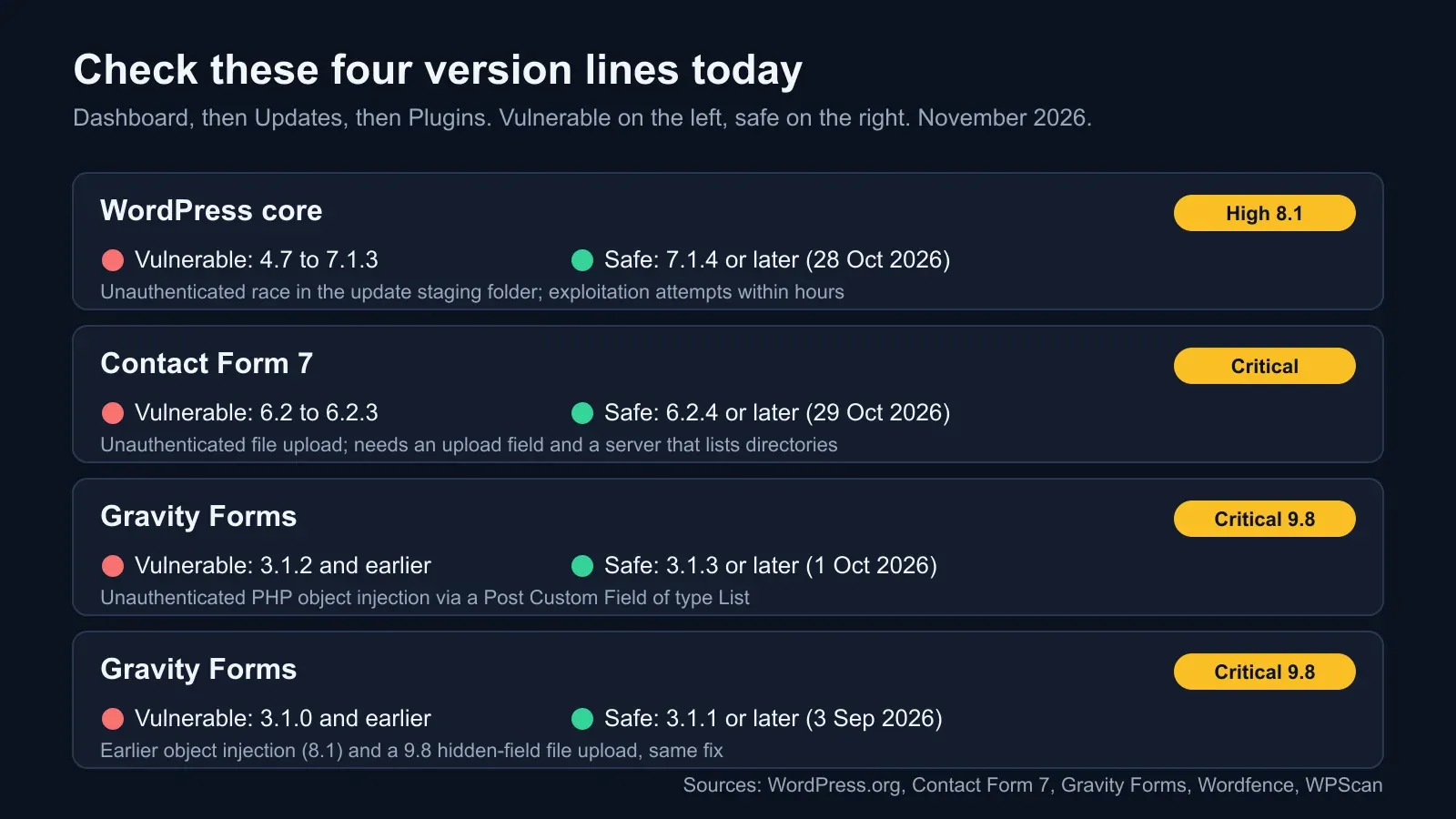
In the WordPress admin, go to Dashboard, then Updates, and read the core version. Then Plugins, then Installed Plugins, and read the version column for the two form plugins.
| What | Vulnerable | Safe | Fixed on |
|---|---|---|---|
| WordPress core | 4.7 through 7.1.3 | 7.1.4 or later (backports for older branches as they ship) | 28 October 2026 |
| Contact Form 7 | 6.2 through 6.2.3 | 6.2.4 or later (current 6.2.4.1) | 29 October 2026 |
| Gravity Forms | 3.1.2 and earlier | 3.1.3 or later (current 3.2.1) | 1 October 2026 |
| Gravity Forms | 3.1.0 and earlier | 3.1.1 or later | 3 September 2026 |
If you manage several sites, WP-CLI does it faster:
wp core version
wp plugin list --fields=name,version,update_version,update
Then look for a third category: plugins that have been closed on WordPress.org without a fix. On 13 October three were closed with open vulnerabilities (Front End Users, MAS Videos and Advanced Twenty Seventeen). A closed plugin will never update. Remove it.
WordPress core 7.1.4: a race in the update process
What it is
When WordPress installs a full core update, it unpacks the new files into a staging folder under wp-content/upgrade before moving them into place. In versions 4.7 through 7.1.3 that folder had a predictable name and, on many hosts, was reachable over the web. For a few seconds during an update, a visitor who knew the path could reach staged installer files, and researcher Umut Bayram showed that reaching them at the right moment could lead to remote code execution. No login is needed, but the attack complexity is high: an attacker has to hit a window that Wordfence measured in seconds, on a site that happens to be mid-update.
What happened after the patch
The 7.1.4 release on 28 October randomised the staging folder name, added an index guard and blocked unsafe promotion of staged configuration data. Within hours, attackers were polling the old paths. Wordfence’s firewall rule matched its first attempt nine minutes after deployment and logged more than 18,500 requests aimed at staged installer paths in the first 21 hours. It reported no confirmed compromise. No CVE had been assigned when SecurityWeek covered it on 30 October; some trackers list candidate identifiers, so do not rely on a CVE number to find it in your scanner yet.
Update, 5 November 2026. The flaw now has an identifier, CVE-2026-119977, with a CVSS score of 8.1. On 3 November CISA added it to the Known Exploited Vulnerabilities catalogue on evidence of active exploitation, with a 6 November deadline for US federal agencies to patch; CISA describes it as letting unauthenticated attackers run code on the server during the upgrade window through predictable, web-accessible staging paths. The Hacker News reports that Wordfence blocked 12,632 attempts in a single 24-hour period, and that Previdian’s honeypot logged exploitation attempts from 30 October. The advice above stands: 7.1.4 or the backport for your branch, and wp-content/upgrade closed to the web.
What else is in 7.1.4
Twenty-two more fixes, mostly stored cross-site scripting in blocks, the Interactivity API and the Customizer, an unauthenticated information disclosure of unpublished Customizer changesets, and an authorisation gap in post notes. Anthropic is credited for two of the reports. The release also updates WordPress’s bundled root certificates following the eMudhra certificate revocations of 18 October, which matters for sites that call other services over HTTPS from PHP.
What to do
Update to 7.1.4. If your host pins you to an older branch, the fix is backported as far as 4.7, so take the backport when it ships. Whether or not you are patched, deny web access to wp-content/upgrade and make sure directory listing is off; both are one-line server rules that remove the conditions this flaw depended on.
Contact Form 7 6.2.4: unauthenticated file upload
The flaw
Contact Form 7’s author, Takayuki Miyoshi, describes the issue plainly: an unauthenticated arbitrary file upload in versions 6.2 to 6.2.3. Attackers could combine several flaws to upload files that validation should have blocked and to keep files that should have been removed immediately after the form was submitted. The report came from Shinya Murakami and Jakub Herman through WPScan.
The conditions
The release notes are specific: in theory, every form with a file upload field, hosted on a web server configured to list directory contents publicly, could be a target. Both parts matter. A contact form with no upload field is not affected. A server that does not list directories gives an attacker no easy way to find what was uploaded. That second condition is why directory listing should be off on every WordPress site regardless of this flaw.
The fix, and a side effect to know about
6.2.4 shipped on 29 October, followed by 6.2.4.1. The plugin recommends updating even on versions before 6.2, because the hardening applies to all versions. The hardening changes behaviour: the function that renames dangerous uploads now works from a safelist of file extensions (images, audio, video, PDF and plain text) instead of a blocklist. Any other extension is converted to a safe alternative. If your forms accept, say, ZIP or DOCX files, they will arrive renamed after the update until you add those extensions back through the wpcf7_file_extension_safelist filter. That is a feature, not a bug, but it is the kind of change that generates support tickets, so warn whoever handles the inbox.
Gravity Forms 3.1.3: critical PHP object injection
The flaw
CVE-2026-103039, CVSS 9.8, affects every Gravity Forms version up to and including 3.1.2. A form field of type Post Custom Field, with its input type set to List, passed submitted values to WordPress’s general unserialise function instead of the plugin’s hardened one (which was added in 3.1.1 for a related flaw). An unauthenticated visitor could inject a PHP object into post metadata.
The conditions
Three things have to line up. The site needs a form that creates posts from entries using a Post Custom Field of type List, with a content template enabled. And object injection on its own does nothing: the advisory notes that Gravity Forms contains no gadget chain, so turning the injection into code execution needs a chain from another plugin or theme, or the WordPress-supplied chain that applies when the custom field maps to the protected _wp_page_template key on a host with a readable PEAR install and register_argc_argv enabled. Many sites meet none of this. Some busy sites meet all of it.
The fix and the licence trap
3.1.3, released on 1 October, fixes it, along with a stored XSS through list fields. The same autumn run of releases fixed an earlier unauthenticated object injection (CVE-2026-97296, 8.1, fixed in 3.1.1) and a critical unauthenticated file upload through a hidden upload field (9.8, also 3.1.1). The current version is 3.2.1 from 28 October.
The trap: Gravity Forms is a paid plugin that only updates itself while its licence is valid. A site whose licence lapsed in the summer may show no update at all and sit on 3.0.x indefinitely. Check the version by hand, and if it is old, renew or replace the plugin before you do anything else.
The rest of October: 29 CVEs across 17 plugins
On 23 and 24 October alone, 29 CVEs were published for 17 plugins, including Speed Optimizer (over a million installs, fixed in 7.8.5), Popup Builder (200,000 installs, fixed in 4.4.6), Download Monitor (fixed in 5.3.4 and 5.3.5), User Profile Builder (fixed in 4.0.5) and Prime Mover, with a 9.8-rated flaw fixed in 2.2.2. None of them was reported as exploited in the wild at publication. The useful lesson is not any single plugin: it is that a WordPress site with 20 plugins sees a security release somewhere in its stack most weeks, and the only sustainable answer is a process, not a weekly panic.
Vulnerable is not compromised: how to tell the difference
A scanner that says “vulnerable version detected” is reporting a version number, not a break-in. To decide whether you were actually exposed, check the conditions:
| Flaw | Exposed if | Not exposed if |
|---|---|---|
| Core update race | A full core update ran while on 4.7 to 7.1.3 and wp-content/upgrade was web-accessible | No full update ran in that period, or the folder was blocked |
| Contact Form 7 upload | A form had a file upload field and the server listed directories | No upload field, or directory listing off |
| Gravity Forms injection | A form created posts with a Post Custom Field of type List and a content template | No such form |
If your site was exposed, update first and then look for signs of compromise:
- Files in
wp-content/uploadsyou did not put there, especially PHP files, files with double extensions, or files dated in the exposure window. - Changed core or plugin files. Run
wp core verify-checksumsandwp plugin verify-checksums --all; anything flagged needs explaining. - Users you did not create, particularly administrators, and sessions on accounts that should be idle.
- Scheduled tasks (
wp cron event list) and.htaccessrules you do not recognise. - Redirects or outbound calls you did not set up, and a Google Search Console security warning.
If you find any of these, treat the site as compromised: take it offline or into maintenance mode, restore from a backup taken before the exposure window, rotate every password and API key the site held, and only then bring it back on the patched versions. If you have no clean backup, you are rebuilding, which is the argument for the backup section below.
A hardening checklist that would have blunted all three
- Update on a schedule you can keep. Minor core releases update automatically by default; leave that on. Turn on per-plugin auto-updates for maintained plugins. Put paid-plugin licence renewals in a diary.
- Remove what you do not use. Every inactive plugin is attack surface with no benefit, and a closed plugin will never be fixed.
- Switch off directory listing (
Options -Indexeson Apache,autoindex offon Nginx). This alone removes the condition the Contact Form 7 flaw needed. - Block PHP execution in
wp-content/uploadsand deny web access towp-content/upgrade. Two short rules that cover the two most common post-exploitation paths. - Least privilege. One administrator account per human, strong passwords, two-factor authentication on every account that can edit files, and no shared logins with agencies.
- Put a web application firewall in front of the site, from your host, a CDN or a security plugin. Wordfence’s rule for the core race matched within nine minutes; that is what a firewall buys you while you patch.
- Back up, and test the restore. A backup you have never restored is a hope. Keep at least one copy somewhere the site’s own credentials cannot delete it; our guide to protecting backups from ransomware explains why that separation matters.
- Monitor from outside. Uptime checks catch a defaced or crashed site before your customers tell you; a periodic external scan tells you whether the public face of the site has changed.
Where BCDRPulse fits
BCDRPulse does not patch WordPress or scan your plugin list; your host and a WordPress security plugin do that. It covers the outside view. Uptime monitoring on the Free plan checks your site every five minutes and emails you when it goes down, which is often the first sign of a compromise that breaks something. The security scan (Pro) checks your site’s TLS configuration and security headers from the outside, against a domain you have verified as yours, so you have a dated record of how the public site looked before and after a change. See pricing for the plans.
The bottom line
The versions to be on today: WordPress 7.1.4, Contact Form 7 6.2.4 and Gravity Forms 3.1.3, or anything later. All three flaws needed no login; all three needed conditions that many sites do not meet, so check the conditions before you assume the worst, and check for signs of compromise if you met them. Then fix the two server settings, directory listing and PHP in uploads, that keep turning ordinary bugs into break-ins.
Sources.
- 1. WordPress.org, WordPress 7.1.4 security release (28 October 2026) (opens in a new tab) wordpress.org
- 2. SecurityWeek, Fresh WordPress vulnerability in attackers' crosshairs (30 October 2026) (opens in a new tab) www.securityweek.com
- 3. Contact Form 7, release notes for 6.2.4 (29 October 2026) (opens in a new tab) contactform7.com
- 4. WordPress.org plugin directory, Contact Form 7 (10+ million active installations) (opens in a new tab) wordpress.org
- 5. Patchstack, Contact Form 7 vulnerability database (opens in a new tab) patchstack.com
- 6. WPScan, Gravity Forms vulnerability history (opens in a new tab) wpscan.com
- 7. NVD, CVE-2026-103039: Gravity Forms PHP object injection via Post Custom Field (30 October 2026) (opens in a new tab) nvd.nist.gov
- 8. Gravity Forms, change log (3.1.1 to 3.2.1) (opens in a new tab) docs.gravityforms.com
- 9. West Oak Bridge, WordPress plugin vulnerabilities: 23 to 24 October 2026 (17 plugins, 29 CVEs) (opens in a new tab) westoakbridge.co
Frequently asked questions.
What WordPress security updates came out in October and November 2026?
The big three are WordPress core 7.1.4 on 28 October 2026 (23 security fixes, one of them an unauthenticated race condition in the update process that attackers started probing the same day), Contact Form 7 6.2.4 on 29 October (an unauthenticated arbitrary file upload affecting 6.2 to 6.2.3), and Gravity Forms 3.1.3 on 1 October (a critical unauthenticated PHP object injection affecting 3.1.2 and earlier, published as CVE-2026-103039 on 30 October). A further 29 CVEs across 17 smaller plugins were published on 23 and 24 October.
Which Contact Form 7 versions are vulnerable?
Versions 6.2, 6.2.1, 6.2.2 and 6.2.3. The plugin's author says the flaw is seen only in that range, but recommends 6.2.4 for everyone because the hardening applies to all versions. The current release is 6.2.4.1. The flaw lets an unauthenticated visitor upload files that validation should have blocked and keep files that should have been deleted after submission; in practice it needs a form with a file upload field on a server that lists directory contents publicly.
Which Gravity Forms versions are vulnerable?
For the critical object injection (CVE-2026-103039, CVSS 9.8), every version up to and including 3.1.2; 3.1.3 fixes it. An earlier object injection (CVE-2026-97296, 8.1) and a critical file upload through a hidden upload field were both fixed in 3.1.1. The latest version is 3.2.1. Gravity Forms is a paid plugin and only updates itself with a valid licence key, so check the version by hand.
Is my site hacked if it was running a vulnerable version?
Not necessarily. A vulnerable version means the hole existed; a compromise means someone used it. Each flaw needs conditions: the core race needs a full update to have run while an attacker was polling the staging folder; the Contact Form 7 flaw needs an upload field and public directory listing; the Gravity Forms flaw needs a form that creates posts with a Post Custom Field of type List and a content template, plus a gadget chain from another plugin or theme for code execution. Update first, then check for signs of compromise if your site met the conditions.
What are the signs that a WordPress site has been compromised?
Files you did not upload in wp-content/uploads, especially PHP files or files with double extensions; new administrator users; changed core or plugin files (compare checksums with wp core verify-checksums); unexpected scheduled tasks; new or edited .htaccess rules; outbound traffic or redirects you did not set up; and warnings from Google Search Console about hacked content. A clean malware scan is reassuring but not proof.
How do I stop PHP files running from the uploads folder?
Add a rule that denies PHP execution under wp-content/uploads. On Apache, a .htaccess file in that folder with a rule that matches .php files and denies them; on Nginx, a location block for the uploads path that returns 403 for PHP. Also switch off directory listing with Options -Indexes, which on its own removes the condition the Contact Form 7 flaw depended on. Managed WordPress hosts usually do both already; check rather than assume.
Should I turn on automatic updates for plugins?
For most sites, yes, at least for security releases. WordPress applies minor core updates automatically by default; turn on auto-updates per plugin from the Plugins screen for anything that is maintained and that you would otherwise forget. Keep a tested backup and a staging copy for plugins that have broken your site before. Paid plugins such as Gravity Forms only auto-update with a valid licence, so put their renewal dates in a diary.
Published . Last updated .
Founder, BCDRPulse
Founder of BCDRPulse. Enterprise backup and data protection since 2007, supporting Fortune 500 companies. Writes guides to keeping a site up, fast and secure, and to proving it.